AMI Music
Listed on Google Play as “AMI Play”
- 65.96K
- 4.6
- Installs
- 1.00M
- Price
- Free

Screenshots
Analysis by Reviewed APKs
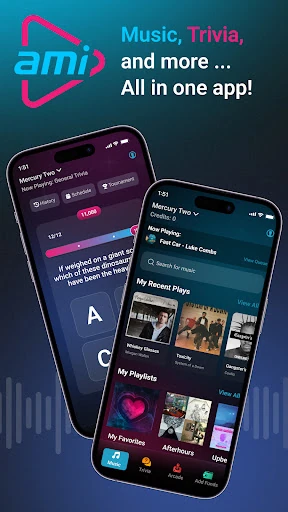
AMI Play is a companion app for nights out at venues with AMI jukeboxes and arcade machines. It lets me choose songs and videos, join free trivia, and pay to start supported games, all from my phone. I’d recommend it to people who already visit participating spots; it is much more about controlling entertainment in a venue than listening to music at home.
A night out, from my phone
Picture settling in with friends at a bar or other AMI venue. Instead of waiting for someone to choose a song at the jukebox, I can open AMI Play, find the venue, and select music or a video from my phone. The app also offers featured playlists and trending music, so choosing something for the room need not mean starting with a blank search.
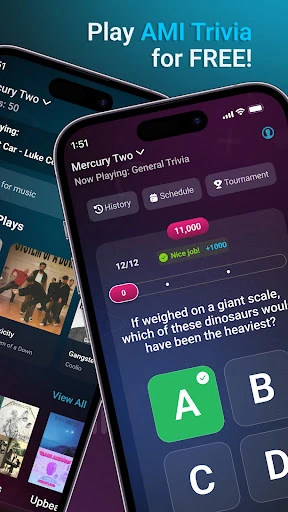
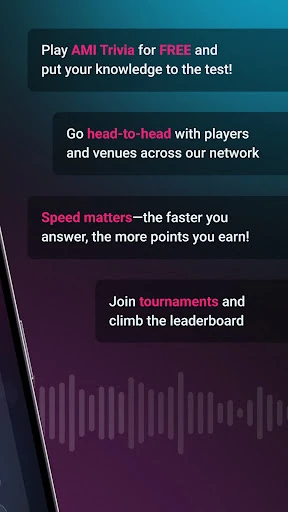
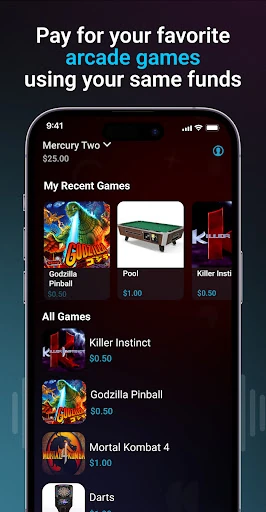
If the group is in a competitive mood, the same app can take the evening in a different direction. AMI Trivia is described as free to play, with tournaments for players who want to test their knowledge against others. And when an arcade machine is available, the app can be used to activate supported games. That mix makes most sense as a venue companion, not as a standalone night-in activity.
A venue tool, not a streamer
The obvious comparison is a music-streaming app, but AMI Play has a different job. It is built around selecting songs and music videos for AMI jukeboxes at participating venues, rather than listening privately through headphones or discovering a catalogue for home playback. My Music and custom playlists help organize selections, but the point is to send them to venue entertainment.
That distinction matters before downloading. If I wanted music to follow me on a commute, offline listening, or a general-purpose personal music library, this description does not make AMI Play a replacement for a streaming service. Its appeal depends on being somewhere with AMI equipment. In the right setting, it brings jukebox requests, trivia, and arcade play together; elsewhere, much of its purpose falls away.
Make repeat visits easier
A little preparation can save time when the room is busy. I can create an account ahead of going out, then use the venue finder to locate a participating spot and save places I visit often as favorites. That turns a return visit into fewer steps: open the app, find the venue, and get to the entertainment options rather than starting the search from scratch.
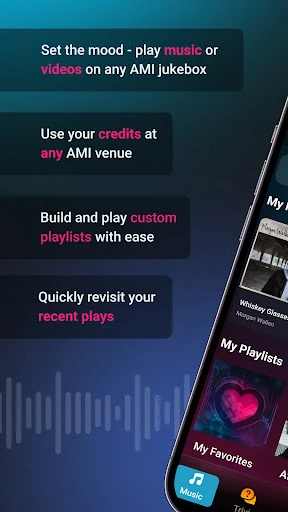
For music, My Music and recent selections are useful ways to keep familiar choices close. Featured playlists and hot songs can help when I want to contribute without debating every track with the group. The app also describes priority play options and bonus credits for playing multiple songs in one visit, so it is worth checking the in-app terms before building a routine around those options.
More From Our News Desk

Zoom Meetings, Google Meet, or Teams: Which Is Easiest to Join?

How I Build a Free Streaming Lineup With Tubi

Why Crunchyroll Is the Default Anime App for So Many Fans

YouTube TV: A Practical Guide to Cutting Cable

Rummikub and the Small Comfort of Phone Games

TeamViewer Remote Control or AnyDesk for Helping Family?
Who will get the most from it
I’d suggest AMI Play to people who regularly spend time at venues with AMI jukeboxes or arcade machines and like having a say in the soundtrack. Trivia players may also appreciate that the app includes a free way to compete, with tournaments for an added challenge. It is especially convenient for groups that want to make music choices from a phone rather than take turns at the machine.
It may not suit someone looking for a conventional music app for personal listening, or someone who rarely visits participating venues. The app’s music and arcade functions are tied to equipment at those locations, and the experience is therefore shaped by what is available where you go. I’d also keep in mind that AMI Play contains ads, which may be a drawback for anyone who prefers an ad-free app.
AMI Play is a Music & Audio app from AMI Entertainment Network. On Google Play, it has more than 1 million installs and a 4.6-star rating from about 66,000 ratings. The app is free to download, is marked as containing ads, and has a Teen content rating. The supplied store facts give version 5.4.0 and a release date of June 29, 2012.
The supplied Google Play information gives October 15, 2026 as the last update date. The app description says users can add funds for jukebox selections and arcade play, with credit card, PayPal, Venmo, or Google Pay among the payment methods. The store facts say there are no in-app purchases. A minimum Android version is not included in the supplied details, so check Google Play for device compatibility.
How AMI Play Fits a Night Out
A venue-first first impression
The first thing I would do is set up an account and look for a venue, because the app’s main purpose depends on being somewhere with AMI equipment. The description says an account can be created with Google, Facebook, or an email address. Once a place is found, checking in connects the app’s music and game options to that venue.
That setup gives the app a clear shape: it is not asking me to build a general listening habit before it becomes useful. Its value starts when I arrive somewhere it supports. Saving a favorite venue makes sense if I return to the same places, while the venue search is the practical first step for a less familiar night out.
Choosing music together
The everyday music flow is about contributing to what everyone in the room hears. I can use the phone to select songs or music videos for an AMI jukebox, then draw on trending choices, featured playlists, or recent selections when I want an easy pick. This feels more social than privately curating a queue: a request becomes part of the shared room.
Custom playlists in My Music give repeat choices somewhere to live, and priority play options are described for faster song requests. The app also mentions bonus credits when multiple songs are played in one visit. Those details can help frequent users plan, although the practical value depends on the venue and the terms shown in the app.
Trivia and arcade options
AMI Play is not only a remote jukebox control. The description includes AMI Trivia, which players can join at no cost, along with tournaments for people who want a more competitive format. That gives a group something to do when the playlist is settled or when nobody wants to spend the evening picking tracks.
There is also a route into arcade play: the app can activate supported machines, with darts and pool named as examples through Amusement Connect. I like that these options sit alongside music in one venue-oriented app. They are still dependent on the machines and entertainment available at the place I am visiting, rather than being phone games to play anywhere.
A simple evening routine
For a planned visit, I would check the venue in AMI Play before the group gets comfortable, then save it as a favorite if it is somewhere I expect to return. If people are ready to put music on, I can make a selection early and use recent picks or a playlist when the conversation is moving faster than a lengthy song search.
Later in the evening, the group can switch to trivia or use the app with an available arcade machine. If I expect to make several music requests, I would review the credit information and any priority options first. That is a small but sensible habit: it helps me understand how venue spending works before tapping through a series of selections.
Keep the setting in mind
AMI Play is most useful at participating venues, so it is not something I would rely on for music or games in every setting. Finding a venue is part of the core experience, and the app’s main controls are aimed at AMI jukeboxes and supported arcade machines. People who rarely go to those places may have little reason to keep it in their routine.
There are practical trade-offs, too. The app contains ads, and song or arcade use involves adding funds rather than treating every venue activity as included with the free download. The supplied store information does not give a minimum Android version, so compatibility is worth checking before installing. Those limits do not undermine its focused purpose, but they make expectations important.
AMI Play brings jukebox requests, free trivia, and supported arcade play into a single phone-based venue companion. I like the way it can make an ordinary group outing more interactive without pretending to be a full music-streaming service. The venue connection is both its best feature and the main condition for getting value from it.
I’d recommend it if AMI-equipped venues are already part of your social routine, especially if you like choosing the room’s music or joining trivia. If you want offline listening or a personal music service for everyday use, I’d look elsewhere. Check compatibility and the in-app credit details before relying on it for a particular visit.
AMI Music Frequently Asked Questions
What is AMI Play used for?
AMI Play is a companion app for entertainment at venues with AMI equipment. It lets users find and check into venues, select songs and music videos on AMI jukeboxes, play AMI Trivia, and pay to activate supported arcade machines. It is designed for use around participating venues rather than as a general personal music player.
Which phones and devices support AMI Play?
The supplied platform information identifies AMI Play as an Android app available through Google Play. Its described music and arcade controls work with compatible AMI equipment at participating venues. The minimum Android version is worth checking on the Google Play page, since it may vary with the current app release and device.
Does AMI Play cost money?
The app is free to download, and AMI Trivia is described as free to play. The store facts say the app has ads and no in-app purchases. Separately, the description says users can add funds for jukebox selections and arcade play using listed payment methods. Check the app and venue for applicable credit details.
Can I use AMI Play to listen at home?
AMI Play is described as a way to control songs and music videos on AMI jukeboxes at venues, not as a home music-streaming service. It also includes venue-based trivia and arcade options. If you are looking for personal playback away from participating equipment, this app may not fit that purpose.
Who should download AMI Play?
It is best suited to people who visit venues with AMI jukeboxes or supported arcade machines and want to choose music, play trivia, or start games from a phone. Someone who rarely visits those venues or wants ad-free personal music listening may find it less useful. Venue availability and device compatibility are worth checking first.
Pros
- Combines jukebox requests, trivia, and supported arcade play in one venue-focused app.
- Lets users save favorite venues and keep custom playlists in My Music.
- AMI Trivia is described as free, with tournaments for competitive players.
- Supports several account sign-up and payment methods.
Cons
- Most music and arcade features depend on visiting a participating AMI venue.
- The app contains ads, which may interrupt an otherwise straightforward experience.
- Adding funds for venue entertainment means the free download does not make every activity free.
- Category
- Music & Audio
- Version
- 5.4.0











