Coverstar
- 4.22K
- 3.9
- Installs
- 500.00K
- Price
- Free

Screenshots
Analysis by Reviewed APKs
Coverstar is a social video app for making and sharing short clips, joining creative challenges, and watching other people’s posts. It is aimed at people who want a more moderated, upbeat setting than a broad social feed, especially younger creators and viewers. After looking through what it offers, I see a focused place for casual video expression, with useful boundaries around interaction and a few trade-offs to consider.
A Small Creative Break
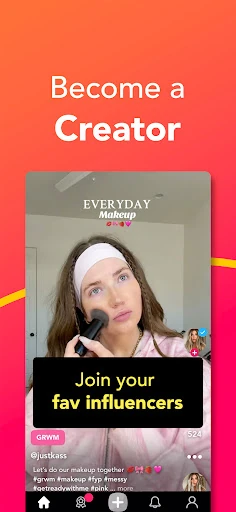
When I first imagined using Coverstar in an ordinary week, I pictured having ten spare minutes after school or work and a simple video idea in mind. I could record a short reaction, a dance clip, or a quick get-ready-with-me video, then browse challenges for a prompt if I was stuck. That makes the app feel less like a production suite and more like a place to turn a passing idea into something shareable.
The challenge format gives that spare moment a little direction. Rather than starting with a blank screen and wondering what to post, I could look for a prompt and make my own take on it. Then I could spend a few minutes seeing what others have shared. The appeal is the low-pressure cycle of creating and browsing, not a promise that every clip will become popular or that I need to post every day.
A More Bounded Social Feed
Compared with a general short-video platform, Coverstar’s described focus is narrower: short videos, trends, challenges, and a community shaped around moderated content. The stated limits matter as much as the creative tools. The app says it does not have direct messaging, and it describes posts as reviewed. That can suit someone looking for a more bounded social experience, though moderation does not mean every user will enjoy every post or interaction.
I would not treat Coverstar as a private video diary, a one-to-one chat app, or a professional editing program. Its purpose is to share clips and take part in a social feed, with live streams also part of the mix. If someone mainly wants private conversations, detailed video editing, or a place to publish work for a broad professional audience, this is not the clearest fit based on its described features.
Make Prompts Work for You
A useful habit would be to browse challenges before recording, especially on days when I have an idea but no clear angle. A prompt can give a clip a starting point without dictating exactly how it should look. I would also keep a few easy formats in mind—such as a reaction or a short vlog—so that opening the app does not turn into a long planning session.
I’d use the avatar and face-tracking tools when I wanted a more playful post, rather than forcing them into every video. Challenges and trends can also be a way to browse with a purpose: find something interesting, make a version that feels personal, and then move on. For live streams, it makes sense to use the feature when I have time to watch or join, rather than treating the feed as a task to keep up with.
More From Our News Desk

Zoom Meetings, Google Meet, or Teams: Which Is Easiest to Join?

How I Build a Free Streaming Lineup With Tubi

Why Crunchyroll Is the Default Anime App for So Many Fans

YouTube TV: A Practical Guide to Cutting Cable

Rummikub and the Small Comfort of Phone Games

TeamViewer Remote Control or AnyDesk for Helping Family?
Who Might Enjoy Coverstar
I’d recommend Coverstar to people who enjoy short-form video and want prompts to help them make casual posts. The mix of vlogs, reactions, dances, hauls, and challenges gives different kinds of creators a way in, while avatars and face tracking offer another way to express a mood. It may also appeal to families looking for a social app whose stated approach puts moderation and a positive tone at the center.
It may be less satisfying for adults seeking a broad, unrestricted social network, people who rely on direct messages, or creators who need advanced editing controls. The Teen content rating is worth keeping in mind when deciding whether it suits a particular household. I’d also suggest that anyone considering it check the store details and the app’s current policies, then decide whether its social format and boundaries match their preferences.
Coverstar is developed by Coverstar and is available on Google Play for Android. It has more than 500,000 installs and a 3.9-star rating from about 4,200 ratings. The app is free to download, with in-app purchases priced from $0.99 to $99.99 per item. Google Play gives it a Teen content rating.
The stated minimum requirement is Android 8.0, and the current version is 9.2.0. Coverstar was released on August 6, 2018, and its most recent update was February 3, 2026. The app does not contain ads, according to its store facts. As with any app, compatibility and purchase details can change, so I’d check Google Play before installing.
How Coverstar Fits Into a Social Routine
Opening the App
My first impression is that Coverstar has a clear identity: this is a video-sharing social app, not a general-purpose creative toolkit. Its description sets expectations around short clips, challenges, trends, avatars, and live streams. That focus should help a new user understand what they are there to do. The emphasis on moderation and the absence of direct messaging also define the experience before a person starts posting.
I would begin by exploring the kinds of videos and challenges available, then decide whether I wanted to make something or simply watch. The app’s stated features are approachable formats—vlogs, reactions, dances, hauls, and similar clips—rather than a list of technical editing controls. That makes the initial appeal easy to grasp, although the exact feel of a feed depends on the posts and prompts a person encounters.
The Everyday Experience
The core loop is straightforward: make a short video, share it, browse what others have posted, and use a challenge or trend as a possible next idea. That kind of loop suits small bursts of attention. I can imagine opening Coverstar while waiting for a ride, watching a few clips, and leaving without needing to plan a full session. When I have more time, a challenge can turn browsing into a reason to create.
The social side is shaped by the app’s stated moderation and no-direct-messaging approach. That may make the experience feel more contained than services where private chats are central, but it also means Coverstar is not a replacement for messaging friends. It is better understood as a public-facing creative community, where the main activity is content rather than private conversation.
Tools With Personality
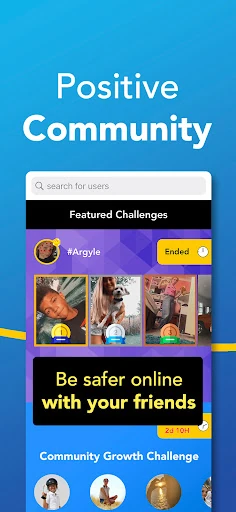
Challenges are one of the more useful ideas because they give creators a starting point and make it easier to participate in a shared theme. Users can explore prompts and create their own, so the format is not limited to copying an existing trend. I like that balance in principle: a prompt can reduce the effort of deciding what to film while still leaving room for an individual take.
Custom avatars and face-tracking tools offer a different kind of expression from standard camera clips. They may suit users who want to add emotes or reactions to a video without making the whole post a conventional vlog. Coverstar also describes live streams, with background audio support and Picture in Picture on supported devices. Those options broaden the app beyond recording and watching short clips.
A Low-Pressure Routine
A practical way to use Coverstar would be to make it part of an occasional creative break, rather than another feed that needs constant checking. I’d browse a challenge when I wanted an idea, record a short response if one appealed, and then return later to see what else people had made. That approach keeps the app tied to a small activity instead of letting scrolling fill every quiet moment.
For someone who likes sharing different kinds of clips, rotating formats can help keep posting from feeling repetitive. One day might call for a quick reaction; another might suit a vlog or a dance video. An avatar or face-tracking effect could be reserved for a post where it adds something. Live streams make more sense as a deliberate watch or participation choice than as background noise during every visit.
Boundaries and Trade-Offs
The app’s moderation message is an important part of its appeal, but it should be read as an approach to the community, not a reason to stop using judgment online. Coverstar says posts are reviewed and that bullying and explicit content are not allowed. A moderated environment can still contain posts a user does not like, and individual comfort levels differ, especially for younger users.
The absence of direct messaging is a real limitation for people who want private back-and-forth conversations within the same app. The description also focuses on creating and sharing videos, not on advanced editing or private storage. Anyone looking for those things may need another tool alongside Coverstar. The Teen rating is another practical consideration for families choosing apps for younger users.
The experience also depends on whether the available challenges and community posts feel engaging to you. If you enjoy short videos and social prompts, that format can be an easy source of ideas. If you prefer a quiet, non-social creative app, the sharing and browsing loop may feel like more than you need.
Coverstar has a clear proposition: short videos and creative challenges in a social environment that emphasizes moderation and does not include direct messaging. I like that its prompts can make creating feel easier, and that avatars and live streams give people more than one way to participate. The boundaries are useful to understand before deciding whether the community suits you.
I’d try it if I wanted a casual place to make and watch short clips, especially if challenges help me get past a blank-page moment. I would look elsewhere for private chats, professional editing, or a non-social video workspace. For families, the Teen rating and the app’s current store information are worth reviewing before use.
Coverstar Frequently Asked Questions
What is Coverstar used for?
Coverstar is a social video app for creating and sharing short clips, browsing trends, and joining or making creative challenges. Its described video formats include vlogs, reactions, dances, and hauls. It also offers custom avatars with face-tracking tools and live streams. The app is built around sharing and community participation rather than private video storage.
Which devices can run Coverstar?
Coverstar is an Android app available through Google Play. The stated minimum requirement is Android 8.0. The app describes Picture in Picture support for live streams on supported devices, so that particular experience can depend on the device. I’d check Google Play for current compatibility details before installing.
Does Coverstar cost money?
Coverstar is free to download and includes in-app purchases. Store facts give a price range of $0.99 to $99.99 per item. It does not contain ads according to its Google Play facts. Purchase options and prices can change, so check the current store information before making a purchase.
Is Coverstar suitable for younger users?
Google Play gives Coverstar a Teen content rating. The app describes itself as moderated, with posts reviewed and no direct messaging, and says its community rules are intended to keep content positive. Those features may appeal to some families, but suitability depends on the individual and household. Review the current store details and decide what fits.
Can I message friends on Coverstar?
Coverstar’s description says the app does not have direct messaging. Its social features focus instead on creating and sharing videos, taking part in challenges, browsing trends, and joining live streams. If private conversations are important to you, Coverstar may not meet that need. Feature details can change, so the Google Play information is worth checking.
Pros
- Creative challenges give users prompts when they need an idea for a short video.
- Avatar and face-tracking tools add a playful alternative to standard camera clips.
- The app describes a moderated community and does not include direct messaging.
- Live streams offer another way to participate beyond posting and browsing clips.
Cons
- No direct messaging may frustrate users who want private conversations in the app.
- Its social video focus is not a substitute for advanced video editing tools.
- The Teen content rating may make it unsuitable for some younger users.
- Category
- Social
- Version
- 9.2.0