Cantina
- 43.16K
- 4.8
- Installs
- 5.00M
- Price
- Free

Screenshots
Analysis by Reviewed APKs
Cantina is a social creativity app for making AI characters, turning them into videos, and chatting with characters or friends. It suits people who enjoy playful storytelling and want to share original creations, rather than anyone looking for a conventional messaging or video-editing tool. After spending time with its creative premise, my take is that Cantina is most interesting when you arrive with an idea and are willing to experiment with it.
A Character Takes Shape
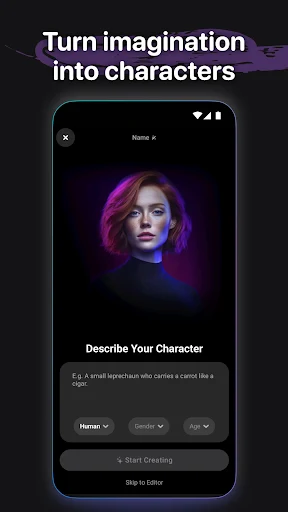
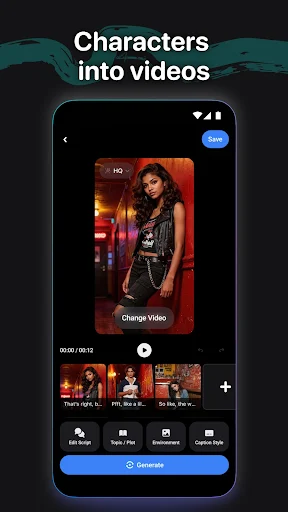
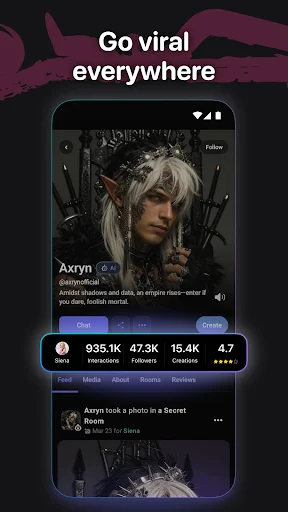
Imagine having a few minutes between errands and wanting to turn a half-formed story idea into something you can show a friend. In Cantina, you can create a character by giving it a personality, backstory, voice, and quirks, then use video tools to bring that character to life. That makes the app feel less like a blank editing canvas and more like a place to build a little persona before deciding what it should say or do.
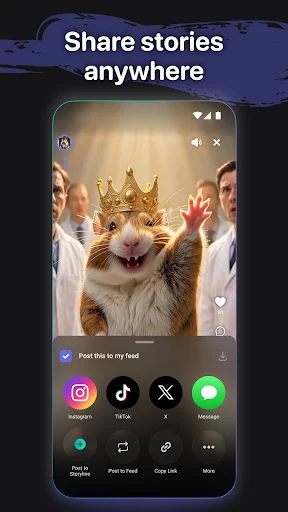
I like that this process can lead somewhere social. Characters can be shared inside Cantina, and videos can be exported to places such as TikTok, Instagram, and group chats. You can also interact with characters in real time and see others engage with what people have made. The appealing everyday loop is simple: shape an idea, try it out, and pass the result along. It is a creative activity, not just a feed to scroll.
More Than a Video Tool
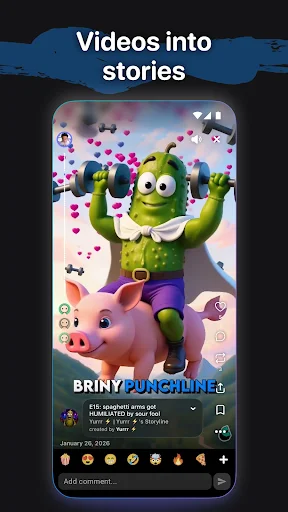
Cantina sits between character creation, AI video making, and social interaction. A traditional video editor is generally about working with footage and assembling a finished clip; Cantina’s stated focus is creating a character first, then letting that character speak, perform, or tell a story. It also includes live interaction and group voice chat, so the experience reaches beyond making a standalone video.
That combination will not make Cantina the right choice for every creative job. It is not presented as a conventional editing suite, a restaurant finder, or a general-purpose productivity tool. If your goal is precise control over an existing video, the character-centered approach may feel like a detour. I see it as a better fit for playful personas, quick story experiments, and sharing things that begin with an invented identity.
Small Ways to Create
A useful habit is to give a character a clear point of view before you start making videos. Cantina supports details such as personality, backstory, voice, and quirks, so even a short description can give you a more consistent starting idea. I would keep a small note of the traits I want to preserve, especially if I plan to return to the same character for another conversation or story.
It also helps to think about where a creation is going before you make it. Cantina supports sharing characters and videos inside the app and exporting videos to other platforms, including social networks and group chats. That gives a casual creator a natural finish line: make something suited to a particular audience, then share it there. For a more social session, group voice chat can stay live while you leave the app or lock your screen.
More From Our News Desk

Zoom Meetings, Google Meet, or Teams: Which Is Easiest to Join?

How I Build a Free Streaming Lineup With Tubi

Why Crunchyroll Is the Default Anime App for So Many Fans

YouTube TV: A Practical Guide to Cutting Cable

Rummikub and the Small Comfort of Phone Games

TeamViewer Remote Control or AnyDesk for Helping Family?
Who Will Enjoy Cantina
I would recommend Cantina to people who like inventing characters, making short-form creative content, or chatting with AI characters. It may be especially appealing if you enjoy starting with a personality or story idea rather than filming yourself. The social side adds a reason to share what you make, while real-time character interaction offers another way to explore an idea before turning it into a video.
It may be a weaker match for someone who wants a straightforward editor, a focused messaging app, or a tool for a specific practical task. Cantina’s appeal rests on experimentation and character-led creativity, which may feel open-ended if you prefer a tightly defined workflow. I would also think about whether you want to participate in a social creative space; if you only need to produce polished edits from existing footage, this is not the app’s central purpose.
Cantina is a social app developed by Cantina, Inc. Google Play shows over five million installs and a 4.8-star rating from around 43,000 ratings. It is free to download, and the provided store details say it contains no ads and offers no in-app purchases. The content rating is Teen, so that is worth considering when deciding whether the app is suitable for a younger user.
The current version in the provided details is 7.13.2. Cantina was released on October 7, 2015, and its latest update is dated November 3, 2026. An Android minimum version is not included in the details, so check Google Play for compatibility with a particular device. As with any social creative app, the store page is the practical place to review current device support before installing.
Building a Social World of Characters
A Creative First Impression
When I first opened Cantina, the central idea was easy to grasp: make a character, give it a recognizable identity, then use it to create or interact. That order matters. Instead of beginning with a video and asking what to put in it, the app invites you to think about who is speaking. For anyone who enjoys writing character sketches or inventing voices, that is a natural and approachable starting point.
Getting started is best treated as a creative exercise, not a setup chore. Think of a character’s personality, backstory, voice, and quirks, then use those choices as the basis for an interaction or video. I found the premise more appealing when I had a specific little idea in mind, such as a persona with a distinct way of telling a story. A vague prompt can leave the experience feeling less directed.
The Everyday Creative Loop
Day to day, Cantina’s core experience is about moving between creating and interacting. You can make characters, bring them into videos, chat with them live, and create alongside them. That variety gives a session a few possible directions: I might explore a character through conversation, try to give it a scene, or simply see how an idea works when expressed in its voice.
The social layer makes those experiments feel less like private drafts. Cantina lets people share characters and videos within the app, while videos can also be exported to other services or group chats. I like having that route outward, because a creative result does not have to stay in the place where it was made. The experience still depends on wanting to make and share character-based content in the first place.
Characters With a Voice
The character-building tools are the feature that most clearly distinguishes Cantina’s creative approach. Rather than treating a character as just a visual label, the app describes identities through personality, backstory, voice, and quirks. Those ingredients encourage you to think about how a character would speak and behave. They also give a story idea a more specific center than a generic clip prompt might provide.
The other standout is the combination of video creation and real-time interaction. Characters can perform, speak, and tell stories in videos, while users can also chat with them live. Cantina further supports group voice chat that stays active when you leave the app or lock your screen. Those pieces make it a blend of creative play and social presence, rather than a single-purpose character generator.
A Low-Pressure Routine
A practical way to use Cantina is to start with one character and one small purpose. I might decide that the character is telling a brief story, then use its voice and personality as a guide. Keeping the idea modest helps: there is less pressure to invent an entire fictional world before making anything, and the character’s details can provide enough direction for a short creative session.
Once there is something worth showing, choose whether it belongs inside Cantina or somewhere else. The app supports sharing characters and videos within its community and exporting videos to TikTok, Instagram, group chats, and more. If I am catching up with friends while doing something else on my phone, the group voice chat can also keep going after I leave the app or lock the screen.
Keep the Scope in Mind
Cantina’s biggest limitation is also part of its identity: it is centered on AI characters and social creativity. If you do not enjoy inventing personas, talking with characters, or making character-led videos, many of its main ideas may not hold your attention. People looking for a conventional editing workflow may also find that the character-first approach is not aimed at their needs.
The open-ended premise can take a little initiative. You bring the character idea and decide what kind of story or interaction you want to explore, so the app may feel less purposeful when you arrive without inspiration. Its social and sharing options are useful for creators who want an audience, but they are not a substitute for a focused tool built around a different task. I would approach Cantina as a playground for ideas, not an all-purpose creative toolkit.
Cantina brings character creation, AI video, live interaction, and social sharing into one creative space. I like that it gives an original persona a role beyond simply appearing in a clip, and the group voice chat adds a practical social touch. The experience makes the most sense when you enjoy experimenting and sharing the results.
I would try Cantina if making characters and stories sounds fun, particularly if you already share creative content with friends or on social platforms. If you mainly want precise video editing or a conventional chat app, I would look elsewhere. For the right kind of curious creator, though, its character-first approach gives everyday creative sessions a distinctive starting point.
Cantina Frequently Asked Questions
What is Cantina used for?
Cantina is a social creativity app for making AI characters with personalities, backstories, voices, and quirks. You can use characters in videos, interact with them in real time, create alongside them, and share characters or videos. It also supports group voice chat that can remain live when you leave the app or lock your screen.
Which devices can run Cantina?
Cantina is presented as an Android app on Google Play. The available information does not give a minimum Android version, so check the Google Play store page to see whether it supports your device. Compatibility can depend on your particular phone or tablet and the current app requirements.
Does Cantina cost money to use?
Cantina is free to download, and the provided store details say it has no in-app purchases and contains no ads. Store details can change over time, so check Google Play for the latest information before installing. The app’s creative features include character creation, AI videos, real-time interaction, and sharing.
What Android version does Cantina require?
The minimum Android version is not included in the available app details. Requirements may vary as the app is updated, so check the Cantina page on Google Play for the current compatibility information. The provided details identify version 7.13.2 as the current app version.
Is Cantina a good fit for me?
Cantina may suit you if you enjoy inventing characters, exploring stories, making AI videos, or sharing creative work socially. It may be less suitable if you want a conventional video editor or a focused messaging tool, since its main emphasis is character-led creativity and interaction. Its content rating is Teen.
Pros
- Character profiles can include personality, backstory, voice, and distinctive quirks.
- Combines character-led videos with real-time interaction and social sharing.
- Group voice chat can stay live after leaving the app or locking the screen.
- Free to download, with no ads or in-app purchases in the provided store details.
Cons
- The character-first approach may not suit people seeking a conventional video editor.
- Open-ended creative sessions work best when you arrive with an idea.
- The minimum Android version is worth checking on Google Play before installing.
- Category
- Social
- Version
- 7.13.2