Vimeo
- 140.17K
- 3.4
- Installs
- 10.00M
- Price
- Free

Screenshots
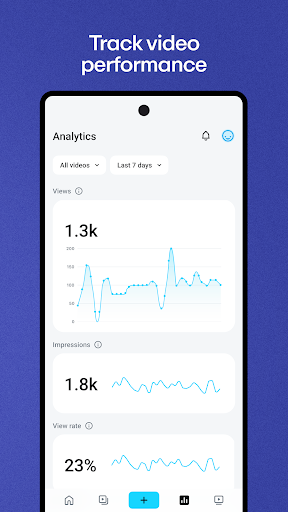
Analysis by Reviewed APKs
Vimeo is a video app for watching ad-free HD videos and creating, managing, and sharing your own. I can see it fitting both people who follow independent creators and anyone who needs to record or send useful videos from a phone. Its appeal is the mix of viewing and practical video tools in one place, though the range of features may be more than a casual viewer needs.
A Video Task on the Go
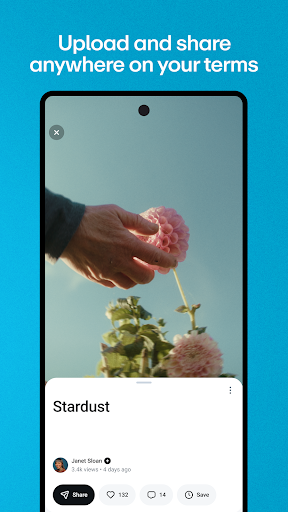
Imagine I need to show a coworker how to complete a small task, but explaining it over messages would take longer than demonstrating it. Vimeo lets me record a video on my phone, trim it, and share it using a private link or password. That makes the app useful for quick instructions as well as more polished clips. I can do the essential work without switching from recording to a separate editing app.
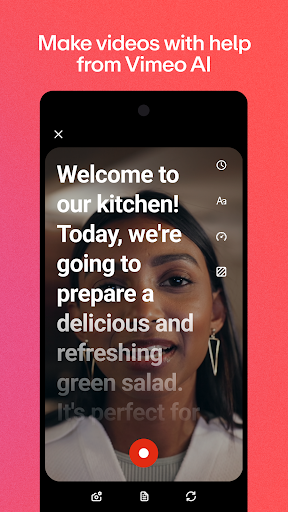
For a more planned recording, the built-in teleprompter can help me keep a short script in view while I speak. If I stumble, Vimeo also describes editing tools that let me remove pauses and filler words by editing text. I like that this approach is aimed at making a straightforward recording easier to finish, rather than requiring a full desktop editing session for every small update.
More Than a Video Feed
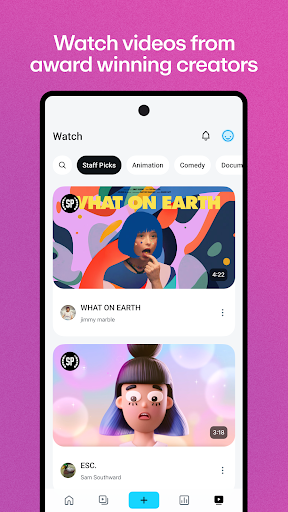
Vimeo covers some of the same ground as a conventional video-watching app, but it also gives creators tools to record, edit, upload, and manage videos. I can follow creators, browse curated categories, and save videos for offline viewing; when I have something to make, I can work on it in the same app. That combination suits someone who both watches videos and occasionally needs to publish or share their own.
It is not simply a lightweight feed for passing a few minutes, nor is it presented as a replacement for every advanced editing workflow. The listed tools focus on phone-friendly recording, trimming, simple text-based edits, sharing, and live streaming. For someone who only wants entertainment, the creation and team features may feel unnecessary. For someone who needs elaborate editing controls, the app’s described focus may not be enough on its own.
Small Habits That Help
I would start by deciding whether a clip is meant for public viewing or a specific person or team. Vimeo supports private links and password-protected sharing, so choosing that approach before sending a video can make the sharing step more deliberate. For a recording I plan to speak through, drafting a brief script first gives the teleprompter a clear job and helps keep the finished video focused.
When I am watching rather than making, following creators helps shape the feed, while categories such as Animation and Documentary offer another way to find something specific. Saving a video for offline viewing is handy when I know I will want to watch without a connection. These are small habits, but they make Vimeo feel less like a jumble of tools and more like a useful place to return to.
More From Our News Desk

Zoom Meetings, Google Meet, or Teams: Which Is Easiest to Join?

How I Build a Free Streaming Lineup With Tubi

Why Crunchyroll Is the Default Anime App for So Many Fans

YouTube TV: A Practical Guide to Cutting Cable

Rummikub and the Small Comfort of Phone Games

TeamViewer Remote Control or AnyDesk for Helping Family?
Who Might Find It Useful
I would recommend Vimeo to people who regularly share videos, create short demonstrations, or want a phone-based way to record and tidy up a clip. The teleprompter, screen recording, trimming, and private sharing options make sense for creators and teams that communicate through video. It also has a viewing side, with followed creators, curated categories, HD playback, and offline downloads for people who want to watch as well as make.
A viewer who only wants the simplest possible entertainment feed may not use much of Vimeo’s creation and collaboration toolkit. Likewise, anyone who expects every feature to be available everywhere should keep in mind that availability can differ by region. I would try it if video is already part of my routine, but would be less enthusiastic if I only need an occasional basic player.
Vimeo is developed by Vimeo.com, Inc. and is available on Android through Google Play. The app has more than 10 million installs and a 3.4-star rating from about 140,000 ratings. It is rated Teen. The current version shown is 11.21.1, and its release date is January 9, 2012.
The app is free to download and contains no ads. It offers in-app purchases, with listed items ranging from $0.99 to $900.00 each. The most recent update date provided is October 19, 2026. The Android version requirement can vary by device or app release, so it is worth checking the Google Play entry for compatibility.
A Closer Look at Vimeo on Mobile
Getting Oriented
When I first open Vimeo, the main idea is easy to grasp: it is a place to watch videos, but also a toolkit for making and sharing them. The range is immediately noticeable. HD playback and creator discovery sit alongside recording, editing, and live streaming, so the app serves more than one kind of video routine.
For a first project, I would keep the goal modest: record a short clip, trim it, and decide how to share it. Vimeo supports uploads from a phone or tablet and includes a built-in teleprompter and screen recording. That gives me a few clear ways to begin without needing to plan a complicated production.
Everyday Video Work
In day-to-day use, the practical value is having several steps in one place. I can record a clip, make a basic edit, and share it without moving through a string of separate apps. The option to edit videos like text is particularly approachable for small fixes such as removing an awkward pause or an “um,” rather than rebuilding the whole recording.
The viewing side has its own simple rhythm. I can watch videos in up to 1080p HD, follow creators to shape what appears in my feed, and download videos for offline viewing. When I want a larger display, Vimeo also supports Chromecast. These options make it useful for both a quick phone watch and a more settled viewing session.
Tools That Stand Out
The teleprompter is one of the more distinctive tools for anyone who records themselves speaking. Keeping a script in view can make a short presentation or instruction easier to deliver in one take. Vimeo also offers AI script generation, which can help someone get from a blank page to a starting point, though the feature is not a substitute for checking that the final script says what they intend.
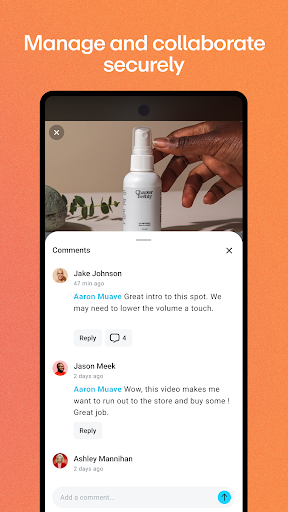
Screen recording expands the app beyond talking-head clips. It can be useful when I need to show what is happening on a device rather than describe it from memory. For teams, the app describes video libraries searchable by titles, tags, and spoken words, along with tools for managing permissions and privacy. Those capabilities give Vimeo a role in workplace communication, not just personal publishing.
Live streaming is another option, with the ability to stream events and watch live events. The precise availability of features may depend on region, but the overall set is broad: create, edit, share, manage, and view. I would think of these as a menu of tools to use when needed, rather than features every user has to adopt.
A Simple Weekly Routine
A practical routine might begin with capturing a short training update on a phone. I could prepare a few lines, use the teleprompter while recording, and trim the result before sharing it with a team through a private link or password. For a software walkthrough, I could use screen recording instead, then send the clip to the people who need it.
Later, I could search the video library using a title, tag, or spoken words when I need to find a previous clip. That kind of repeatable workflow is more helpful than treating every video as a one-off. It keeps recording and sharing manageable, while the app’s privacy and permission tools are relevant when content is meant for a particular audience.
Limits to Keep in Mind
Vimeo’s breadth is also its main trade-off. Someone who just wants to watch a few clips may not care about screen recording, scripts, team permissions, or live events. On the other hand, people seeking a deep, specialized editing suite should compare the available tools with their own workflow rather than assuming that a mobile-first set of editing options covers every production need.
The Google Play rating is 3.4 stars, so I would not assume the experience suits everyone equally. The app is free to download, but it also includes in-app purchases, and listed purchase prices span a wide range. I would check the current store details and consider which features I actually need before spending money.
Finally, some features may not be available in every region, and Android compatibility depends on the requirement shown for the particular app release and device. Those details are worth checking before relying on a specific tool for a project. For ordinary viewing and basic video sharing, the core idea is clear; for a more specialized need, verify the exact feature first.
Vimeo makes the most sense to me as a combined video destination and practical creation tool. I like that a phone can be used to record, trim, share, and watch videos without making the experience solely about publishing. The teleprompter, screen recording, private sharing, and offline viewing each have an understandable place in an everyday routine.
I would recommend giving Vimeo a try if you create or share videos regularly, or if you want an ad-free place to follow creators and watch HD clips. Casual viewers may find much of the toolkit unnecessary, while demanding editors should check that its mobile tools fit their needs. It is versatile, but the best reason to install it is having a real use for that versatility.
Vimeo Frequently Asked Questions
What is Vimeo used for?
Vimeo is used to watch videos and to upload, record, edit, manage, and share them. Its tools include screen recording, a built-in teleprompter, trimming, live streaming, and private sharing with passwords or links. Viewers can follow creators, browse categories, watch HD video, download videos for offline viewing, and use Chromecast.
Which devices can run Vimeo?
Vimeo is available as an Android app on Google Play, and its description refers to using it on a phone or tablet. It also mentions casting videos with Chromecast. Check the store entry for current device compatibility and availability, since requirements and access to some features can vary.
What Android version does Vimeo require?
The Android version requirement can vary with the app release and device. I would check the current Google Play entry for the minimum version shown for your device before installing or updating Vimeo. The app’s listed version is 11.21.1, but compatibility should be checked against the current store information.
Does Vimeo cost money to use?
Vimeo is free to download and does not contain ads. It offers in-app purchases, with listed items ranging from $0.99 to $900.00 each. Which purchases are relevant can depend on the features you want, so check the current Google Play details before buying.
Is Vimeo a good fit for casual viewers?
It can suit casual viewers who want ad-free HD playback, creator feeds, curated categories, offline downloads, or Chromecast support. Vimeo also includes a substantial set of creation and team tools, which may be unnecessary if you only want a simple video feed. Its 3.4-star Google Play rating suggests experiences vary.
Pros
- Combines ad-free HD viewing with recording, editing, uploading, and sharing tools.
- Built-in teleprompter and screen recording support practical phone-based video creation.
- Private links and password-protected sharing help tailor videos to their audience.
- Offline downloads and Chromecast add flexibility to watching videos.
Cons
- The broad creator and team toolkit may feel excessive for viewers who want a simple feed.
- In-app purchase prices span a wide range, so check costs before buying.
- Some features may not be available in every region.
- Category
- Entertainment
- Version
- 11.21.1











