Tom Thumb Deals & Delivery
- 23.31K
- 4.8
- Installs
- 500.00K
- Price
- Free
Screenshots
Analysis by Reviewed APKs
Tom Thumb Deals & Delivery is a grocery shopping app for browsing products, finding deals, planning meals, and arranging pickup or delivery. I see it working best for people who already shop at Tom Thumb and want their lists, rewards, and orders in one place. Its range goes beyond a basic grocery cart, though that breadth means it is most useful when you take time to explore the tools you actually need.
A Grocery Run, Organized
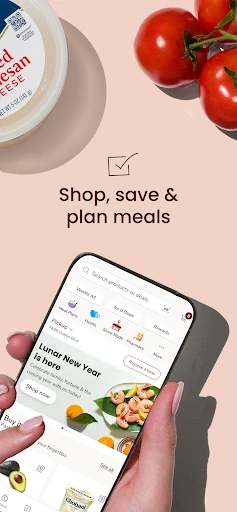
When I’m planning a grocery run, I like being able to start with the shopping list rather than trying to remember everything while walking the aisles. Tom Thumb’s app lets me add items to a list or cart, revisit past orders, and look through weekly offers. For a typical week, I could gather ingredients for a few dinners, add household staples, then decide whether to shop in store or arrange an order.
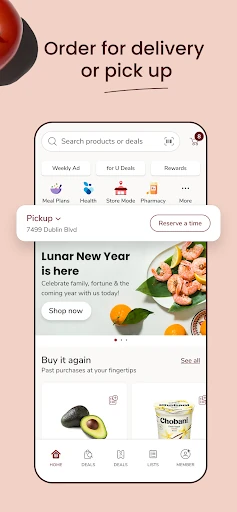
The useful part is that the list can serve more than one kind of trip. If I’m going into a store, in-store mode can help locate items by aisle and scan products to check prices and deals. If I’d rather not browse in person, the app supports pickup or delivery, with order status tracking and notifications. That makes it a practical organizer for both a planned shop and a quick top-up.
More Than a Delivery Cart
The obvious comparison is a grocery delivery app, but Tom Thumb Deals & Delivery also has a role during an in-store visit. A list, aisle locations, and price-and-deal scanning are aimed at the person shopping on site, while pickup and home delivery cover the less hands-on option. Past orders can also save time when I’m restocking familiar items instead of building a cart from scratch.
I wouldn’t treat it as a general-purpose shopping marketplace or as a meal-planning app alone. Its shopping, recipes, pharmacy, nutrition, and activity tools all sit within a Tom Thumb-focused experience. That breadth may appeal if you want several everyday tasks together, but anyone looking only for a simple list or a place to compare a wide range of retailers may find the extra sections beside the point.
Small Habits That Help
A helpful routine is to add items to a list as soon as I notice I’m running low, rather than trying to reconstruct the pantry before every trip. Before ordering, I can check the weekly coupons and offers, then use past orders to bring back regular purchases. It’s a modest habit, but it can make the difference between a deliberate shop and a cart assembled in a hurry.
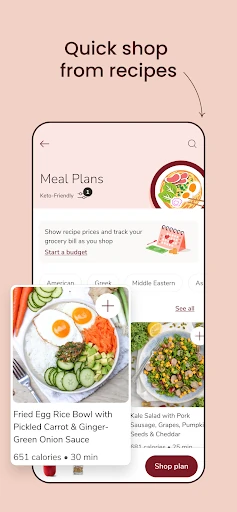
Meal planning offers another way to make the app more purposeful. I can browse recipes, choose meals with my budget in mind, and then make sure the needed ingredients are on my list. For a store visit, checking aisle locations before wandering and scanning items for prices or deals can keep the trip focused. The app’s tools work best when I use them before and during a real shop.
More From Our News Desk

Zoom Meetings, Google Meet, or Teams: Which Is Easiest to Join?

How I Build a Free Streaming Lineup With Tubi

Why Crunchyroll Is the Default Anime App for So Many Fans

YouTube TV: A Practical Guide to Cutting Cable

Rummikub and the Small Comfort of Phone Games

TeamViewer Remote Control or AnyDesk for Helping Family?
Who May Find It Useful
I’d recommend Tom Thumb Deals & Delivery to regular Tom Thumb shoppers who want a single place for grocery lists, offers, rewards, orders, and meal ideas. It can suit people who alternate between shopping in person and arranging pickup or delivery, since the app supports both. Frequent shoppers may also appreciate being able to browse past orders and use the app’s in-store tools during a visit.
It may be less appealing to someone who does not shop at Tom Thumb or wants only a bare-bones checklist. The app includes areas beyond grocery shopping, such as prescription management and activity tracking, so it has a broader scope than some people need. Whether that feels convenient or cluttered depends on your routine; I’d focus on the features that solve an actual task and leave the rest alone.
Tom Thumb Deals & Delivery is a free Android shopping app from Albertsons Companies, Inc. Google Play shows over 500,000 installs and a 4.8-star rating from around 23,000 ratings. Its content rating is Mature 17+. The app’s listed release date is July 6, 2012, with version 2026.2.0 shown as the current version.
The minimum listed requirement is Android 7.0, and the most recent update date provided is February 9, 2026. The app is free to download, with no in-app purchases or ads reported in the provided app facts. The description covers grocery shopping, deals, rewards, pickup and delivery, along with recipes, pharmacy services, and health-related tracking.
A Closer Look at the Shopping Routine
Starting With a Plan
When I first opened an app like this, the main question I’d want answered is whether it can handle the whole grocery routine or just place an order. Tom Thumb’s description points to both: I can shop from a list, check offers, revisit previous purchases, and choose an in-store trip, pickup, or delivery. That range gives the app a clear everyday purpose rather than making it only an online storefront.
The starting point is signing in or creating an account, then deciding which parts matter for the next shop. I might begin with a list and a few familiar purchases, rather than exploring every section at once. That keeps the first session practical. There are also separate tools for recipes, pharmacy tasks, and activity tracking, so the app can grow into a broader routine if those are useful.
The Regular Shop
For a normal grocery order, the app’s central rhythm is straightforward: gather items, look at available deals, and choose how to get the order. Frequent purchases and past orders can help reduce repeat work, while recommendations offer another route to adding products. I’d still check the cart against my actual list; convenience is most helpful when it supports a planned shop rather than encouraging extra browsing.
Pickup and delivery make the app useful on days when an in-store trip is inconvenient. For delivery, the description says I can track order status, receive notifications, and check in curbside when I arrive for a pickup. These are practical details around the handoff, not just the act of buying groceries. They help make the order part of a busy day without requiring me to keep checking manually.
Useful Extras in Context
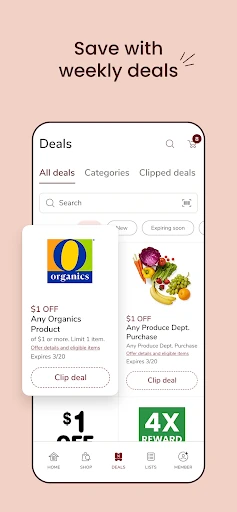
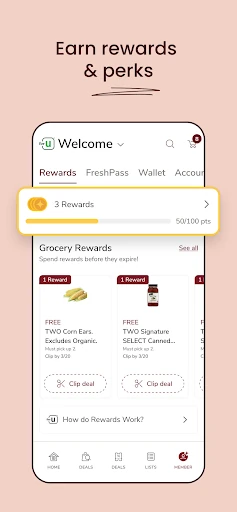
Weekly coupons, deals, and offers are a natural companion to the shopping list. The app also lets shoppers earn, track, and redeem rewards. I’d check those before finishing an order or heading to the store, so savings remain tied to things I already planned to buy. That approach feels more useful than browsing offers without a meal or household need in mind.
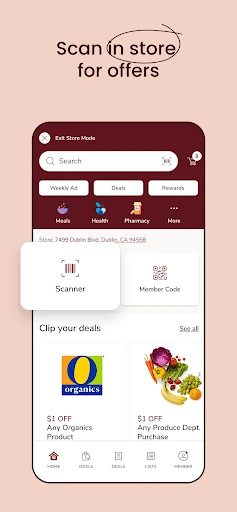
In-store mode is one of the more distinctive parts of the experience because it serves a different moment from delivery. Finding products by aisle location can help me plan a route, and scanning items lets me check prices and deals. Recipes bring another planning angle: I can choose meals and make sure their ingredients are on hand, with the description noting that budget can be part of the selection.
A Weekly Planning Loop
A routine I’d use is to make a short list during the week, then open the app before the main shop to fill in meal ingredients and household basics. I’d look through weekly offers, draw on past orders for repeat items, and decide whether I’m going to the store or arranging pickup or delivery. The sequence gives each tool a job and keeps the app from becoming a collection of disconnected sections.
If I’m shopping in person, I can refer to aisle locations as I move through the store and scan products to check prices and deals. If I’m collecting an order, I can use the status information and curbside check-in described for pickup. Afterward, saved past orders can help with the next round. It’s a small cycle, but it makes the app more valuable than opening it only when I need an immediate delivery.
Keep the Scope in Mind
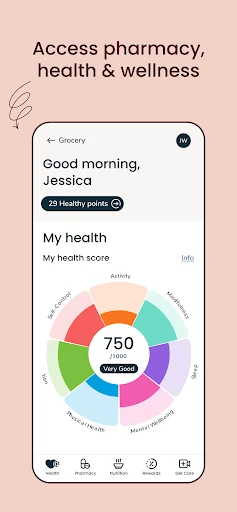
The app covers a lot of ground, and that can be a plus or a distraction. Along with groceries, lists, and rewards, it includes pharmacy tools for managing, transferring, and refilling prescriptions for people and pets, plus access to vaccines, tests, and records. It also describes tools for monitoring nutrition, steps, sleep, and activities. Those features broaden its use, but they aren’t necessary for a straightforward grocery run.
The experience is centered on shopping with Tom Thumb, so its value depends on whether that fits my regular routine. Someone who only wants a simple checklist may not need ordering, recipes, pharmacy, or wellness sections. And while delivery and pickup offer convenience, I’d still choose the option that suits the particular trip. The app is best understood as a store-focused toolkit, not a substitute for every kind of shopping or planning service.
Tom Thumb Deals & Delivery makes the most sense as a companion for regular shoppers who want their lists, deals, rewards, and order options together. I like the way it covers both in-store and pickup or delivery routines, while recipes and pharmacy tools add possible value beyond the cart.
I’d give it a try if Tom Thumb is already part of your grocery routine, especially if you use weekly offers or repeat orders. If you want only a minimalist list or shop elsewhere, much of its wider toolkit may go unused.
Tom Thumb Deals Frequently Asked Questions
What is Tom Thumb Deals & Delivery used for?
Tom Thumb Deals & Delivery is used to shop for groceries, build lists, browse deals and rewards, and arrange pickup or delivery. It also supports in-store aisle finding and scanning to check prices and deals. The app includes recipes, pharmacy services, and tools for tracking nutrition and activity, so its scope extends beyond placing a grocery order.
Which devices can run Tom Thumb Deals & Delivery?
The app is available for Android, and its listed minimum requirement is Android 7.0. Device compatibility can depend on the phone or tablet as well as the installed system version, so it is worth checking the Google Play store page on the device you plan to use. The provided facts do not describe availability on other platforms.
What Android version does Tom Thumb Deals & Delivery require?
The minimum Android version listed for Tom Thumb Deals & Delivery is Android 7.0. A device running that version or newer meets the stated operating-system requirement, though compatibility may vary by device. If you are unsure whether your particular phone or tablet can install it, check its Google Play store page.
Does Tom Thumb Deals & Delivery cost money?
Tom Thumb Deals & Delivery is free to download. The provided app facts say it has no in-app purchases and contains no ads. Store details can change over time, so check the Google Play listing for the current information before installing if cost or purchasing options are important to you.
Who should use Tom Thumb Deals & Delivery?
It is most suited to people who shop at Tom Thumb and want grocery lists, weekly deals, rewards, and pickup or delivery options in one app. Its recipes, pharmacy tools, and activity features may also suit shoppers who want those extras. If you do not shop at Tom Thumb or want only a simple checklist, the broader range may not be a fit.
Pros
- Combines grocery lists, past orders, deals, rewards, and several ways to shop.
- Supports in-store aisle finding and price-and-deal checks by scanning items.
- Recipes can help connect meal planning with ingredients for a shop.
- Includes pickup and delivery order tracking and curbside check-in.
Cons
- Its many sections may feel unnecessary if you only want a simple shopping list.
- The experience is focused on shopping with Tom Thumb.
- Pharmacy and activity tools may add breadth without helping every grocery shopper.
- Category
- Shopping
- Version
- 2026.2.0