Swimtopia
- 739
- 4.3
- Installs
- 100.00K
- Price
- Free

Screenshots
Analysis by Reviewed APKs
Swimtopia is a team companion for swimmers’ families and meet spectators, bringing team notices, swimmer histories, sign-ups, and meet information into one place. I found its appeal is practical rather than flashy: it can reduce the small bits of season-long coordination that otherwise get scattered across messages and paper schedules. It suits families already on a Swimtopia team, especially those who attend meets, but some live-meet tools depend on the host’s software.
A Meet-Day Companion
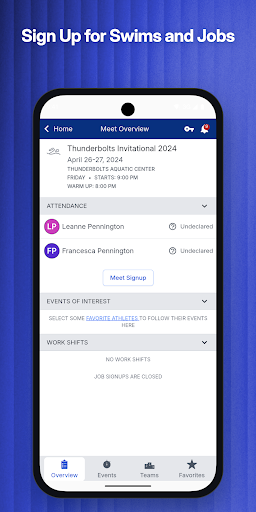
On a busy meet morning, I can see the value of opening Swimtopia before packing the swim bag. A team member can check the family’s upcoming meets, see which events their swimmers are entered in, and review any volunteer jobs attached to the family. That makes it easier to catch a scheduling detail before everyone is already at the pool, without digging through old messages or trying to remember what was signed up for.
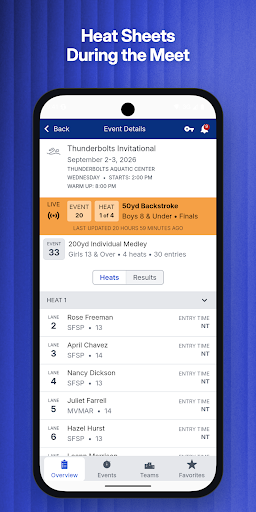
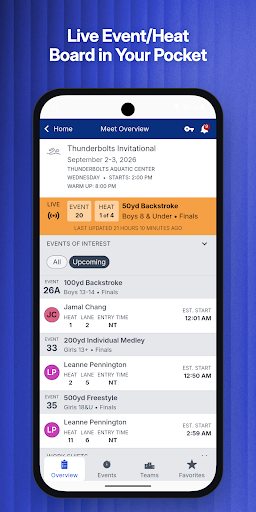
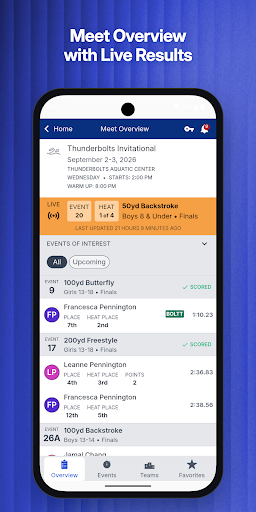
Once the meet is underway, the app has a different job: keeping families oriented. Team notifications and the live event or heat indicator can help answer the basic question of what is happening in the pool. For meets run with Meet Maestro, a Pro subscription adds items such as heat sheets, estimated start times, live results, and team scores. It is a useful spectator setup, though the meet’s software choice affects what appears.
For Teams, Not Training
I would compare Swimtopia with a team’s usual email threads, shared calendars, and paper meet sheets, rather than with a swim-training or workout app. Its strengths are the family-specific team details, sign-ups, and meet-day information. Swimmers’ best times and histories are available too, but the app’s purpose is to help people follow team activity, not to provide a general-purpose coaching plan or a library of lessons.
That distinction matters if you are deciding whether it belongs on your phone. Swimtopia is most useful when your team uses the service and keeps its information there; it is not a universal directory for every swim club or every competition. Some spectator features specifically require a meet to use Meet Maestro, and the live event indicator also depends on team administrators enabling it. Without those pieces, the app’s meet-day view can be more limited.
Small Habits That Help
I’d make a quick check of the personalized meet overview part of the weekly routine. Looking at upcoming meets, events, and volunteer jobs together gives the family a clearer picture of what is coming than checking each item separately. Signing up for meets and jobs in the app can also keep those commitments close to the rest of the team information, rather than leaving them buried in a separate conversation.
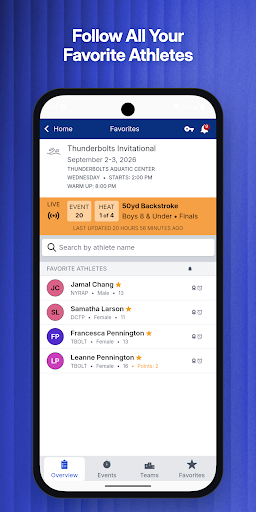
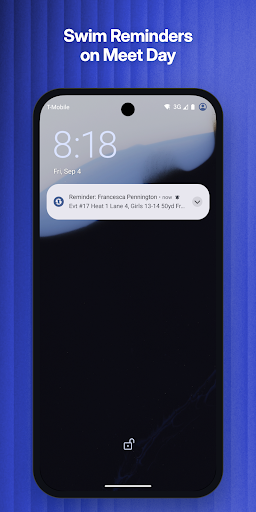
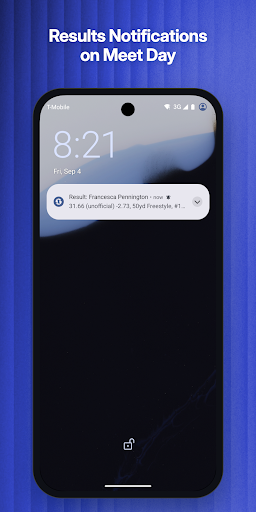
Before a meet, favoriting the swimmers you want to follow makes the Pro tools more useful when they are available: the app can show their assignments and estimated starts, and offer reminders and result notifications. I would still treat estimated start times as a changing guide, since Swimtopia describes them as updating as a meet progresses. Checking team alerts and the live indicator during the session helps make the app a companion, not a substitute for paying attention poolside.
More From Our News Desk

Zoom Meetings, Google Meet, or Teams: Which Is Easiest to Join?

How I Build a Free Streaming Lineup With Tubi

Why Crunchyroll Is the Default Anime App for So Many Fans

YouTube TV: A Practical Guide to Cutting Cable

Rummikub and the Small Comfort of Phone Games

TeamViewer Remote Control or AnyDesk for Helping Family?
Who Will Get the Most From It
I’d recommend Swimtopia to parents, guardians, and other family members whose swim team uses the platform. The family-focused overview, event and job sign-ups, swimmer best times, and post-meet results all address the ordinary coordination that comes with a season. Spectators who regularly attend meets may appreciate the live information, particularly when the host uses Meet Maestro and the team has enabled the live event indicator.
It may be less compelling for someone who only wants to track personal workouts, browse swimming instruction, or follow meets unrelated to their team. Guests can use public meet search and the live indicator, but the richer team and family view is aimed at team members. I’d also be cautious about expecting every live feature at every event: Pro tools are tied to Meet Maestro, and access to the live indicator involves a team-admin setup.
Swimtopia is a sports app from Team Topia Inc. On Google Play, it has more than 100,000 installs and a 4.3-star rating from 739 ratings. The app is free to install, contains no ads, and offers in-app purchases. Listed in-app product prices range from $1.99 to $14.99 per item. Its content rating is Everyone.
The current version is 8.0.0. The app was released on July 3, 2015, and was last updated on September 14, 2026. Android 8 or later is required. Team-member tools and some public features are free, while Pro features have a seven-day free trial and are available for qualifying meets run with Meet Maestro. A Pro subscription renews automatically unless canceled within the stated period.
How Swimtopia Fits Into Meet Day
A Team-Focused First Look
When I first opened Swimtopia, the clearest idea was that it is built around a team season, not a one-off swim result. Its free team-member tools bring together notices, a personalized view of upcoming meets, and details for a family’s swimmers. That focus makes sense for people who need to coordinate events and volunteer jobs over time, rather than just check a single score.
Getting the most from it depends on being connected to a team that uses Swimtopia. Once that relationship is in place, the app can show team and swimmer information and send team notifications. I would start by checking the upcoming meet and family overview, then see whether the details match what the team has shared. That gives a quick sense of whether the app is serving as the team’s current source of information.
Everyday Season Details
The useful day-to-day work is fairly grounded: knowing what is coming up, registering swimmers for meets, and signing up for jobs. Swimtopia’s personalized overview gathers a family’s events and volunteer commitments, so a parent can check the season’s moving parts in one place. The app also keeps a swimmer’s best times and swim history available, with post-meet results for the family’s swimmers.
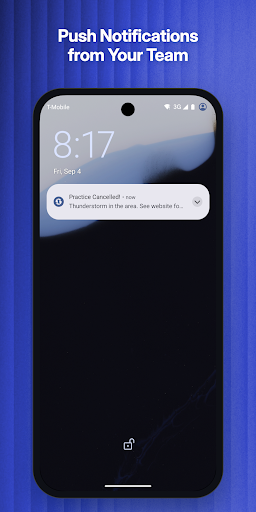
I like that those details cover both preparation and follow-up. Before an event, the family can review participation and jobs; afterward, it can look at results without treating the app as a training log. Push notifications add another way to catch team updates. The practical benefit is less about sophisticated analysis and more about keeping the routine information connected to the team.
Live Meet Information
The standout spectator feature is the live event or heat indicator, which broadcasts what is happening in the pool. It can make a difference when a family member is moving between the stands and other meet-day tasks and wants a quick sense of where the competition is. Guests and team members can access this indicator, although the team’s administrators need to complete setup for it to be available.
For a meet run using Meet Maestro, Pro adds a broader set of tools: heat sheets, assignments and estimated start times for favorite swimmers, live results for all swimmers, and team scores. Swimmers can be favorited for upcoming-event reminders and results alerts. I found that combination more useful than a single results screen because it covers both anticipating a race and checking what happened afterward.
A Simple Meet Routine
A sensible routine would begin at home, with a look at the family’s meet overview and any volunteer job. I’d use that moment to confirm which swimmers and events are on the schedule, then sign up for anything that still needs attention. That is the kind of small check that can prevent a rushed search for details while everyone is getting out the door.
At the pool, I’d use the live indicator to follow the meet and, if the event supports the Pro features, check favorite swimmers’ assignments and estimated starts. Notifications can help call attention to upcoming swims or results. After the session, the family’s post-meet results and swim history offer a convenient way to revisit performances. The routine stays focused on information the app is designed to provide.
A Few Real Limits
The biggest limitation is that not every feature works independently of the team or meet setup. The live event indicator needs team-admin steps, while Pro meet-day features require the host to run Meet Maestro. That means two families using the same app may have different experiences depending on their team and event. I would check with the team about its setup before relying on live information at a particular meet.
There is also a clear line between the free team tools and the paid Pro experience. Team members can access many season details for free, but the extra live results, heat sheets, estimated starts, and score information are part of Pro for qualifying meets. The seven-day trial and automatic renewal terms are worth understanding before subscribing. Swimtopia’s focused scope is another limit: it helps manage team and meet information, rather than offering general swim instruction or workout tracking.
Swimtopia makes the most sense as a shared team utility. I like its practical mix of family meet details, sign-ups, swimmer histories, and spectator information, with a useful upgrade path for eligible live meets. Its value depends on the team’s use of the platform, so it is not equally useful for every swimmer or every event.
I’d recommend trying it if your team already uses Swimtopia, especially if you regularly juggle meet schedules and volunteer jobs. Spectators who want live updates should first check whether their meets use Meet Maestro and whether the team has enabled the indicator. If those conditions fit, Swimtopia can make a busy season easier to follow.
Swimtopia Frequently Asked Questions
What is Swimtopia used for?
Swimtopia helps team members and spectators keep up with swim-team information and meets. Team members can view family meet details, sign up for meets and jobs, check swimmers’ best times and histories, and see post-meet results. Guests and members can also use public meet search and the live event or heat indicator, where the required setup is in place.
Which phones and devices support Swimtopia?
Swimtopia is an Android app, and Android 8 or later is required. The information provided describes the Android version and Google Play availability. If you are checking support for a particular phone or device, it is worth reviewing the Google Play store details for compatibility before installing.
Does Swimtopia cost money?
The app is free to install, with free features for team members and guests. It also offers in-app purchases, including a Pro subscription with a seven-day free trial for qualifying meet features. The listed in-app item prices range from $1.99 to $14.99; check Google Play for the current subscription options and prices.
Does Swimtopia show live results at every meet?
No. Pro meet features such as heat sheets, live results, estimated start times, and team scores require the meet host to use Meet Maestro. The live event or heat indicator has a separate team-admin setup requirement. Check with your team about its configuration and with the meet host about the software used.
Who is Swimtopia best suited for?
It is best suited to families and spectators connected to a swim team that uses Swimtopia. Its meet overview, swimmer information, sign-ups, notifications, and eligible live-meet tools are designed around team participation. It may be less useful if you want a general workout tracker or need information about a team or meet that does not use the service.
Pros
- Personalized family meet overviews bring swimmer events and volunteer jobs together.
- Free team tools include sign-ups, notifications, swim histories, and post-meet results.
- Pro can add heat sheets, live results, estimated starts, reminders, and team scores.
- No ads, with public meet search and a live event indicator for guests and members.
Cons
- Pro meet-day features require the host to run Meet Maestro.
- Teams must complete setup before the live event or heat indicator is available.
- The app is less useful for swimmers whose teams do not use Swimtopia.
- Category
- Sports
- Version
- 8.0.0