StubHub - Live Event Tickets
- 84.76K
- 4.2
- Installs
- 10.00M
- Price
- Free

Screenshots
Analysis by Reviewed APKs
StubHub - Live Event Tickets is a marketplace app for finding tickets to concerts, sports, theater, comedy, and festivals, with options to buy or sell through your phone. I found its appeal clearest when I knew the event I wanted but still needed to compare sections, prices, or ticket counts. It suits people who like browsing live events in one place, though it is still a marketplace rather than a simple event calendar.
Making Plans for a Game
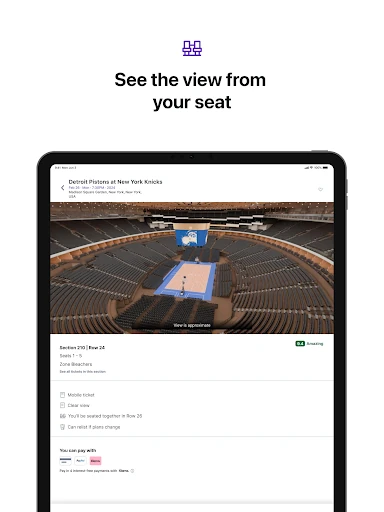
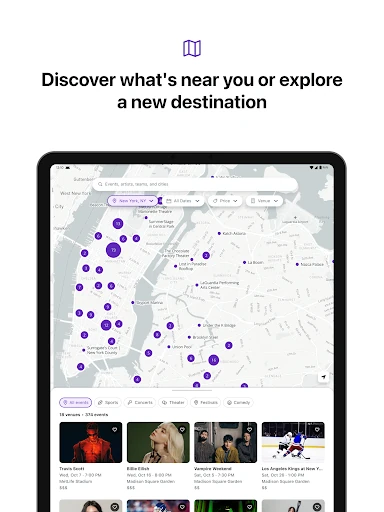
Imagine a friend texts on Thursday asking whether you want to catch a game this weekend. I’d open StubHub, look for the event, and compare the available tickets by price, section, row, and number of seats. The venue map and seat-view previews help turn a wall of listings into a more useful choice. That is the app’s central job: getting from “maybe we should go” to a clearer idea of what attending could cost.
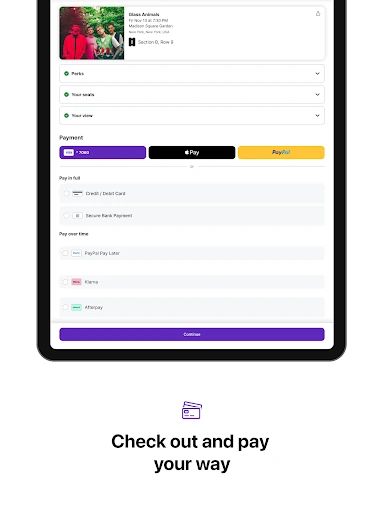
I like that this scenario can start casually. You can browse concerts, sports, theater, comedy, and festivals, then narrow the choice around practical details such as the section or accessible seating. The ticket price may be above or below face value, so I would compare carefully rather than assume a listing is a bargain. Once plans are settled, checkout supports several payment methods, including Apple Pay, Google Pay, and credit cards.
Marketplace, Not Calendar
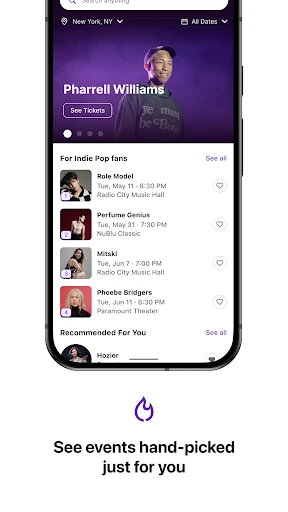
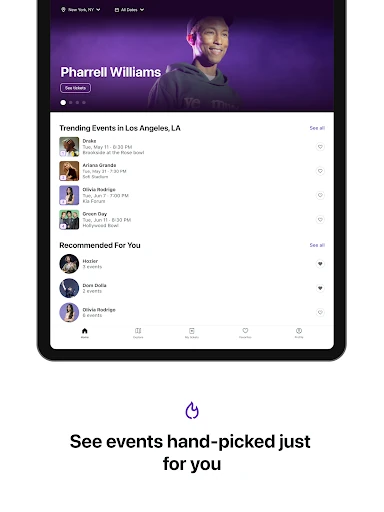
StubHub makes more sense to me as a place to shop for tickets than as a comprehensive calendar for deciding what to do. Its recommendations, artist and team follows, and venue information can help surface events, but the strongest experience begins when I have a performer, team, or event type in mind. The ability to compare ticket listings and seating details is more central than planning a whole evening from scratch.
That distinction matters if you mainly want free local happenings, event reviews, or a detailed itinerary builder. Those are not the focus described here. StubHub is built around buying and selling tickets, with an option to resell if plans change. I’d use it alongside whatever sources I already rely on to learn about an event, then come here when I’m ready to compare available seats and prices.
Small Habits That Help
A little preparation makes ticket shopping less scattershot. I’d follow the artists, teams, and venues I care about so upcoming dates and presales have a better chance of crossing my path. When an event catches my eye, I’d set a price range and choose the number of seats before comparing sections. Those filters keep me focused on options that fit the group and budget I have in mind.
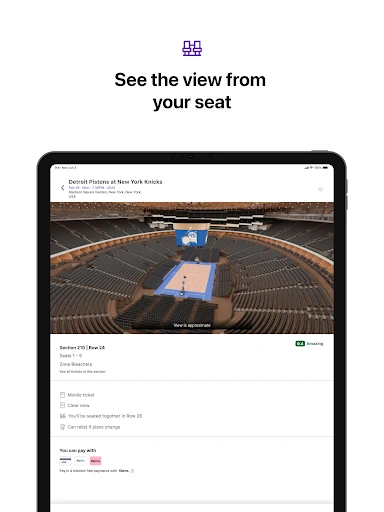
I’d also take a moment with the venue map and seat previews before making a decision. A low price is only useful if the section and view suit the occasion. If plans later change, the app provides a way to list tickets for resale, with the option to set a price or use a suggested one and track listing views. It is a practical backup, not a reason to buy casually.
More From Our News Desk

Zoom Meetings, Google Meet, or Teams: Which Is Easiest to Join?

How I Build a Free Streaming Lineup With Tubi

Why Crunchyroll Is the Default Anime App for So Many Fans

YouTube TV: A Practical Guide to Cutting Cable

Rummikub and the Small Comfort of Phone Games

TeamViewer Remote Control or AnyDesk for Helping Family?
Who Gets the Most From It
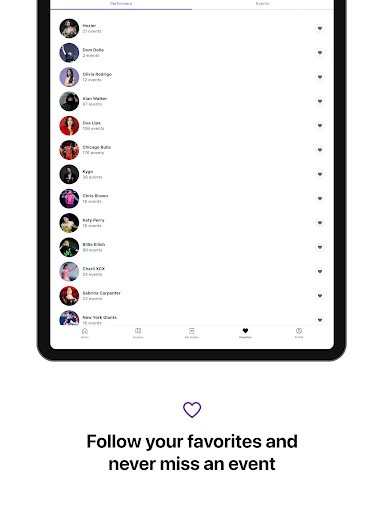
I’d recommend StubHub to people who regularly go to live events and want a single app for browsing listings, comparing seats, and handling ticket purchases. It is especially useful when a group needs a specific number of seats or when the section matters as much as the event itself. Following favorite artists, teams, or venues can also make it a convenient place to keep an eye on dates that interest you.
It may be less appealing if you are looking for a broad local-events guide, detailed editorial coverage, or a tool for planning every part of a night out. The marketplace approach also means you should pay attention to the price and seat details rather than treating the first result as the obvious choice. If you already know what you want to see, though, the filters and venue previews make the app a focused ticket-shopping option.
StubHub - Live Event Tickets is developed by StubHub and is listed in the Events category on Google Play. The app has more than 10 million installs and a 4.2-star rating from about 85,000 ratings. It is rated Everyone. The listed Android requirement is Android 10, and the current version is 104.5.1.
The app is free to download, with no in-app purchases or ads indicated in the supplied app details. Its release date is March 9, 2011, and its last update was February 5, 2026. Ticket prices can be higher or lower than face value, so the cost of attending depends on the event and ticket you choose.
A Closer Look at Ticket Shopping
First Look and Setup
When I first opened StubHub, I thought of it as a ticket counter that also lets me browse, rather than as an event magazine. The range is broad: concerts, sports, theater, comedy, and festivals all sit within the same general purpose. That makes it easy to move from checking a favorite team to looking for a concert, without needing a different ticket-shopping app for each kind of outing.
The personalization tools give the experience a more useful starting point over time. Following artists, teams, and venues can help keep relevant dates and presales in view, while recommendations are described as tailored to what a user likes. I’d start by following a few genuine interests rather than trying to tune everything at once. A short, relevant list is more likely to make the event suggestions feel helpful.
Comparing Tickets Day to Day
The core shopping experience is about narrowing choices. I can compare tickets using filters for price range, section, row, ticket quantity, and amenities such as VIP packages or accessible seating. Those details matter in ordinary situations: a pair of friends may need two seats together, while a family might prioritize a particular section or seating access. Filters save time by bringing the practical requirements into the decision early.
What I appreciate is that the app offers more context than a bare list of prices. Interactive 3D venue maps and seat-view previews help me understand where a listing sits before I commit. They do not remove the need to compare options carefully, but they give the decision more shape than simply choosing the cheapest number. For a venue I have never visited, that extra perspective is particularly useful.
Tools Beyond Buying
StubHub also covers the other side of a ticket purchase. If I can no longer attend, the app lets me list tickets for resale, set a price or use a suggested one, and track views of the listing. That is a sensible addition for people whose plans can shift. I see it as a practical fallback, rather than a feature that should make anyone less careful about the original purchase.
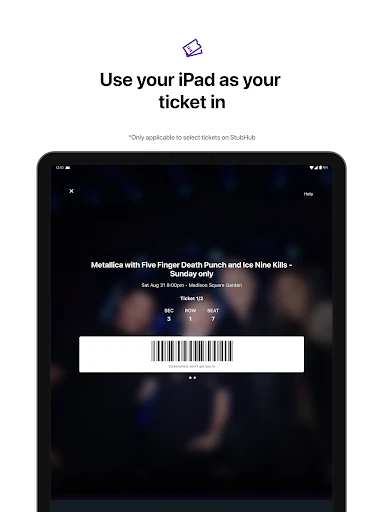
The app describes an order protection program called FanProtect, with replacement tickets or a refund as possible remedies if there is an issue. It also provides access to round-the-clock support from within the app. These details may be reassuring while shopping, but I would still read the order information closely and keep track of the event and ticket specifics. Useful support is not a substitute for understanding what is being purchased.
A Useful Event Routine
My ideal routine would be simple: follow a handful of favorite artists, teams, and venues, then check the app when I have a free weekend or hear about a show. If something looks promising, I’d choose the ticket count and price range first, then compare sections and seat previews. That order prevents me from getting attached to a listing before checking whether it fits the group or the kind of view I want.
For a group outing, I’d settle the basic preferences with everyone before checkout: how many tickets, an acceptable price range, and any seating needs. I’d use the map and previews to compare a few realistic options, rather than scrolling indefinitely. If plans change later, the resale tools provide a route to list tickets and follow interest. It is a tidy workflow for event-goers who want shopping and resale in one place.
Limits to Keep in Mind
Ticket prices can land above or below face value, so a listing’s price deserves attention even when the seat looks appealing. I would compare several options and check the details before deciding. The app’s filters and previews make that comparison easier, but they do not make every ticket equally suitable or inexpensive. The best choice still depends on the event, the available seats, and what you are comfortable paying.
The marketplace focus also sets expectations. StubHub is useful for discovering and purchasing event tickets, but it is not presented as a full calendar, itinerary planner, or source of extensive event coverage. Personalized recommendations can help surface relevant dates, yet browsing is likely to work best when I have a few interests in mind. That keeps the app’s strengths clear and avoids expecting it to do a different job.
StubHub - Live Event Tickets earns its place as a practical ticket marketplace, especially for comparing seat locations and filtering by the details that matter to a group. I like the mix of event discovery, venue previews, purchase options, and resale tools. The main caveat is familiar but important: ticket prices vary, so a little comparison is part of using the app well.
I’d recommend it to regular concert, sports, theater, and festival-goers who want to shop for tickets from their phone. It is less compelling for someone who only needs a general guide to local activities. If you already have an event in mind, StubHub gives you useful ways to weigh the available options before deciding.
StubHub Frequently Asked Questions
What is StubHub - Live Event Tickets used for?
StubHub - Live Event Tickets is used to discover, buy, and sell tickets for live events, including concerts, sports, theater, comedy, and festivals. The app lets shoppers filter listings by details such as price, section, row, and ticket quantity, and view venue maps and seat previews. Users can also list tickets for resale if their plans change.
Which devices can run StubHub - Live Event Tickets?
The app is available for Android through Google Play. The supplied requirements specify Android 10, so check the Google Play store details for compatibility with your particular device. The app information provided here does not establish availability on other platforms, so anyone looking to use it on a different device should check the relevant store.
What Android version does StubHub need?
StubHub - Live Event Tickets requires Android 10 according to its supplied app details. If you are unsure which Android version your phone uses, check its system settings before installing. Store compatibility can depend on the device, so it is also worth checking the Google Play page from the phone you plan to use.
Does StubHub - Live Event Tickets cost money?
The app is free to download, and the supplied details indicate no in-app purchases or ads. Tickets themselves are a separate cost, and prices may be higher or lower than face value depending on the listing. Review the final ticket and order details in the app before purchasing, since the amount depends on the event and seats you select.
Who should use StubHub - Live Event Tickets?
It is a good fit for people who attend live events and want to compare ticket listings, seating sections, and prices in one app. Following favorite artists, teams, and venues can also help users keep relevant dates in view. People looking mainly for a general local-events calendar or broader event-planning tools may prefer a different kind of app.
Pros
- Filters cover price, section, row, ticket quantity, and selected seating amenities.
- Venue maps and seat previews add useful context to ticket comparisons.
- Buyers and sellers can manage ticket plans within the same app.
- Personalized recommendations and followed interests help surface relevant events.
Cons
- Ticket prices may be higher or lower than face value.
- The marketplace focus is narrower than a general local-events planning app.
- Choosing well still requires comparing listings and checking seat details.
- Category
- Events
- Version
- 104.5.1