Sound Effects
- 13.48K
- 4.2
- Installs
- 1.00M
- Price
- Free

Screenshots
Analysis by Reviewed APKs
Sound Effects is an Android soundboard and ringtone app for people who want quick access to comic noises, alarms, animal calls, and other short effects. I can see it working for a playful group chat, a custom alert, or a quick laugh during a quiet moment. After looking through what it offers, my take is that it is a focused entertainment utility: useful for browsing and assigning sounds, but not an audio-editing tool.
A Sound for the Moment
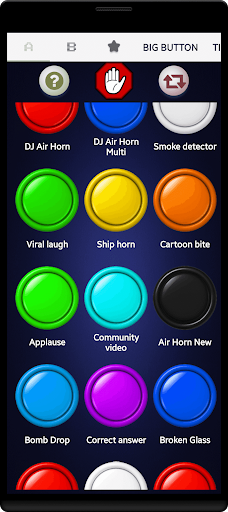
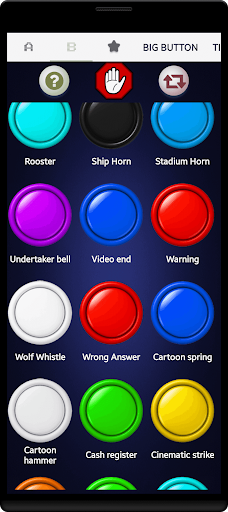
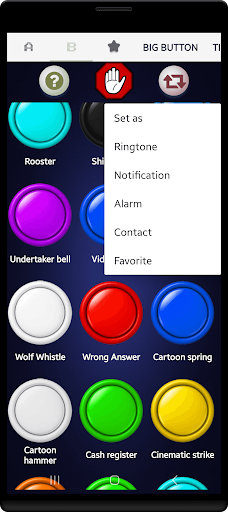
When I want a small change from the same old notification tone, Sound Effects gives me a simple place to browse alternatives. I can tap a sound to hear it, then decide whether it suits an alert, alarm, or ringtone. The library covers playful options such as a cartoon splat, familiar animal calls, and louder effects such as sirens and horns, so the choice depends on the mood and setting.
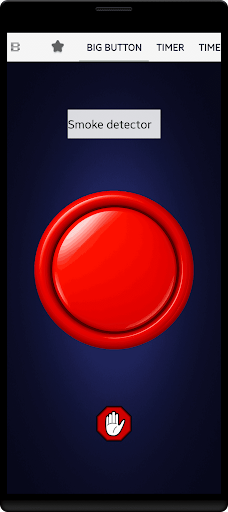
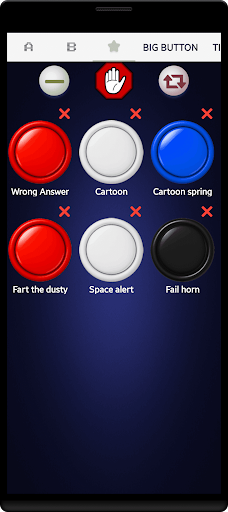
I also like the idea of keeping a few favorites ready instead of searching through the whole collection every time. The app describes a personal favorites board and a random sound button, both of which fit quick, casual use. For example, I might save a couple of gentle or distinctive tones for daily alerts and keep the more ridiculous effects for showing friends when the moment is right.
A Soundboard, Not a Studio
The closest comparison is a basic soundboard or ringtone collection, rather than a music player or recording app. Sound Effects is built around short, ready-made clips that I can preview and use on my device. Its categories span comedy, animals, emergency sirens, alarms, and notification sounds. That breadth is handy when I want a specific kind of effect without making one myself.
I would not choose it to edit audio, build a soundtrack, or produce a polished recording. The provided features focus on browsing, playback, favorites, and setting sounds as tones; they do not describe tools for shaping or mixing audio. It is also worth using the louder or startling effects with care around other people. This is a casual entertainment app, not a replacement for context-sensitive communication.
Small Habits That Help
A little restraint makes a collection like this more useful. I would preview a sound before setting it, especially if it might play during work, a class, or a quiet evening. A dramatic siren or air horn can be funny once, but it may be a poor everyday notification. Choosing a tone that is recognizable without being disruptive is a practical way to enjoy the novelty without annoying everyone nearby.
The favorites board can make the app easier to revisit: I can save the handful of clips I actually use rather than repeatedly browsing a large selection. The random button is better for exploring than for choosing an important alert, since its appeal is the surprise. If I assign a custom ringtone to a contact, I would make sure the sound is easy to identify and appropriate for the situations where that person may call.
More From Our News Desk

Zoom Meetings, Google Meet, or Teams: Which Is Easiest to Join?

How I Build a Free Streaming Lineup With Tubi

Why Crunchyroll Is the Default Anime App for So Many Fans

YouTube TV: A Practical Guide to Cutting Cable

Rummikub and the Small Comfort of Phone Games

TeamViewer Remote Control or AnyDesk for Helping Family?
Who Might Enjoy It
I would recommend Sound Effects to Android users who enjoy novelty sounds, want a broader choice of ringtones and alerts, or like having a simple soundboard to share a laugh in person. The collection includes comic, animal, alarm, and siren-style effects, with options to preview sounds and use them as device tones. Its appeal is strongest when the goal is quick entertainment or personalization rather than a serious audio project.
It may not suit someone looking for sound editing, original music creation, or a quiet utility with no interruptions, since the app contains ads. People who prefer subtle alerts may also find many of the effects too theatrical for daily use. I would treat the more startling sounds as occasional novelty choices and take a moment to consider the setting before making one a ringtone or alarm.
Sound Effects is an Entertainment app from RayJayFro. Google Play shows more than one million installs and a 4.2-star rating from 13,477 ratings. The app is free to download and contains ads. Its content rating is Teen. The supplied app facts give version 8.3 and a release date of March 31, 2012.
The supplied store information gives October 20, 2026 as the last update date. The app description says the sound collection can be used offline and that it has no hidden purchases; the app facts also say it does not offer in-app purchases. No minimum Android version is included in the available details, so check Google Play for device compatibility before installing.
How Sound Effects Fits Into Everyday Use
First Look and Setup
The first thing I notice about the idea behind Sound Effects is how direct it is: open a collection, tap a clip, and hear what it sounds like. There is no need to compose a sound or record something before getting started. With more than 100 effects described, the app offers plenty of variety for casual browsing, from odd little cartoon noises to more dramatic alarm and siren sounds.
I would start by auditioning a few clips rather than assigning the first one that catches my attention. A sound can seem funny in a preview and become tiresome when it plays repeatedly as an alert. The app supports setting a sound as a ringtone, notification sound, or alarm tone by pressing and holding it. That makes a quick test especially worthwhile before choosing a permanent everyday tone.
The Daily Soundboard
In everyday use, the most helpful part is that clips are available for immediate preview. I can tap around to compare a few options without committing to one first. That suits small decisions, like choosing a different notification sound or looking for a distinctive ringtone. The library’s mix of familiar and silly effects gives the browsing a casual, exploratory feel rather than making it a technical task.
Sound Effects also supports custom ringtones for individual contacts. That can help distinguish a particular caller from a general ringtone, though I would choose a sound that remains appropriate when the phone rings in public. For less frequent fun, the favorites board provides a way to keep selected clips close at hand. These are practical touches for a compact sound collection, rather than features aimed at managing a full music library.
Variety Beyond Alerts
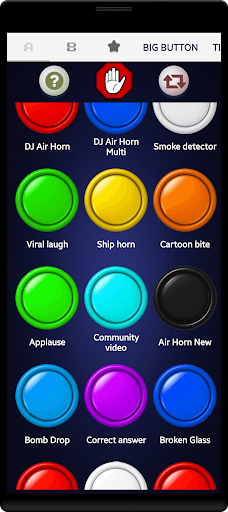
The collection stands out through its range of categories. The description mentions animal calls such as a rooster crow and lion roar, cartoon effects such as a bubble pop and splat, and novelty clips including an internet dial-up sound. There are also familiar alert-like choices, including a doorbell, school bell, and smoke detector beep. That mix means browsing can be entertaining even when I do not have a particular tone in mind.
There are options for several kinds of device sound, too: the app describes ringtone choices, notification sounds, and alarm effects. Examples range from a DJ air horn and goal horn to a laugh track and a magic fairy chime. I would not expect every category to fit every routine, but having different styles makes it easier to choose between a playful effect and something more recognizable.
A Sensible Personal Routine
A practical way to use the app is to treat setup as a short browse-and-test session. I would listen to several candidates, save the ones I like, and then choose one that works at the volume and in the setting where it will usually play. For an alarm, a clip should be noticeable enough for its job; for a notification, a shorter or less dramatic sound may be easier to live with.
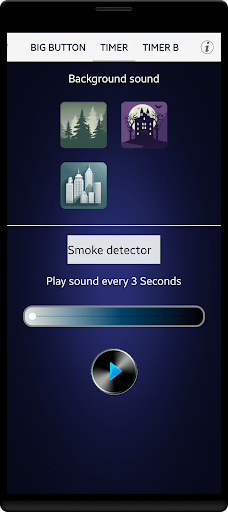
The favorites board and random sound button serve different purposes in that routine. Favorites are useful when I want to return to a particular effect, while random playback is a lightweight way to stumble across something unexpected. I would keep random listening separate from choosing a dependable alarm or contact tone. That distinction lets the playful side of the app stay fun without making important alerts unpredictable.
Limits to Keep in Mind
Sound Effects is centered on ready-made clips, so its usefulness depends on whether the sounds in its collection match what I want. The described functions do not include editing, recording, or mixing tools. Anyone hoping to adjust effects for a creative project should look for a different kind of app. Here, the main experience is choosing from the available sounds and using them as device tones.
The novelty can also wear off if a loud or unusual clip becomes part of a daily routine. A horn, scream, or siren may draw attention in a way that is amusing at home but awkward elsewhere. I would preview carefully and consider who might hear it before assigning one to a contact or alarm. The app contains ads, another reasonable trade-off to keep in mind for something used mainly for casual entertainment.
Finally, Android compatibility is worth checking before installation because the supplied details do not give a minimum operating-system version. The app facts identify it as an Android release, with version 8.3 and a last update date of October 20, 2026. Device requirements can vary, so Google Play is the place to check whether it suits a particular phone or tablet.
My overall impression is that Sound Effects knows its lane: it offers a broad, playful collection of short clips and straightforward ways to preview and assign them. The favorites board and contact-specific ringtones add everyday usefulness, while the stranger sounds keep browsing entertaining. Ads and the lack of described editing tools set clear limits on what to expect.
I would try it if I wanted a casual soundboard, a more unusual ringtone, or a few novelty alerts to share with friends. I would be more cautious about using loud effects as regular tones, and I would not install it for audio production. For simple sound-based fun on Android, it is a focused option worth considering.
Sound Effects Frequently Asked Questions
What is Sound Effects used for?
Sound Effects is an Android app for browsing and playing short sounds, including comic effects, animal calls, sirens, alarms, and ringtone-style clips. You can tap to preview sounds, save favorites, and set a sound as a ringtone, notification tone, or alarm. It also supports custom ringtones for individual contacts, making it a soundboard and device-personalization app rather than an audio editor.
Which phones and devices support Sound Effects?
The supplied details identify Sound Effects as an Android app. They do not specify a minimum Android version or a separate supported-device list, so compatibility may vary by phone or tablet. Check the Google Play store entry for the current requirements on your device before installing. The app description says the sound collection can be used offline.
Does Sound Effects cost money?
Sound Effects is free to download, and the supplied app facts say it has ads but does not offer in-app purchases. The description also says there are no hidden purchases. Store details can change over time, so check Google Play for current availability and terms if you are deciding whether to install it.
What Android version does Sound Effects require?
The available app details do not provide a minimum Android version. Sound Effects is an Android app, but the version supported by a particular phone can affect whether it installs or runs. Requirements may vary, so check the Google Play store entry from the device you plan to use before downloading.
Is Sound Effects suitable for everyday ringtones?
It can suit someone who wants distinctive ringtones, notification sounds, or alarm tones, and it supports assigning a custom ringtone to an individual contact. The library also includes loud and startling effects, so I would preview choices and consider the setting before using them regularly. It may be less appealing if you prefer subtle alerts or want audio-editing features.
Pros
- More than 100 described sounds cover comedy, animals, alarms, sirens, and novelty effects.
- Tap-to-preview playback makes it easy to audition sounds before choosing one.
- Favorites, contact-specific ringtones, and a random sound button support casual use.
- The description says sounds are available offline, with no in-app purchases.
Cons
- The app contains ads, which may interrupt a casual browsing session.
- Its described tools focus on playback and tones, not audio editing or mixing.
- Some loud or startling clips may be unsuitable as everyday alerts.
- Category
- Entertainment
- Version
- 8.3











