Shopping List - Simple & Easy
- 29.89K
- 4.4
- Installs
- 1.00M
- Price
- Free

Screenshots
Analysis by Reviewed APKs
Shopping List - Simple & Easy is a straightforward way to keep track of groceries and other things I need to buy. I like its basic approach: make a list, add items, and tap them off as I shop. It suits people who want a reusable checklist more than a full-featured meal planner. After spending time with its simple workflow, I see it as a practical little tool with a few useful conveniences.
A List for Errand Day
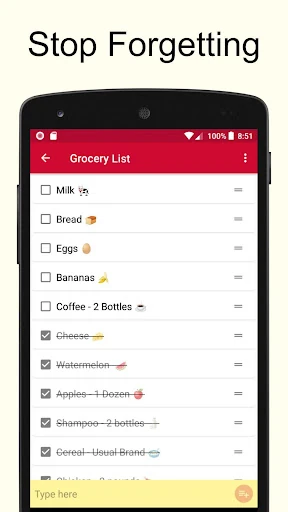
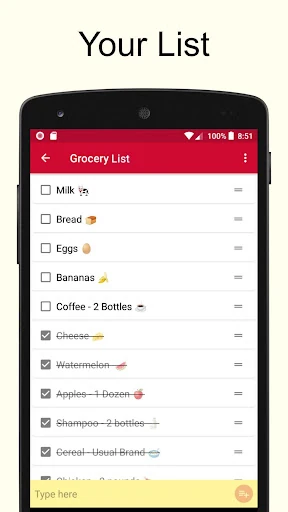
When I first opened Shopping List - Simple & Easy, I pictured using it before a regular grocery run. I could create a list for the store, add milk, vegetables, and the few household basics I was running low on, then check the list while walking through the aisles. Tapping an item crosses it off, so I can see what is still waiting in the cart without rereading a note full of scribbles.
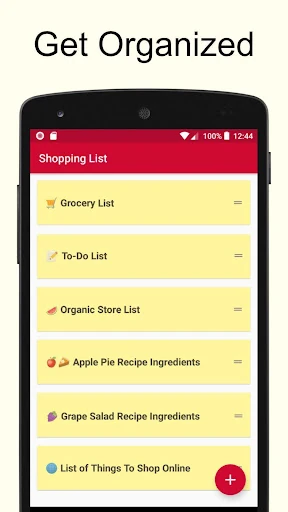
The appeal is most obvious when a household list changes throughout the week. I can add something when I notice it is nearly gone, then return to the same list before shopping instead of starting from scratch. Separate lists can also represent different stores or errands. That keeps a quick stop for groceries from getting mixed up with a hardware-store reminder or another set of things I need to pick up.
A Checklist, Not a Planner
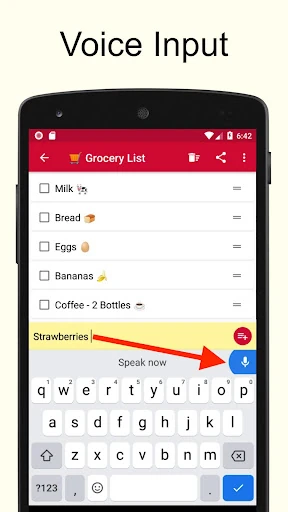
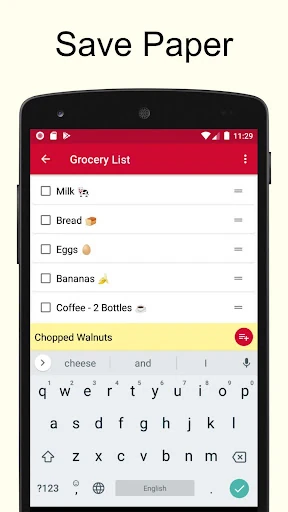
Compared with a note-taking app or a paper list, this app is built around shopping checklists. Its basic loop is quick: create a list, enter items in the yellow text box, and tap each one as it is handled. I find that focused design easier to scan than a general notes page when my hands are full or I am trying to keep moving through a store.
That narrow focus is also a boundary. Shopping List - Simple & Easy is not presented as a recipe finder, meal planner, or price-comparison service. I would not choose it when I need those broader tools or detailed organization. It makes more sense for someone who wants a simple place to collect items and mark them done, without turning a small shopping errand into a planning project.
Make Lists Reusable
The most helpful habit is keeping a regular grocery list instead of deleting it after every trip. The app lets lists be reused, so I can leave familiar staples in place and check or uncheck them as needed. That saves the small effort of retyping the same basics each week. It also makes the list feel personal over time, because it reflects the items I actually remember to buy.
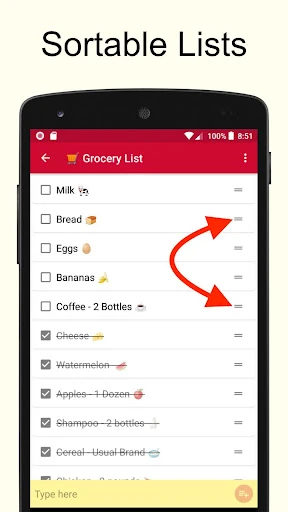
After shopping, the trash icon can clear the crossed-off items. I would use that as a quick reset once I am home, rather than letting completed items clutter the next trip. Alphabetical sorting is another modest way to tidy a list when it grows. And when I want an item to stand out in a familiar way, the app supports adding emojis through the keyboard.
More From Our News Desk

Zoom Meetings, Google Meet, or Teams: Which Is Easiest to Join?

How I Build a Free Streaming Lineup With Tubi

Why Crunchyroll Is the Default Anime App for So Many Fans

YouTube TV: A Practical Guide to Cutting Cable

Rummikub and the Small Comfort of Phone Games

TeamViewer Remote Control or AnyDesk for Helping Family?
Who Will Appreciate It
I would recommend Shopping List - Simple & Easy to anyone who wants a dedicated, uncomplicated shopping checklist on a phone. It works particularly well for routine errands: groceries, supplies for the house, or a separate list for each store. People who prefer checking off items as they go should find the central interaction easy to understand, while reusable lists help reduce repeated typing.
It may be less appealing to people who want their shopping app to do much more than store lists. The description focuses on entering items, checking them off, sorting, and reusing lists, rather than a larger collection of planning tools. If a plain checklist feels like enough, that restraint is a plus. If you expect extensive organization or extra shopping services, this may feel too basic.
Shopping List - Simple & Easy is developed by Opulogic Inc and is available on Google Play for Android. It has over one million installs and a 4.4-star rating from around 29,900 ratings. The app is free to download, contains ads, and offers in-app purchases priced from $1.99 to $2.99 per item. Its content rating is Everyone.
The current version is 3.38. The app was released on December 25, 2018, and its most recent update was October 30, 2026. A minimum Android version is not included among the available app details, so check Google Play for device compatibility before installing. The core purpose remains simple: create shopping lists, add items, and cross them off as you go.
A Closer Look at the Checklist
A Quick First Impression
When I first opened the app, its uncomplicated purpose was clear: this is a place to make lists, not a dashboard full of competing tasks. Creating a new list starts with the plus sign. From there, I can enter items in the yellow text box. That short path from opening the app to writing something down is useful when I remember an item in the middle of another task.
I also appreciate that the main interaction is easy to picture without a learning period. Items are crossed off with a tap, and the app’s instructions describe a small set of actions rather than a complicated setup routine. I would start by making one list for my usual shop, then add another only if I had a clear reason to keep a different errand separate.
The Everyday Checklist
Day to day, the app’s value comes from keeping unfinished purchases visible. I can add an item when I think of it and return to the list when I am ready to shop. In a store, tapping an item as I pick it up gives the list a clear sense of progress. It is a small interaction, but it is more convenient than trying to remember which things I have already put in the basket.
Multiple lists make the same simple system useful for more than one shopping destination. I might keep groceries separate from other supplies, for example, rather than forcing every errand into one long checklist. The app also says lists can sync across multiple devices in real time. That can help keep a list current when it is used on more than one device.
Useful Small Touches
Reusing a list is the standout convenience for my routine. Many shopping trips involve the same basics, and being able to check and uncheck those items means the list does not have to be rebuilt each time. I can keep familiar entries ready and focus on adding anything unusual for the next trip. It is a simple idea, but it addresses a common bit of list maintenance.
The cleanup and sorting options are practical additions rather than elaborate features. The trash icon removes crossed-off items, while alphabetical sorting can make a longer list easier to scan. The app also supports emojis through the keyboard’s built-in function. I would use that sparingly for visual cues or a personal touch, without expecting it to replace a more detailed way of organizing items.
A Routine That Sticks
A useful routine could start whenever I notice something running low. I would open the relevant list, add the item in the yellow text box, and carry on with what I was doing. Before leaving for the store, I could glance through the list and make any final additions. This keeps list-making close to the moment I remember something, rather than leaving every detail for the day of the errand.
While shopping, I would tap items as I find them. Once I am done, the trash icon offers a way to clear the completed entries, while the list itself can remain ready for another trip. For a household that uses multiple devices, the described real-time syncing could make the same list more convenient to keep current. Separate lists can help preserve a little order when errands involve different stores.
Keep Expectations Simple
The app’s straightforward design means the experience is centered on lists and individual items. That is a good fit for basic shopping, but it will not satisfy someone looking for a broader planning system. The app description does not present meal ideas, recipes, or price tracking as part of its job. I would treat it as a dependable place for reminders, not a complete guide to deciding what to buy.
There are also a couple of practical details to keep in mind. The app contains ads, and optional in-app purchases are available, even though downloading it is free. Its listed minimum Android requirement is not provided in the available details, so it is worth checking Google Play for compatibility with a particular device. These points do not change the basic checklist workflow, but they can matter before installing.
Shopping List - Simple & Easy does not try to make shopping more complicated than it needs to be. I like its reusable lists, clear check-off interaction, and the option to separate errands by store. It is an everyday utility rather than a feature-heavy organizer, and that focus is the reason it makes sense for routine shopping.
I would recommend it to people who want a simple digital list they can keep coming back to. The ads and in-app purchases are worth knowing about, and anyone expecting a full planning suite should look elsewhere. For basic groceries and other shopping reminders, though, its small set of tools covers the essentials.
Shopping List Frequently Asked Questions
What is Shopping List - Simple & Easy used for?
Shopping List - Simple & Easy is for creating shopping checklists and other lists of things to buy. You can make multiple lists, enter items, and tap an item to cross it off. Lists can be reused, sorted alphabetically, and cleared of crossed-off items. The app description also says lists can sync across multiple devices in real time.
What devices support Shopping List - Simple & Easy?
Shopping List - Simple & Easy is an Android app available on Google Play. The available details do not give a minimum Android version, so check the Google Play entry for current device requirements before installing. The app description says lists can sync across multiple devices, which may be useful when the same list is used in more than one place.
Does Shopping List - Simple & Easy cost money?
The app is free to download on Google Play. It contains ads and offers in-app purchases priced from $1.99 to $2.99 per item. Store details can change, so check Google Play for current purchase information before deciding whether the free version or any optional purchase suits you.
What Android version does Shopping List - Simple & Easy require?
A minimum Android version is not included in the available app details. Since compatibility requirements can vary as an app is updated and devices change, the safest place to check is the Google Play entry for Shopping List - Simple & Easy. The listed current app version is 3.38.
Who should use Shopping List - Simple & Easy?
It should suit people who want a straightforward place to record groceries or other shopping, then check items off as they go. Reusable lists and multiple-list support help with recurring trips and separate stores. It may not suit someone looking for a larger planning tool, since the described features focus on maintaining and using lists.
Pros
- Reusable lists save time when the same groceries come up every week.
- Multiple lists help keep different stores or errands separate.
- Simple tap-to-cross-off interaction is easy to use while shopping.
- Alphabetical sorting and crossed-item cleanup help keep lists tidy.
Cons
- Ads are included, and optional in-app purchases are available.
- The described feature set stays focused on checklists rather than broader planning.
- Minimum Android requirements should be checked on Google Play.
- Category
- Shopping
- Version
- 3.38











