PS Remote Play
- 121.73K
- 2.8
- Installs
- 10.00M
- Price
- Free
Screenshots
Analysis by Reviewed APKs
PS Remote Play lets me view and control a PS5 or PS4 from an Android phone, turning a console session into something I can pick up away from the TV. It suits players who already own a compatible PlayStation and have a fast, stable connection. I found it useful for flexible play and quick check-ins, though its comfort and responsiveness depend heavily on the network and controls.
A Console Session, Away
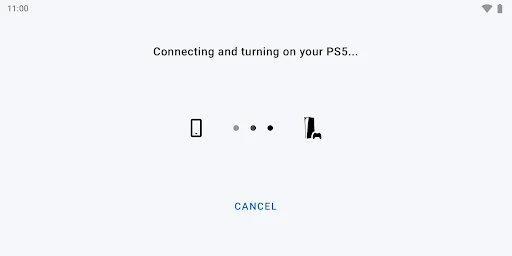
When I first tried to picture Remote Play in an ordinary routine, the best fit was a quiet stretch of time when the television was already in use. I could open the app on my phone, connect to my PS5 or PS4, and see the console screen there instead. The app’s job is straightforward: carry the console experience to a mobile screen, rather than provide a separate library of games.
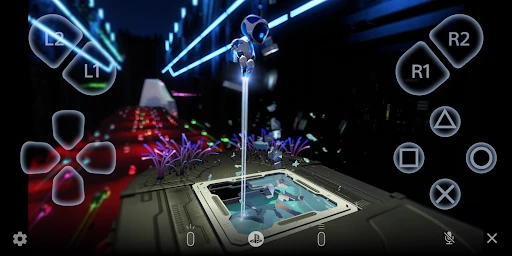
The phone’s touchscreen supplies an on-screen controller, and the app can also use compatible physical controllers. That makes it possible to play a little from a different room or while away from home, provided the connection is fast and stable. I would treat it as a convenient extension of a console session, not as a substitute for having the console set up and ready.
Remote Play, Not a New Library
Compared with playing directly on a television, Remote Play trades a larger display and familiar console controls for access on a mobile device. Compared with a mobile game, it relies on your PS5 or PS4 rather than offering its own independent game catalog. That distinction matters: the app is most useful when you already have a console and want another way to reach it.
I wouldn’t choose it as a general-purpose game-streaming service or as a way to play without a PlayStation console. You need a PS5 or PS4 with current system software, a PlayStation Network account, and a stable internet connection. It may also be incompatible with some games, so a phone session is not necessarily a fit for every title or play style.
Make the Phone Comfortable
A small bit of preparation can make a session feel less fussy. I’d check that the console has the latest system software, sign in with the PlayStation Network account I use with it, and try the connection before counting on a longer session. The app needs Android 10 or later, but controller support depends on Android version, so it is worth checking that detail before choosing a controller.
For a quick session, the on-screen controls keep the setup simple. For longer play, a supported wireless controller may feel more familiar; the app also supports the Backbone One PlayStation Edition on USB Type-C Android phones. I’d favor a reliable Wi-Fi connection where possible, since mobile data can use much more data than typical video streaming and may be affected by carrier conditions.
More From Our News Desk

Zoom Meetings, Google Meet, or Teams: Which Is Easiest to Join?

How I Build a Free Streaming Lineup With Tubi

Why Crunchyroll Is the Default Anime App for So Many Fans

YouTube TV: A Practical Guide to Cutting Cable

Rummikub and the Small Comfort of Phone Games

TeamViewer Remote Control or AnyDesk for Helping Family?
Who Will Get the Most From It
I’d recommend PS Remote Play to people who already play on a PS5 or PS4 and want the option to use a phone screen when the television is unavailable or they are away from the console. It is especially appealing if you are comfortable with a streaming-style connection and have a compatible controller or don’t mind touchscreen controls for shorter sessions.
It may be a poor match for someone without a PlayStation console, someone who wants games to run locally on a phone, or anyone with an inconsistent connection. Players who need precise, immediate input may also prefer playing directly on the console, since device performance and wireless controller use can introduce input lag. The app’s low Google Play rating is another reason to set expectations rather than assume it will suit every setup.
PS Remote Play is developed by PlayStation Mobile Inc. On Google Play, it has over 10 million installs and a 2.8-star rating from around 122,000 ratings. The app is free to download, contains no ads, and has no in-app purchases. Its content rating is Everyone, and it requires Android 10 or later.
The supplied app version is 8.5.1. PS Remote Play was released on October 27, 2014, and its latest update date is October 27, 2025. Recent changes mention performance improvements. To use it, you also need a PS5 or PS4 with the latest system software, a PlayStation Network account, and a fast, stable internet connection.
How Remote Play Feels in Practice
Getting Connected
My first impression is that PS Remote Play has a very specific purpose: it puts the screen and controls of a PlayStation console on an Android device. There is little need to learn a separate game service or browse a new catalog. The important first step is having the console, account, and connection ready, because the app depends on all three.
Setup requirements are clear enough to plan around. A mobile device needs Android 10 or later, and the PS5 or PS4 needs the latest system software. The app also requires a PlayStation Network account. I’d test the connection while near my usual setup before relying on it somewhere else, particularly if I expect to use mobile data.
The Everyday Experience
Day to day, the appeal is the freedom to keep using a console session when the television is not convenient. The app displays the console screen on the phone, and the touchscreen provides controls. For a brief check-in or a short stretch of play, that can be enough to make the console more accessible without moving the main setup.
The experience still depends on the quality of the connection and the phone. Sony notes that device performance can affect input lag with a wireless controller, and some games may not be compatible. I’d keep that in mind for games where timing matters. A stable connection is a core requirement, not a minor convenience, and mobile data can consume substantial data.
Controller Choices
Controller flexibility is one of the app’s more useful details. The on-screen controller means a separate accessory is not essential for trying a session. The app also supports a DUALSHOCK 4 wireless controller, and Android version affects support for newer options: DualSense works on Android 12 or later, while DualSense Edge requires Android 14 or later.
There is also support for the Backbone One PlayStation Edition on USB Type-C Android smartphones. Those options give players a way to choose between a phone-first setup and controls that feel closer to a console session. Controller vibration may differ from playing directly on a PS5 or PS4, and the touch pad function on Android 10 and 11 uses the on-screen controller.
A Practical Session Plan
For a low-stress routine, I’d start at home on Wi-Fi and try a game I already know before taking the phone setup elsewhere. That gives me a useful sense of how the controls feel and whether the connection is steady enough for the way I play. If touchscreen controls feel cramped, I’d try a supported controller rather than assuming every session will suit touch input.
When I do use mobile data, I’d be deliberate about session length. Remote Play uses considerably more data than most video streaming services, and carrier or network conditions can prevent it from working well. I’d also keep the phone’s Android version in mind when selecting a controller, since support differs across controller models.
Limits to Keep in Mind
The most important limitation is that this is a way to access a console, not a replacement for one. You need the PS5 or PS4, its current system software, a PlayStation Network account, and a suitable internet connection. If any part of that chain is unavailable, the app cannot serve its main purpose. That makes it a companion tool for existing PlayStation owners.
Compatibility and responsiveness deserve realistic expectations. The app may not work properly on unverified devices, and some games may not be compatible. Input lag can occur depending on the mobile device’s performance, while wireless controller vibration may feel different from console play. With a 2.8-star Google Play rating, user experiences appear mixed, so I would test my own setup before building a routine around it.
PS Remote Play is a focused companion for people who already have a PS5 or PS4 and want the option to play from an Android device. The controller choices and phone-screen access make it practical in the right setting, but the connection is central to the experience, and mobile data can be costly in usage.
I’d recommend trying it if you have a compatible console, Android device, and reliable internet, especially for occasional sessions away from the television. I’d be more cautious if you need consistently precise controls or expect it to work like a standalone mobile game. A short test on your own network is the sensible way to see whether it fits.
PS Remote Play Frequently Asked Questions
What is PS Remote Play used for?
PS Remote Play displays a PS5 or PS4 screen on an Android mobile device and lets you control the console using on-screen controls or supported controllers. It also supports voice chat through the phone’s microphone and text entry through the mobile keyboard. You need a PlayStation console, a PlayStation Network account, and a fast, stable internet connection.
Which devices can run PS Remote Play?
The Android app requires Android 10 or later. Controller support varies by Android version: DualSense works on Android 12 or later, and DualSense Edge on Android 14 or later. The app names Google Pixel 7, 8, and 9 series as verified devices; it may not work properly on unverified devices, so check the store details for your phone.
Does PS Remote Play cost anything?
PS Remote Play is free to download on Google Play. It contains no ads and has no in-app purchases. Using it still requires a PS5 or PS4, a PlayStation Network account, and an internet connection. Mobile data use can be high compared with most video streaming services, and charges may depend on your carrier and plan.
Does PS Remote Play work without a console?
No. The app is for accessing a PS5 or PS4, so it is not a standalone mobile game service. Your console needs the latest system software, and you need a PlayStation Network account and a fast, stable internet connection. Some games may not be compatible, and connection quality can affect the experience.
Who should try PS Remote Play?
It is best suited to existing PS5 or PS4 owners who want to access their console from an Android phone. People who prefer a physical controller can use supported models, subject to Android-version requirements. It may not suit players with unreliable connections or those who expect every game and device to work; device compatibility and experience can vary, so check the store information.
Pros
- Lets existing PS5 and PS4 owners access the console screen on an Android phone.
- Offers touchscreen controls and support for several PlayStation controller options.
- Includes mobile voice chat and keyboard-based text entry.
- Free to download, with no ads or in-app purchases.
Cons
- Requires a console, PlayStation Network account, and fast, stable internet.
- Mobile data use can be high, and carrier conditions may affect access.
- Some games or unverified devices may not work properly.
- Category
- Entertainment
- Version
- 8.5.1











