Nova Launcher
- 1.34M
- 2.6
- Installs
- 100.00M
- Price
- Free
Screenshots
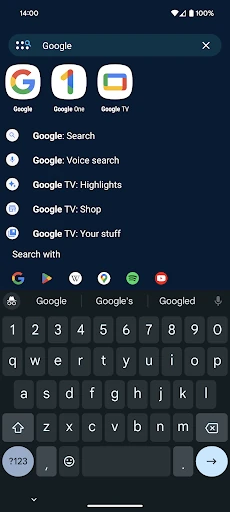
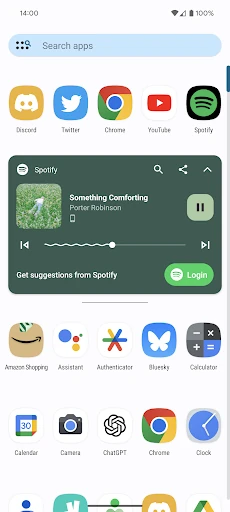
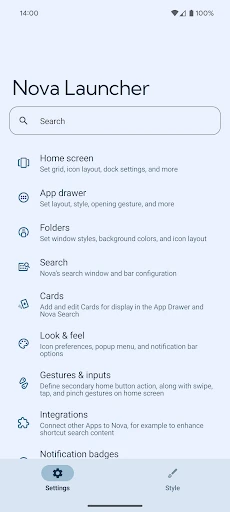
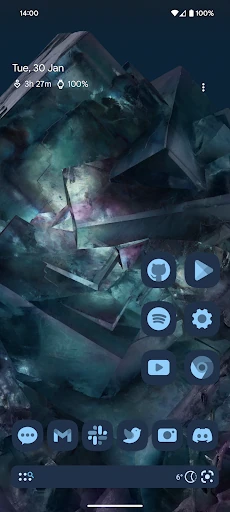
Analysis by Reviewed APKs
Nova Launcher replaces the standard Android home screen with one you can arrange and style in much finer detail. It suits people who enjoy tuning their phone’s layout, as well as anyone who wants a more organized app drawer or a consistent icon theme. After spending time with its options, my take is that Nova offers real flexibility, though its depth is most appealing to people willing to make a few choices.
A Home Screen That Fits
When I first opened Nova, I thought about the small things I reach for throughout an ordinary day: the weather widget, a messaging app, and the handful of tools I use before heading out. Nova is built around arranging that home screen to suit those habits. I can adjust icon size and label colors, position the search bar, and place widgets with more precise spacing than a rigid grid usually allows.
That precision comes from subgrid positioning, which lets icons and widgets sit between the usual grid cells. I found the idea especially useful when a widget looked slightly cramped beside my most-used apps. The app drawer has its own layout and search choices, and folders can help keep the home screen from becoming a long row of icons. Rather than forcing one ideal arrangement, Nova gives me room to make the screen feel practical for my routine.
A Launcher, Not a New Phone
Nova makes sense when the part of Android I want to change is the way I reach apps and organize the home screen. It is a replacement for that home-screen experience, not a new operating system or a general-purpose phone utility. I can change the look with icon themes, colors, and light or dark settings, while the everyday job remains familiar: opening apps, finding things, and keeping useful shortcuts close.
Compared with leaving the phone’s existing launcher untouched, Nova offers many more layout decisions. That can be a welcome alternative if the default arrangement feels restrictive, but it is not automatically better for someone who prefers a ready-made setup and never wants to adjust it. Some listed options, including gestures and app-drawer groups, belong to Nova Launcher Prime. I would treat Nova as a customization tool, not as a promise that every phone task will feel faster.
Small Tweaks, Better Flow
I get more from a launcher like Nova by changing one thing at a time. I might first settle the home-screen layout, then check whether the app drawer is easier to scan with a different scroll direction or search-bar position. Icon shapes and label colors are another manageable pass. Making several changes together can leave me unsure which one actually improved the screen, so a gradual approach is less frustrating.
Search can also become a useful everyday habit. Nova can search apps and contacts, connect with other services, and show quick results for calculations, unit conversions, and package tracking. If I rely on a setup over time, backup and restore can help when moving between phones or trying another layout. Nova says backups can be stored locally or in the cloud, so I would make a backup after settling on a configuration I want to keep.
More From Our News Desk

Zoom Meetings, Google Meet, or Teams: Which Is Easiest to Join?

How I Build a Free Streaming Lineup With Tubi

Why Crunchyroll Is the Default Anime App for So Many Fans

YouTube TV: A Practical Guide to Cutting Cable

Rummikub and the Small Comfort of Phone Games

TeamViewer Remote Control or AnyDesk for Helping Family?
Who Will Enjoy Nova
I’d recommend Nova to Android users who enjoy making their phone feel more personal and have a few minutes to spend getting the layout right. It is a good fit for someone who wants a coordinated icon style, a more carefully arranged app drawer, or precise widget placement. The range of choices also makes sense for people who like to refine their setup over time instead of accepting the first screen they are given.
It may not suit someone who wants a launcher to make every decision for them. Nova’s flexibility brings settings to consider, and the most involved options can take some patience to set up. I would also be cautious about choosing it solely for Prime features without checking what is included and what it costs in Google Play. Its 2.6-star rating across about 1.3 million ratings is worth weighing alongside the features that matter to you.
Nova Launcher is an Android personalization app from Instabridge Sweden AB. Google Play shows over 100 million installs and a 2.6-star rating from about 1.3 million ratings. The app is free to download, with in-app purchases priced from $0.99 to $4.99 per item. Google Play also indicates that it contains ads.
The content rating is Everyone, and the listed minimum requirement is Android 8.0. The current version shown is 81026 (8.3.2). Nova was released on February 23, 2012, and its listed last update was February 4, 2026. These details give a useful snapshot of the app, though store information can change over time.
Making Room for Your Own Android Routine
First Look and Setup
My first impression of Nova is that it starts with a familiar job and opens up more control around it. This is still an Android home screen, not a completely different way to use a phone. The difference becomes clear as I look at choices for icon size, labels, drawer layout, folders, and search placement. That makes the app approachable in concept, even if deciding how much to customize takes a little thought.
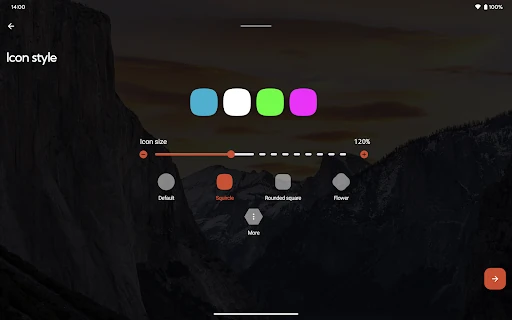
I would begin with the screen I already use rather than trying to redesign everything in one sitting. A few deliberate changes make it easier to judge whether Nova’s layout suits me. If I use a custom icon theme, I can also shape icons for a more consistent appearance. The app supports thousands of icon themes available through Google Play, so there is room to change the visual style without treating every icon as a separate project.
The Daily Home Screen
Day to day, Nova’s value is in making the route from unlocking the phone to finding something feel more personal. I can keep frequent apps where I expect them, use folders to group related shortcuts, and give widgets the space they need. Subgrid positioning is a particularly practical detail: a layout does not have to look slightly off just because an icon or widget cannot fit neatly into the standard cells.
The app drawer gives me another place to keep things orderly, with controls for its scrolling style, search bar position, icon sizing, and label colors. I like that the home screen and drawer can be considered separately rather than treated as one fixed page. Search adds another way to reach apps and contacts, with integrations for other services and quick results such as calculations and unit conversions.
Details That Stand Out
Color and theme options give Nova a useful range without reducing customization to wallpaper and icons alone. I can use Material You colors from the system or choose colors myself. Light and dark themes can follow the system, change with sunrise and sunset, or stay on a chosen setting. Those are small decisions, but they help the home screen feel consistent with how I use the phone at different times of day.
Search is one of the more distinctive practical features. Alongside apps, contacts, and connected services, Nova offers instant Micro Results for things like calculations, unit conversions, and package tracking. I would not install a launcher just for those results, but they can save a detour when I am already looking for something. Customizable app-drawer cards are another option for bringing information into the drawer.
A Routine That Sticks
A sensible way to use Nova is to start with a simple morning-and-evening layout. I would put the apps I open before leaving home in easy reach, keep less frequent tools in folders or the drawer, and make sure a widget has enough breathing room. Then I would use the phone normally for a few days before changing anything else. That short trial helps separate a genuinely helpful arrangement from one that only looks tidy at first.
Once the layout feels settled, I would save a backup so I have a starting point if I want to experiment or move to another phone. Nova supports local and cloud backup and restore. Someone who prefers quick actions can also look at Prime’s gesture options, such as swipe, pinch, or double tap commands, while remembering those are among the paid features rather than assuming every option comes with the free download.
Limits to Keep in Mind
Customization has a trade-off: more choices mean more time spent making choices. I can see Nova being satisfying for a person who likes adjusting details, but less appealing to someone who expects a polished layout to appear without any setup. A launcher also changes how the home screen is organized; it is not a fix for every annoyance elsewhere on Android, and I would not expect it to transform the phone’s underlying system.
Some appealing tools are tied to Nova Launcher Prime, including gestures, app-drawer groups, hiding apps, custom icon swipe gestures, additional scrolling effects, and notification badges. The app also contains ads and offers in-app purchases, so I would check the current Google Play details before deciding which features are worth paying for. The store rating is relatively low, making it sensible to compare the app’s strengths with the specific changes I want.
Nova Launcher gives Android users a substantial set of ways to shape a home screen, from precise widget placement to themes, search, and drawer organization. I like that its useful details go beyond appearance, though the number of options means it rewards a little patience. The low store rating is a reason to read current user feedback before installing, not a reason to ignore the features outright.
I’d try Nova if I enjoy tuning my phone and want more control over its everyday layout. If I prefer a simple, untouched launcher, I would probably find its settings unnecessary. Start with the free download, adjust only the parts that bother you, and check Google Play for the current Prime costs and feature details before making a purchase.
Nova Launcher Frequently Asked Questions
What is Nova Launcher used for?
Nova Launcher replaces the Android home-screen experience and lets you customize layouts, icons, colors, themes, folders, and the app drawer. It also includes search for apps and contacts, integrations with other services, quick results such as calculations and unit conversions, and backup and restore. Some additional options are part of Nova Launcher Prime.
Which phones and platforms support Nova Launcher?
Nova Launcher is an Android app distributed through Google Play. The listed minimum requirement is Android 8.0, so a device needs to meet that requirement to install it. Store compatibility details can change, and availability may vary by device or region, so it is worth checking the current Google Play page for your phone.
Does Nova Launcher cost money?
Nova Launcher is free to download and includes in-app purchases. Google Play lists in-app items from $0.99 to $4.99 each. Features such as gestures and app-drawer groups are described as part of Nova Launcher Prime. Prices and available purchase options may change, so check the current Google Play information before buying.
What Android version does Nova Launcher need?
The minimum Android version listed for Nova Launcher is Android 8.0. The app’s current version is shown as 81026 (8.3.2), but version and compatibility information may change with updates. Check Google Play on the device you plan to use for the latest requirements and availability.
Is Nova Launcher a good fit for me?
It is a stronger fit for Android users who want to adjust their home screen, app drawer, icons, and search experience. If you prefer a fixed layout with little setup, the many customization choices may feel like extra work. The app has a 2.6-star Google Play rating from about 1.3 million ratings, which is useful context when deciding.
Pros
- Precise subgrid positioning makes arranging icons and widgets more flexible.
- Themes, icon shapes, and color choices support a consistent home-screen look.
- Search includes apps, contacts, connected services, and useful quick results.
- Backup and restore can help preserve a preferred setup when changing phones.
Cons
- The many customization choices may take time to sort through.
- Several advanced options require Nova Launcher Prime purchases.
- Google Play shows a relatively low 2.6-star rating.
- Category
- Personalization
- Version
- 81026 (8.3.2)