Morrisons More Card
- 76.15K
- 3.3
- Installs
- 5.00M
- Price
- Free
Screenshots
Analysis by Reviewed APKs
Morrisons More Card is a loyalty app for shoppers who want their More Card, offers and points together on their phone. I found its appeal is practical rather than complicated: scan the digital card, check personalised deals and keep an eye on rewards as you shop. It makes most sense if Morrisons is already part of your routine, though the number of offers can take a little attention to manage.
A More Card for the weekly shop
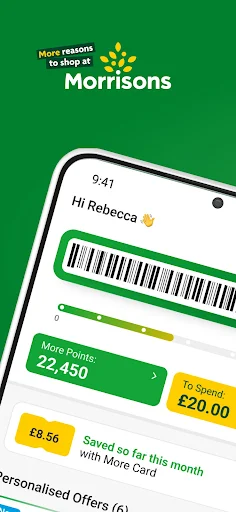
Picture me heading into Morrisons after work with a short list and no plastic loyalty card in my wallet. I can open the app, bring up the digital More Card and scan it at the checkout. The card is the useful centre of the experience: it connects an ordinary shop with points, More Card Prices and any offers I have available.
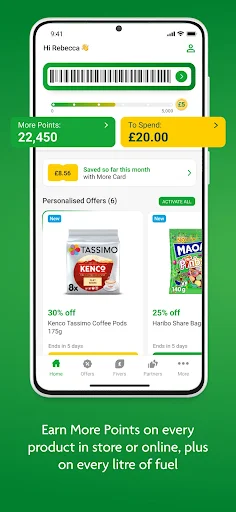
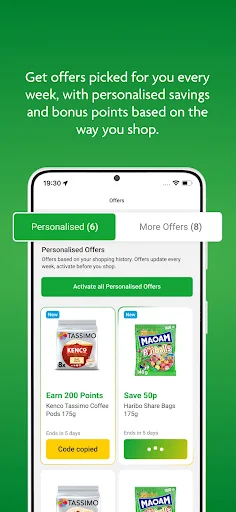
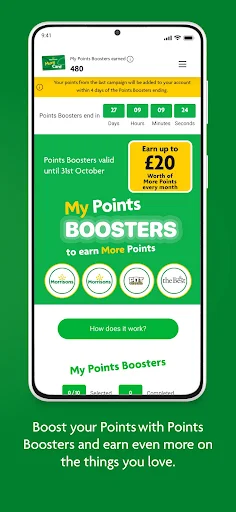
Before a bigger shop, I can check the weekly personalised offers and Points Boosters, then keep an eye out for relevant products as I go around. That is a small change to a familiar routine, not a new way to shop. The app is most helpful when I remember to check it before paying, rather than discovering afterwards that I could have scanned my card.
A loyalty companion, not a supermarket
The obvious alternative is carrying a physical loyalty card or relying on memory to spot promotions. The app puts the digital card, points information and offers in one place, and its listed rewards also cover shopping online and buying fuel. If I already shop at Morrisons, that combination can make the loyalty side easier to follow without changing where or how I buy groceries.
This is not a general grocery comparison tool or a standalone way to plan every part of a food shop. Its offers and rewards are tied to Morrisons and participating partners, and the app’s value depends on those being useful to me. Someone who rarely shops with Morrisons may have little reason to check it, while a frequent customer may appreciate having the card and account details handy.
Small habits that help
I would make checking the weekly offers part of writing my shopping list. A quick look can help me notice a personalised saving or bonus-points offer that fits something I was already going to buy. I would treat it as a prompt, not a reason to add items I do not need; the useful part is matching an offer to the shop I planned.
After shopping, checking the points balance and shopping history gives the rewards a little context. I can see what I have earned and keep track of progress toward converting 5,000 points into a Fiver. It also makes sense to keep the digital card easy to reach, either in the app or a mobile wallet, so scanning it is less likely to slip my mind.
More From Our News Desk

Zoom Meetings, Google Meet, or Teams: Which Is Easiest to Join?

How I Build a Free Streaming Lineup With Tubi

Why Crunchyroll Is the Default Anime App for So Many Fans

YouTube TV: A Practical Guide to Cutting Cable

Rummikub and the Small Comfort of Phone Games

TeamViewer Remote Control or AnyDesk for Helping Family?
Who gets the most from it
I would recommend Morrisons More Card to people who shop at Morrisons regularly, buy fuel there or like keeping loyalty rewards visible. The app brings together a card to scan, personalised weekly offers, points tracking and ways to use points. If those are already part of your shopping routine, having them on your phone can be more convenient than keeping track of a separate card or remembering several offers.
It may suit you less if Morrisons is an occasional stop or you prefer not to check promotions before shopping. Offers are personal, and rewards take attention to follow; they are not the same as an automatic discount on every purchase. I would also avoid installing it expecting a general-purpose grocery app. Its main job is managing the More Card relationship, rather than replacing every part of a shopping routine.
Morrisons develops Morrisons More Card, a free Android shopping app. Google Play shows over 5 million installs and a 3.3-star rating from around 76,000 ratings. The app is rated Everyone. Its current version is 11.1.0, released on October 14, 2024.
The app contains no ads and does not offer in-app purchases. Google Play gives its last update date as October 22, 2026. The minimum Android version is worth checking on the Google Play page for the device you plan to use.
How the More Card fits a real shop
Getting started
When I first opened an app built around a loyalty card, I wanted to know whether I could get to the card quickly. The key promise here is straightforward: keep a digital More Card ready to scan from the app or a mobile wallet. That makes the first practical test less about exploring every feature and more about having the card available when the checkout moves along.
I would then take a minute to look over the weekly offers and find where the points information lives. That initial glance helps turn the app from a card substitute into something I might check before shopping. The app also supports managing a More account, so it can serve as a handy place to keep up with the account as well as the rewards.
The everyday experience
The routine is easy to understand: check offers, shop, scan the card and review what happened. The app says More Points can be earned in store, online and on fuel, with five points on each product and each litre of fuel. That gives the points tracker a clear connection to everyday Morrisons spending, rather than making it feel like a separate activity.
I like that shopping history accompanies the points balance. If I am wondering where a reward came from or how my balance has changed, having a record to refer to is more useful than seeing a number alone. In practice, though, the app only helps if I remember to use the digital card and take a moment to check the account now and then.
Offers beyond points
Personalised offers are one of the more distinctive parts of the app. They are refreshed weekly and can include savings or bonus points based on shopping habits. Points Boosters add another route to extra points on selected products. I would look through these before a planned shop, while keeping the distinction clear: an offer is useful when it matches something I actually want.
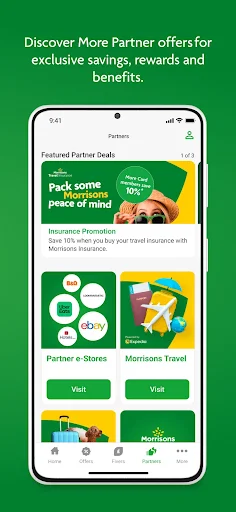
More Card Prices offer savings when the digital card is scanned, while partner offers add deals and benefits from participating partners. Seasonal games are another optional extra for digital customers, with prizes that can include money off, points or free products. I see these as features to dip into when they appeal, rather than reasons to turn a quick grocery trip into a long session in the app.
A simple weekly routine
A practical routine would start at home, while making a shopping list. I would open the weekly offers, note any relevant savings or Points Boosters, and then shop as usual. At checkout, I would bring up the digital card and scan it. This keeps the app connected to decisions I was already making, rather than letting promotions dictate what goes in the basket.
Afterwards, I could check the points total and shopping history, then decide whether to keep saving or convert 5,000 points into a Fiver. Fivers can be spent in store or online, according to the app description. If I use participating partners, their offers are another occasional reason to check in. The routine stays manageable when I review rewards at a natural pause instead of constantly checking.
A few limits to remember
The biggest limitation is also the app’s focus: it is built around Morrisons shopping and the More Card. If I shop elsewhere most of the time, personalised Morrisons offers and points are unlikely to change much for me. Even a regular customer has to remember to scan the card and look at the offers to make the loyalty features count.
The 3.3-star Google Play rating suggests experiences are mixed, so I would not assume every shopper will find the app equally smooth or useful. The core idea is simple, but rewards, offers and account management mean there is more here than a bare digital card. I would try the basic card-and-offer routine first and see whether the extras earn a place in my habits.
Morrisons More Card does a sensible job of gathering a digital loyalty card, points, personalised offers and reward options in one app. I like that its main use fits naturally around a shop or fuel stop, while the points history gives me a way to follow what I have earned.
I recommend it to regular Morrisons shoppers who are willing to scan their card and check offers before buying. If Morrisons is not already part of your routine, the app has less to offer. For existing customers, it is a practical companion, provided the rewards suit the way you shop.
Morrisons More Frequently Asked Questions
What is Morrisons More Card used for?
Morrisons More Card is a loyalty app for managing a More account and digital card. You can use it to earn and track points, check personalised offers and More Card Prices, explore partner offers, and turn 5,000 points into a Fiver to spend in store or online.
Which phones can run Morrisons More Card?
Morrisons More Card is an Android app available through Google Play. The minimum Android version can vary with the app and device, so check the Google Play page for the current requirement before installing. Its digital card can also be kept in a mobile wallet.
Does Morrisons More Card cost money?
The app is free to download and use, with no in-app purchases and no ads. Offers and rewards are part of the More Card programme, and their details can vary. Check the Google Play page for current app information and the terms that apply to offers.
Do I need Android version to use Morrisons More Card?
The app is for Android, but the minimum Android version is worth checking on its Google Play page because requirements can vary. The current version is 11.1.0. If you are unsure whether your phone supports it, check the store information for your device.
Who should use Morrisons More Card?
It is best suited to people who shop at Morrisons, buy fuel there or want to keep More Card rewards and offers close at hand. Occasional Morrisons shoppers may find fewer reasons to open it. Its usefulness depends on whether the offers and points fit your normal shopping.
Pros
- Keeps a digital More Card ready to scan from the app or a mobile wallet.
- Brings weekly personalised offers, More Card Prices and points information together.
- Lets shoppers track points and history, then convert 5,000 points into a Fiver.
- Covers Morrisons shopping, online purchases, fuel and participating partner offers.
Cons
- Most useful to people who already shop at Morrisons regularly.
- You need to remember to check offers and scan the card to benefit.
- The 3.3-star Google Play rating reflects mixed user experiences.
- Category
- Shopping
- Version
- 11.1.0











