Marshalls Official
- 1.68K
- 4.2
- Installs
- 500.00K
- Price
- Free

Screenshots
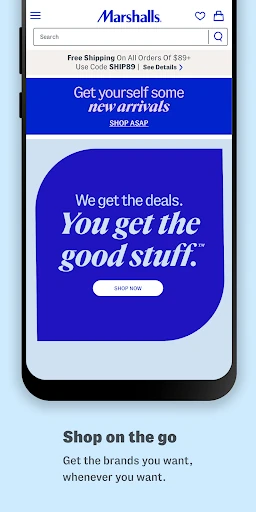
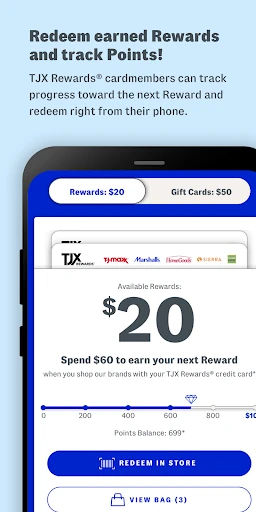
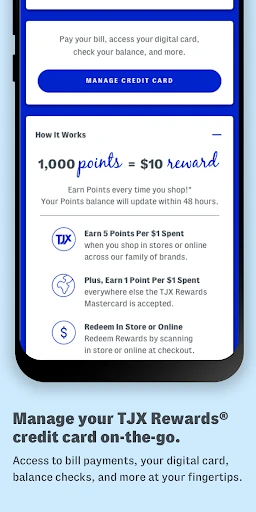
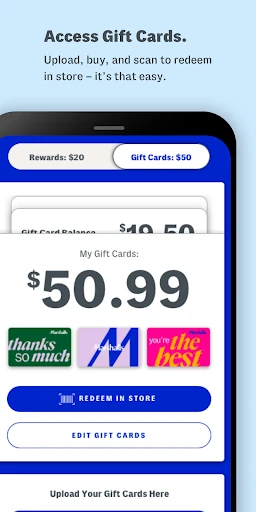
Analysis by Reviewed APKs
Marshalls Official is a shopping app for people who want to explore Marshalls styles, look for similar items from a photo, and handle a few store-related tasks on their phone. I like that it offers more than a basic store locator, especially the image search and custom closet tools. It makes the most sense as a companion to browsing Marshalls, not as a general-purpose shopping or budgeting app.
A Marshalls Shopping Run
When I first opened Marshalls Official, I pictured using it before an ordinary shopping trip: I have a little time, I want to see what catches my eye, and I would rather not start by wandering without a plan. The app gives me a few ways into that task, including searching for similar styles from a photo, saving preferences in a custom closet, and finding a nearby store.
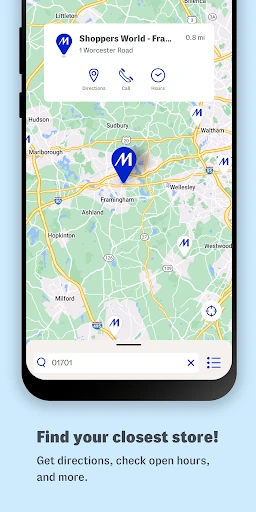
The most distinctive moment is imagining something I like in a photo and using Snap It, Shop It to look for similar styles. That is a more practical starting point than trying to describe a color or shape in a search box. If I decide an in-person visit makes more sense, the Store Locator can help me find a Marshalls location. The app connects discovery with a possible store trip without pretending those are the same activity.
A Store Companion, Not Everything
Compared with opening a general online marketplace, Marshalls Official is focused on Marshalls and the services around shopping there. Its tools are most useful when I already have the store in mind: find similar styles, build a personal collection from preferred details, locate a store, or keep eligible cards and certificates in my account. That focus can be a welcome shortcut if I do not want to sift through unrelated retailers.
I would not treat it as a comprehensive shopping organizer or a replacement for every part of an in-person visit. The supplied feature details do not describe a personal shopping list, sale alerts, or store hours, so I would not rely on it for those jobs. It is also not a general visual-search tool for every retailer; its stated image feature is about finding similar styles through Marshalls.
Small Habits That Help
A useful habit is to take a moment to choose styles and details for the Custom Closet instead of leaving it as a blank idea. The app says it will make a personal collection from those choices, giving me a more tailored place to explore. I would treat it as a lightweight way to express what I like, rather than expecting it to know my preferences without any input.
I would also make the account tools part of a quick pre-visit check. If I use a TJX Rewards Credit Card, manage that account through the app; if I have e-gift cards or Reward Certificates, upload them to my account. Then I can check the Store Locator when I am deciding where to go. These are small steps, but they bring several Marshalls-related tasks together.
More From Our News Desk

Zoom Meetings, Google Meet, or Teams: Which Is Easiest to Join?

How I Build a Free Streaming Lineup With Tubi

Why Crunchyroll Is the Default Anime App for So Many Fans

YouTube TV: A Practical Guide to Cutting Cable

Rummikub and the Small Comfort of Phone Games

TeamViewer Remote Control or AnyDesk for Helping Family?
Who May Enjoy It
I would recommend Marshalls Official to regular Marshalls shoppers who enjoy browsing for styles and want a few useful tools in one place. The photo-based search is especially appealing if I spot something I like and want to find similar styles. The Custom Closet may suit people who enjoy choosing details and collecting ideas before they shop, while the locator and account features serve practical needs around a store visit.
It may be less useful if I rarely shop at Marshalls, want one app to compare many retailers, or expect a full trip planner with features beyond those described. The app’s appeal is tied to this store and its shopping ecosystem. Someone who only needs directions may find the rest unnecessary; someone who wants to manage Marshalls-related shopping from a phone will have more reason to keep it installed.
Marshalls Official is a free Android shopping app from The TJX Companies, Inc. On Google Play, it has over 500,000 installs and a 4.2-star rating from around 1,700 ratings. The listed content rating is Everyone. Those figures give a useful snapshot of its store presence, though they do not say whether its particular tools will suit every shopper.
The listed Android requirement is Android 8.0, and the current version provided is 16.6.0. The app was released on September 24, 2019, and last updated on April 29, 2025. It is free, with no in-app purchases and no ads according to the supplied app facts. The update note says updates are used to fix bugs and improve performance.
Making Marshalls Browsing More Personal
First Open and Setup
My first impression is that this app is built around several specific Marshalls tasks rather than one complicated shopping workflow. The core ideas are easy to grasp: look for similar styles from an image, shape a custom collection around preferences, find a store, or manage account-related items. That gives me a clear sense of why I might open it, even before I decide whether to register.
Registration creates a mobile account, and the app can also be used with HomeGoods and T.J.Maxx accounts. That shared-account detail is convenient for shoppers who already use those services. I would start with whichever tool solves an immediate need, rather than spending time setting up every option at once. The app can be useful as a focused utility even when I only want to find a store.
The Everyday Experience
In day-to-day use, I would expect to move between inspiration and practical errands. Snap It, Shop It gives me a way to search from a picture of something I like, while the Custom Closet turns selected styles and details into a personal collection. Those ideas make browsing feel more directed than simply opening an app with no particular goal.
The store and account tools add a different kind of usefulness. I can use the locator to find a Marshalls nearby, upload e-gift cards and Reward Certificates to my account, or manage a TJX Rewards Credit Card account on the go. I appreciate that these jobs are included alongside style discovery, because they are the sort of small tasks I might otherwise handle separately.
Tools With Personality
Snap It, Shop It is the feature that stands out most to me. Taking a picture of something I see and looking for similar styles feels like a natural fit for spontaneous shopping inspiration. It gives me another way to begin a search when I do not know what words to use. The stated purpose is to find similar styles, rather than identify an exact match.
The Custom Closet is the other personal touch. I select styles and details I like, and the app creates a collection based on those choices. That sounds useful for turning a vague preference into a more deliberate browsing starting point. I also like the practical combination of a Store Locator with account features for e-gift cards, Reward Certificates, and a TJX Rewards Credit Card.
A Simple Pre-Visit Routine
For a routine, I would begin with the Custom Closet when I have a few minutes at home and want to record the styles and details that appeal to me. If I have a visual reference, I would try Snap It, Shop It instead. Neither approach needs to become a major project; they are ways to give a future browse a more useful starting point.
Before heading out, I would use the Store Locator to find a nearby Marshalls. If I have an e-gift card or Reward Certificate, I would upload it to my account, and I could check my TJX Rewards Credit Card account there too. This routine keeps the app’s discovery and practical tools connected without assuming it can plan the entire visit.
Keep the Focus in Mind
The main limitation is also the app’s defining choice: it is for Marshalls shopping. That makes it less compelling for someone who wants to browse many retailers in one place or manage a broad shopping list. Its feature set, as described, centers on similar-style search, a personal collection, store finding, and account tasks. I would judge it on those jobs rather than expecting a wider retail toolkit.
I would also keep expectations specific when using the image feature and Custom Closet. The image search is described as finding similar styles, not guaranteeing an exact item, and the closet is built from the styles and details I select. Those are useful aids for exploration, but they do not remove the need to decide what I want. For me, the app works best as a companion to browsing, not a substitute for personal judgment.
Marshalls Official brings together a few genuinely relevant tools for shoppers who already have a reason to browse Marshalls. I especially like the mix of photo-based style discovery and practical account or store tasks. The focus is narrow, but it is coherent, and the free price makes it easy to try if these features match my routine.
I would recommend it to Marshalls regulars who want to explore similar styles, shape a personal collection, or keep store-related tasks handy. I would skip it if I wanted a retailer-neutral shopping app or a complete shopping planner. For the right shopper, it is a useful companion rather than a must-have for everyone.
Marshalls Official Frequently Asked Questions
What is Marshalls Official used for?
Marshalls Official is a shopping app for exploring styles and handling related Marshalls tasks. Its described features include searching for similar styles from a picture, creating a personal collection from selected preferences, locating a Marshalls store, uploading e-gift cards and Reward Certificates, and managing a TJX Rewards Credit Card account.
Which devices support Marshalls Official?
The supplied platform information is Android, with a minimum requirement of Android 8.0. The app is available through Google Play. Check the store page for current device compatibility, since requirements and availability can vary over time.
Does Marshalls Official cost anything?
The app is free to download, and the supplied facts say it has no in-app purchases and contains no ads. App details can change, so it is worth checking the Google Play page for the current cost and purchase information before installing.
Can I use another TJX account with Marshalls Official?
The app’s description says registration creates a mobile account and that HomeGoods and T.J.Maxx accounts can also be used. It also describes uploading e-gift cards and Reward Certificates and managing a TJX Rewards Credit Card account. Check the app or store information for current account details.
Who is Marshalls Official best suited to?
It is best suited to people who shop at Marshalls and want tools for finding similar styles, building a personal collection, locating a store, or managing related account tasks. It may not suit someone looking for a general shopping app that covers many retailers. The app’s features are focused on Marshalls.
Pros
- Photo-based search offers a handy way to look for similar styles.
- Custom Closet turns selected preferences into a personal collection.
- Store locator and account tools support practical Marshalls-related tasks.
- Free to download, with no ads or in-app purchases listed.
Cons
- Its focused Marshalls feature set may not suit multi-retailer shoppers.
- Image search is for similar styles, not a promised exact match.
- The Custom Closet depends on choosing styles and details first.
- Category
- Shopping
- Version
- 16.6.0











