Lemuroid
- 26.52K
- 4
- Installs
- 5.00M
- Price
- Free

Screenshots
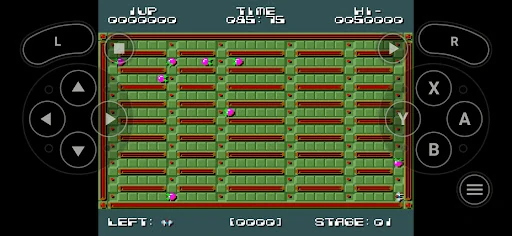
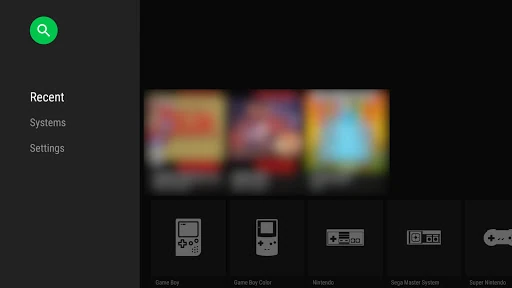
Analysis by Reviewed APKs
Lemuroid is an Android emulator for playing games from a range of classic console systems, using ROM files you supply yourself. It suits people who already have game files and want one place to organize and play them on a phone, tablet, or TV. After spending time with its broad system support and practical controls, I see it as a convenient, no-frills option, though it still depends on your device and your own game collection.
A Pocketful of Old Favorites
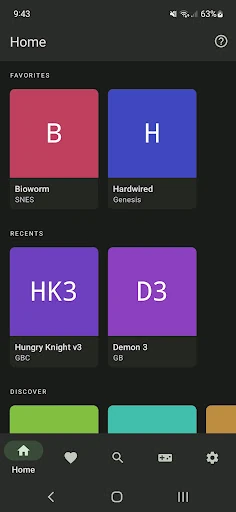
When I first opened Lemuroid, I thought about the small gaps in an ordinary day: a few minutes waiting for an appointment, a quiet ride, or the stretch before bed when I want something more interactive than scrolling. The app is built to bring games from supported systems together, rather than make me switch between separate emulators for each one. Once I provide compatible ROM files, it can scan and index them for browsing.
That means the useful part starts before the first game: I need to have ROM files I legally own and make them available to the app. Lemuroid does not come with games. After scanning, I can pick something from my collection and play with touch controls or a connected gamepad. Automatic save and restore states make it easier to pause a session and come back later, which suits short bursts as well as longer evenings.
One Emulator, Not a Game Store
Lemuroid’s main appeal is breadth. It supports systems including NES, SNES, Game Boy, Game Boy Advance, Nintendo DS, Nintendo 64, PlayStation, PSP, and several Sega, Atari, and handheld platforms. Instead of treating each old console as a separate app, it offers a single place to scan and launch games from many of them. That is handy if my collection spans different generations and I would rather keep the setup consolidated.
It is important to be clear about what this app is not. It is not a library of included games, a way to acquire ROMs, or a general-purpose entertainment service. I have to bring my own legally owned files, and performance depends on the device, especially for more recent systems such as PSP, DS, and 3DS. If I want a ready-to-play catalog without managing files, Lemuroid is not the right fit.
Small Habits That Help
I get more out of Lemuroid when I treat the library as something to set up once and revisit, rather than a place to troubleshoot every time I want to play. Keeping my ROM files organized before scanning makes the initial library-building step easier to understand. Since the app supports zipped ROMs, I also have some flexibility in how I keep files. A little tidiness up front saves rummaging when I have only a few minutes to spare.
For longer sessions, I would take a moment to adjust touch-control size and position, then try a gamepad if I have one available. Save states and quick save/load slots are useful habits for games that do not fit neatly into a short break. Fast-forward can help move through slower stretches, while cloud save sync can help carry progress between supported setups. These tools do not replace a game’s own save system, but they make the routine more flexible.
More From Our News Desk

Zoom Meetings, Google Meet, or Teams: Which Is Easiest to Join?

How I Build a Free Streaming Lineup With Tubi

Why Crunchyroll Is the Default Anime App for So Many Fans

YouTube TV: A Practical Guide to Cutting Cable

Rummikub and the Small Comfort of Phone Games

TeamViewer Remote Control or AnyDesk for Helping Family?
Who Will Enjoy Lemuroid
I would recommend Lemuroid to Android users who already have legally owned ROM files and want a single emulator for a varied retro collection. It is especially appealing if you move between handheld and console-era games, want touch controls as an option, or prefer not to pay for an app or deal with ads. The automatic library scanning and save-state features also make it more approachable for casual sessions than a setup focused only on technical tinkering.
It may not suit someone who expects games to be included, does not want to manage ROM files, or is looking for an official game catalog. People hoping to emulate demanding systems on an older or less capable device should also keep expectations in check. Lemuroid supports a wide range of systems, but support does not mean every device can run every game well. If file preparation and occasional control adjustments sound like chores, a simpler gaming option may feel better.
On Google Play, Lemuroid is developed by Filippo Scognamiglio and is categorized as an Entertainment app. It has more than 5 million installs and a 4.0-star rating from around 26,500 ratings. The app is free, with no in-app purchases and no ads. Its content rating is Everyone, so the store rating is suitable for a broad audience, though individual games you provide may have their own content.
The current version in the supplied app details is 1.17.0. Lemuroid was released on January 21, 2020, and its most recent update is dated April 19, 2026. The Android version requirement is not included among these practical details, so it is worth checking the Google Play information on your device before installing. The same store page is the best place to confirm whether the version and compatibility details have changed.
A Flexible Home for Retro Games
Getting Started
My first impression was that Lemuroid is designed to make a broad emulator feel like one app rather than a collection of separate projects. It is based on Libretro and aims to work across phones and TVs. The real setup task is bringing in my own ROM files: the app does not include games, so there is no instant catalog waiting on first launch.
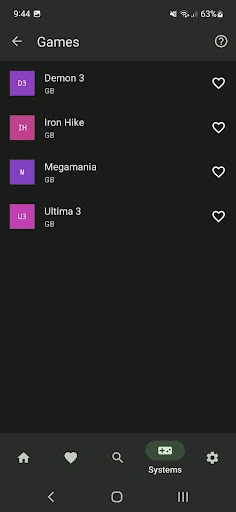
Once files are available, ROM scanning and indexing help turn them into a browsable collection. That is a practical first step, but it also means the app’s usefulness depends on having compatible files organized and ready. I like that the app supports zipped ROMs, which gives me another way to keep a collection manageable. It is still worth approaching the initial setup as preparation, not as a quick download-and-play service.
Playing Day to Day
After the library is in place, the everyday loop is simple: choose a game, play with touch controls or a gamepad, and use save options when I need to stop. Automatic saving and restoring game states is a natural fit for short sessions. I can step away without treating every pause as a major interruption, then return to the same point later.
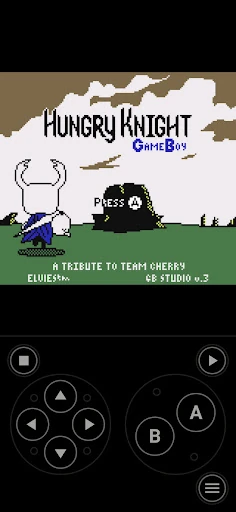
Touch controls are optimized for play on a screen, and I can change their size and position. That matters because a layout that feels comfortable on a larger phone may crowd the view on a smaller one. Gamepad support gives me another way to play, while tilt-to-stick support offers an additional control option. The choice is useful, although comfort will depend on the game and the device in my hands.
Useful Extras
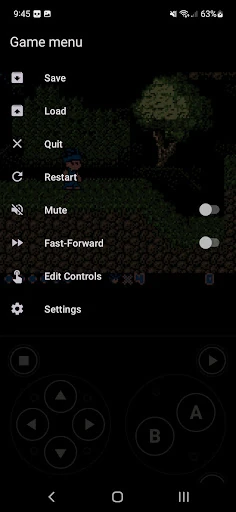
The features that stand out to me are the ones that remove small barriers between sessions. Quick save and load slots complement automatic game-state saving, and fast-forward can speed up parts of play that feel slow. Display simulation offers LCD and CRT looks for people who want a different screen presentation. None of these replaces a game’s own design, but together they give the experience more room to suit personal preferences.
Cloud save sync is another practical inclusion for people who play across supported setups. Local multiplayer is also supported: multiple gamepads can connect to the same device. Those additions make Lemuroid more than a touch-only solo player, while keeping the emphasis on games I supply. I would not assume every feature works identically with every system or setup, but the overall mix covers several common ways people approach older games.
A Simple Play Routine
For a low-friction routine, I would keep my game files in a consistent place, scan them into Lemuroid, and then leave the library ready for the next short break. Before settling into a longer game, I would test the touch layout and adjust the button size and position. If a game feels better with physical controls, connecting a gamepad is an available alternative rather than something I have to plan around from the start.
During play, I would use quick save/load slots when I want a deliberate checkpoint and let automatic save and restore states handle ordinary interruptions. Fast-forward can help when I want to move past slower stretches. This approach works particularly well for a mixed collection, because I can return to different games without rebuilding the whole setup each time. The key is keeping expectations realistic about the device’s ability to emulate each system.
Limits to Remember
The biggest limitation is also easy to overlook: Lemuroid contains no games. I need to provide my own legally owned ROM files, so the app is only one part of the setup. Anyone hoping to install it and immediately browse a supplied collection will be disappointed. That distinction is worth understanding before downloading, because it shapes both the first-run experience and how much organization I need to do.
The other important limit is device performance. Lemuroid supports many systems, but its description cautions that more powerful hardware is needed for recent systems such as PSP, DS, and 3DS. A long compatibility list does not guarantee smooth results on every phone or TV. Controls can also take a little adjustment, especially if I rely on touch input. Those are manageable trade-offs for a flexible emulator, but they are real ones.
Lemuroid is a capable choice for Android users who want one free, ad-free place to manage games from many classic systems. I like the combination of library scanning, adjustable controls, gamepad support, save options, and display choices. It feels most useful once the ROM collection is ready and the controls are tuned to the device.
I would recommend it to people comfortable providing their own legally owned game files and accepting that performance varies by hardware. If you want games included or expect every system to run equally well, look elsewhere. For a prepared retro collection and flexible casual play, Lemuroid keeps the essentials together without charging for the app.
Lemuroid Frequently Asked Questions
What is Lemuroid used for?
Lemuroid is an Android emulator for playing ROM files from a range of supported classic systems. It can scan and index files, then offers features such as touch controls, gamepad support, save states, fast-forward, and display simulation. It does not include games, so you need to provide your own legally owned ROM files.
Which devices can run Lemuroid?
Lemuroid is an Android app designed for devices ranging from phones to TVs. The Android version requirement can vary with app updates and device compatibility, so check the Google Play information for the current requirement before installing. The app supports many systems, but more powerful hardware is needed for some newer systems, including PSP, DS, and 3DS.
Does Lemuroid cost anything?
Lemuroid is free on Google Play, with no in-app purchases and no ads according to the supplied app details. You still need to provide your own legally owned ROM files to play games. Store details can change over time, so the Google Play page is worth checking for the latest information about the app.
Does Lemuroid come with games?
No. Lemuroid does not contain games; you need to provide your own legally owned ROM files. It supports scanning and indexing ROMs, including zipped ROM support, so you can organize compatible files in the app. The systems it supports include several classic consoles and handhelds, but device performance varies, especially for newer systems.
Is Lemuroid a good choice for casual play?
It can suit casual play if you already have ROM files and are comfortable with a little setup. Automatic save and restore states, quick save/load slots, and adjustable touch controls help make short sessions easier to manage. It may not suit people who want included games or expect demanding systems to run smoothly on every device.
Pros
- Supports a wide range of classic systems in one Android app.
- Free to use, with no ads or in-app purchases.
- Includes save states, adjustable touch controls, and gamepad support.
- Supports fast-forward, cloud save sync, and display simulation.
Cons
- Does not include games; users must provide legally owned ROM files.
- More recent systems need a powerful device for emulation.
- Touch controls may need adjustment to suit each device and game.
- Category
- Entertainment
- Version
- 1.17.0











