GameHub
- 16.85K
- 3.4
- Installs
- 5.00M
- Price
- Free
Screenshots
Analysis by Reviewed APKs
GameHub is an Android entertainment app that brings game discovery, cloud titles, imported retro games, and controller management into one place. I see the appeal for players who want a handheld-style hub on their phone rather than a single game or a conventional app store. Its mix is unusual and potentially handy, though it is best approached as a collection of gaming tools, not a promise that every game is ready to play instantly.
A quick gaming break
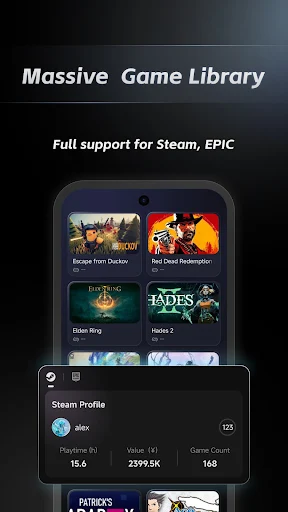
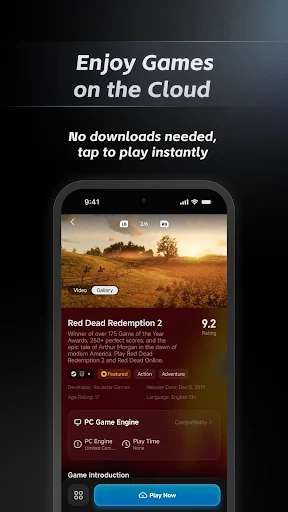
When I have a few minutes between errands, I like the idea of opening one place to see what games are trending instead of searching through separate pages. GameHub’s curated leaderboards give that browsing session a clear starting point. If I want to move from looking to playing, its cloud gaming feature is designed to launch titles without a download, which suits a short break better than waiting for a large install.
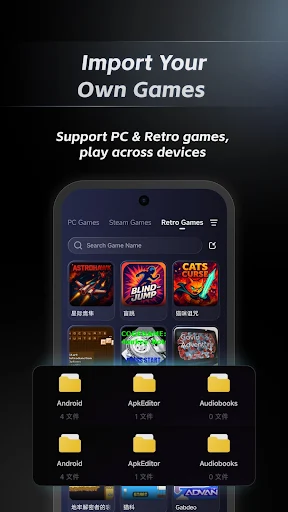
The app also covers a different mood: revisiting older games. Rather than presenting retro titles as a ready-made collection, GameHub lets me import base files to build a personal library. That makes the experience more hands-on than tapping a trending recommendation, but it gives the app a purpose beyond cloud play. I can picture using the leaderboards when I want something new and the retro hub when I already know what I want to revisit.
A hub, not a game store
GameHub sits between a discovery tool and a play-focused launcher. A standard game store is mainly about finding and installing individual titles; GameHub adds cloud gaming, a retro library built from imported base files, and controller diagnostics and management. That combination may appeal if I want several kinds of gaming activity gathered around my phone, rather than a separate app for every part of the routine.
It is not a general social network, a news feed, or a multiplayer matchmaking service based on the available feature set. I would not choose it expecting forums, friend chats, or cross-device progress syncing. Nor does the retro hub mean every classic game is already included: the description says to import base files. Its value is in bringing together discovery and different ways to play, not replacing every gaming service.
Make it a small ritual
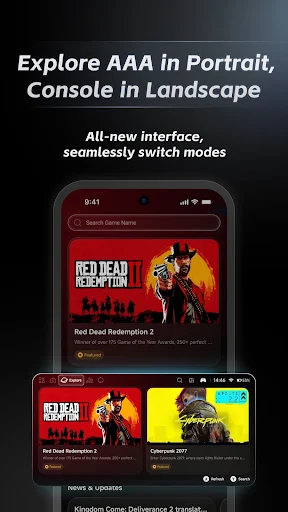
A simple habit could be checking the curated leaderboards when I am ready to try something different, then saving a longer session for a title that catches my eye. GameHub supports both portrait and landscape orientations: browsing in portrait and switching to landscape for play is the intended rhythm. That division makes sense on a phone, where quick scanning and immersive play call for different screen shapes.
For retro play, I would treat importing base files as a deliberate setup task rather than something to do in the middle of a spare-minute session. Once a personal library is built, it should be easier to return to familiar choices. If I use a controller, the one-tap diagnostics and management tools give me a reason to check the connection as part of getting ready, instead of troubleshooting only after a session has started.
More From Our News Desk

Zoom Meetings, Google Meet, or Teams: Which Is Easiest to Join?

How I Build a Free Streaming Lineup With Tubi

Why Crunchyroll Is the Default Anime App for So Many Fans

YouTube TV: A Practical Guide to Cutting Cable

Rummikub and the Small Comfort of Phone Games

TeamViewer Remote Control or AnyDesk for Helping Family?
Who may enjoy GameHub
I would recommend GameHub to Android players who like browsing for new games, want to try cloud gaming, or already have an interest in building a retro library from imported base files. It has a broader scope than a single-title app, and the portrait-to-landscape approach suits someone who uses a phone for both quick discovery and longer play. Controller support is another practical draw for players who prefer a physical input option.
It may be a less natural fit if I only want one specific game, expect a ready-to-play retro catalog, or primarily want social features such as chats and gaming groups. The app’s Google Play score is 3.4 from 16,846 ratings, so I would read recent user feedback before making it part of my regular routine. Players who do not use cloud gaming, imported classics, or controllers may find less here to explore.
GameHub is developed by Guangzhou Chicken Run Network Technology Co.,Ltd. It is an Android entertainment app with over 5 million installs on Google Play. The store rating is 3.4 out of 5, based on 16,846 ratings. Its content rating is Everyone, which gives a basic indication of the intended audience but does not describe the experience of each individual game available through it.
The app is free to download, and Google Play reports no in-app purchases or ads. The current version provided is 6.3.1. It was released on November 5, 2025, and was last updated on September 23, 2026. The Android version requirement can be checked on its Google Play page, where device-specific compatibility details are also available.
How GameHub Fits a Phone Gaming Routine
Opening the hub
When I first open a gaming hub, I want to know whether it is mainly a catalog, a launcher, or a toolkit. GameHub’s stated mix answers that quickly: it brings together trending-game discovery, cloud gaming, retro-library building, and controller management. That range is its defining first impression. It is less focused than a single-purpose game app, but it gives different kinds of players more than one reason to look around.
The interface is designed to work in portrait for browsing and landscape for play. I like that division because it matches how I tend to use a phone: scanning options with one hand, then turning the screen when I settle into a game. The description also points to controller diagnostics and management, which makes the app feel oriented toward play setup as well as recommendations.
The daily play loop
The day-to-day appeal is the short path from browsing to a possible session. Curated leaderboards help narrow the field when I do not already have a title in mind, while cloud gaming is presented as a way to play without downloading games first. That can be useful when phone storage or patience is limited, though the feature does not make every session identical: choosing a title still comes before settling in to play.
I would use the app differently depending on how much time I have. A quick look at the trending games fits a brief pause, while setting up a retro library or checking controller management makes more sense before a planned session. The two orientations support that change of pace. GameHub’s strongest everyday idea is not one specific game, but putting discovery and several play-related tasks under one roof.
Features with a purpose
The trending-game leaderboards are a useful starting point when my usual rotation feels stale. Their curated, top-rated approach gives browsing more direction than an unfiltered list, although it does not mean every recommendation will match my taste. I would treat the rankings as prompts to investigate rather than as a personal recommendation engine, since the feature described is a leaderboard and not a tailored profile.
The retro game hub stands out because it is built around importing base files to create a personal library. That is a different proposition from receiving a preloaded collection: it gives the player a role in assembling what appears there. Cloud gaming is the other notable option, offering access to titles without a download. Together, these features make GameHub more varied than a simple directory of games.
A practical session plan
For a low-effort routine, I would begin with the leaderboards while holding my phone in portrait. If a title looks interesting, I can move into a play session and turn the screen to landscape. That small transition is sensible for a phone app, and it keeps browsing from taking over the whole experience. The cloud option gives me another route when I would rather not download a title before trying it.
For a longer session, I would prepare the parts that require attention first. I would import the base files needed for a retro library ahead of time, then use controller diagnostics and management if I plan to play with a controller. This keeps the actual session focused on playing rather than setup. It is a straightforward workflow, especially for someone who alternates between newer cloud titles and familiar retro games.
Keep expectations grounded
GameHub’s wide scope is also its main limitation as a concept: people who only want a single game may have little reason to keep a hub installed. Cloud gaming sounds convenient, but the description does not spell out a catalog, connection requirements, or how availability works for individual titles. I would check the store page and the app itself for details before building a routine around a particular cloud game.
The retro feature also asks for user-provided base files, so it should not be mistaken for a ready-made library of classics. Controller diagnostics can help with management, but they are not a substitute for knowing whether a particular controller and game suit my setup. Finally, a 3.4 Google Play rating suggests a mixed reception. I would try the free app with modest expectations and judge its useful features firsthand.
GameHub has a practical idea at its center: let me discover games, try cloud titles, build a retro library, and manage a controller from one phone app. I like that it caters to more than one kind of player, and the portrait-to-landscape flow makes sense for everyday use.
I would try it if I enjoy exploring games or already use cloud and retro play. If I want a focused catalog, social gaming tools, or a ready-made retro collection, I would look elsewhere. The free download makes it easy to evaluate, but its mixed store rating is a good reason to keep expectations measured.
GameHub Frequently Asked Questions
What is GameHub used for?
GameHub brings several phone-gaming tasks together. It offers curated leaderboards for discovering trending games, cloud gaming for playing titles without downloading them, a retro hub where users import base files to build a library, and controller diagnostics and management. It is best understood as a gaming hub rather than one individual game or a social community app.
Which devices can run GameHub?
GameHub is an Android app available through Google Play. The Android version requirement and compatibility details may vary by device, so it is worth checking the Google Play page before installing. Its description says it supports portrait and landscape orientations, with portrait suited to browsing and landscape intended for play.
What Android version does GameHub require?
The minimum Android version can vary as app requirements change and may depend on the device. Check the GameHub page on Google Play for the current requirement and compatibility information for your phone or tablet. The provided app version is 6.3.1, but that version number does not by itself determine which Android devices can install it.
Does GameHub cost money or include purchases?
GameHub is free to download on Google Play. The available store facts report no in-app purchases and no ads. Cloud gaming and imported retro files are part of the described experience, but individual game availability or other details may vary, so check the app’s Google Play page for current information.
Is GameHub suitable for casual players?
It can suit casual Android players who enjoy browsing game recommendations or want cloud gaming and controller tools in one place. Its content rating is Everyone. Players interested in retro games should note that the hub is built around importing base files, rather than offering a ready-made retro collection. Those looking only for one game may prefer a more focused app.
Pros
- Combines game discovery, cloud gaming, retro-library building, and controller management.
- Portrait browsing and landscape play suit different phone-use situations.
- Free to download, with no reported ads or in-app purchases.
- Curated leaderboards offer a starting point when choosing something new.
Cons
- Retro play requires importing base files to build a personal library.
- The broad hub approach may feel unnecessary if you want only one game.
- Its 3.4 Google Play rating points to a mixed user reception.
- Category
- Entertainment
- Version
- 6.3.1