DynamicDrive
- 8.07K
- 4.3
- Installs
- 100.00K
- Price
- Free

Screenshots
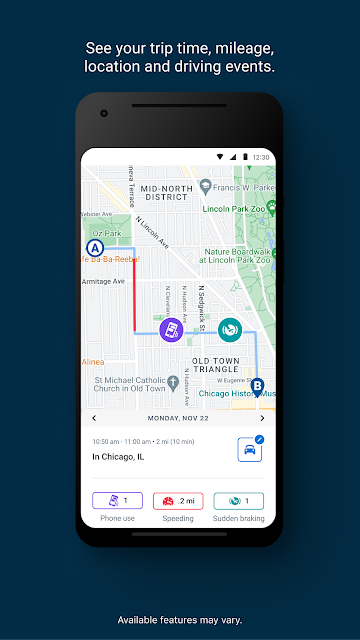
Analysis by Reviewed APKs
DynamicDrive is a driving-behavior tracking app for customers of National General Insurance and certain related insurance brands. It runs in the background, scores trips using factors such as phone use and hard braking, and shows maps of past drives. I see it as a practical fit for drivers who want feedback tied to an insurance program, rather than a general navigation app. Its usefulness depends on being enrolled with a participating insurer.
A week behind the wheel
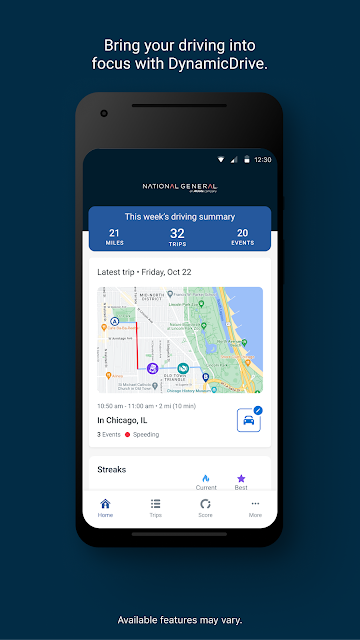
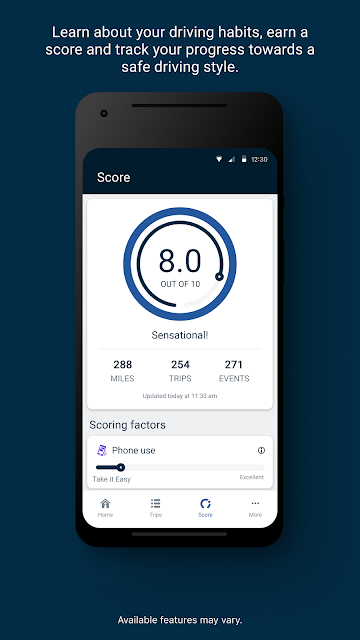
Picture a week of ordinary driving: a commute, a grocery run, and a longer trip to visit family. After enrollment, DynamicDrive is meant to work in the background and assess driving behavior across those trips. Instead of relying only on memory, I can look back at the recorded drives and see how often and how far I drove, along with a score influenced by factors such as braking, phone use, speed, and time of day.
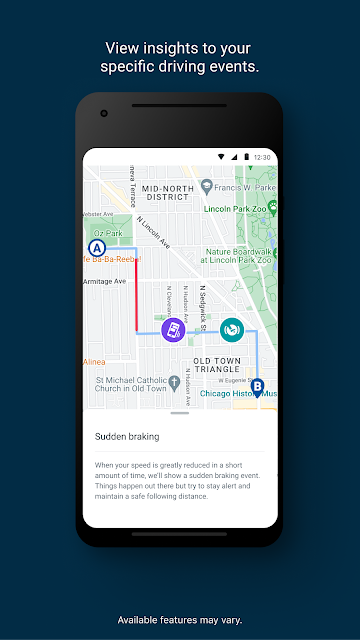
That changes the app’s role from a tool I open before every trip to something I check afterward. The maps give a trip-by-trip view, while the driving score turns several habits into a more digestible summary. I would use that information to notice patterns, not to judge one isolated drive. A rushed stop or a late-night errand may stand out, but the larger value is seeing what repeats over time.
Not another navigation app
DynamicDrive sits closer to an insurance program companion than to a route planner. Its stated job is to monitor driving behavior and connect that information to a participating policy. The useful comparison is not a map app that helps me choose a faster road; it is the act of reviewing how I drive after the trip. That distinction matters if I am deciding whether the app belongs in my regular driving routine.
I would not choose it to find traffic updates, compare routes, or guide me turn by turn. Those are different jobs, and DynamicDrive’s described tools focus on scores and previous-trip maps. Nor is it meant for someone without the required insurer connection: setup uses a seven-digit activation code sent by the insurer. For an enrolled driver, that connection is the point; for everyone else, the app has little reason to become a daily tool.
Make the feedback useful
The simplest habit is to review trips regularly rather than waiting until a renewal is near. A quick look at the maps and driving score can make it easier to connect the feedback with a real routine: perhaps most trips happen after dark, or braking-related events show up during a particular commute. The app identifies factors that contribute to its score, so those are sensible places to focus when trying to understand the result.
I would also treat the score as a prompt for reflection, not as a complete account of every road situation. Reviewing several trips together is more informative than reacting to one number, especially when the app evaluates multiple factors. Since it runs in the background, the main ongoing habit is checking what it has recorded and keeping the required permissions in place. That makes the app less of a chore and more of a periodic driving check-in.
More From Our News Desk

Zoom Meetings, Google Meet, or Teams: Which Is Easiest to Join?

How I Build a Free Streaming Lineup With Tubi

Why Crunchyroll Is the Default Anime App for So Many Fans

YouTube TV: A Practical Guide to Cutting Cable

Rummikub and the Small Comfort of Phone Games

TeamViewer Remote Control or AnyDesk for Helping Family?
Who may find it useful
I would recommend DynamicDrive to a driver who is already part of its supported insurance program and wants a clearer picture of everyday driving. The trip maps, distance and frequency details, and behavior-based score give the feedback some context beyond a bare summary. It may also appeal to someone who likes small, repeatable nudges: review a drive, notice a pattern, and try to make the next one smoother.
It may not suit drivers who want navigation, traffic information, or a general-purpose vehicle toolkit. The activation code and policy connection make enrollment a prerequisite, and the background monitoring means the experience depends on sharing driving insights and accepting required permissions and insurer terms. If that arrangement does not fit your preferences, the core features are unlikely to outweigh the tradeoff. I would check eligibility and program details before making it part of my routine.
DynamicDrive is developed by National General Insurance and is available on Google Play for Android. The app has more than 100,000 installs and a 4.3-star rating from about 8,100 ratings. Its content rating is Everyone. The current version shown is 3.4.0, with a release date of November 1, 2024, and a last update dated October 28, 2026.
The app is free to download, with no in-app purchases or ads. An Android minimum version is not included in the available app details, so compatibility is worth checking on Google Play for your device. DynamicDrive supports customers under National General Insurance, DirectAuto Insurance, and Farmers Union Insurance, and its setup requires an insurer-provided seven-digit activation code.
What daily driving looks like
Starting with enrollment
When I first consider an app like this, the setup is the first practical question: can I simply open it, or does it need to be linked to something? DynamicDrive is designed around an insurance connection. The setup begins with a seven-digit activation code from the insurer, then asks the driver to connect the app to the policy and accept required permissions and the insurer’s terms.
That makes the first step straightforward if the enrollment email is already in hand, but less spontaneous than installing an app just to explore it. I would have the code ready and read the permission prompts before proceeding, since the app monitors driving in the background. Once the account is connected and permissions are accepted, the stated setup process is complete and the app can collect driving insights.
The everyday experience
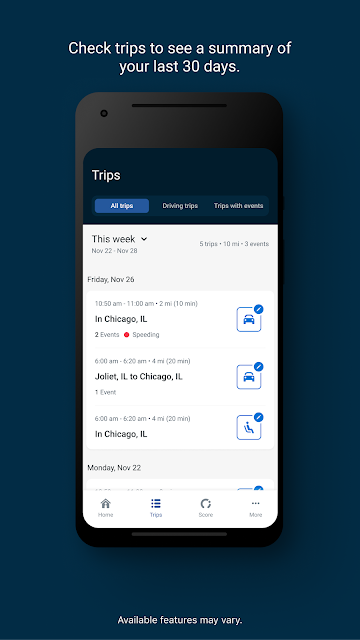
The day-to-day design described here is deliberately low-touch: DynamicDrive runs in the background rather than asking me to start a new session for every drive. That suits a routine where I may make several short trips without wanting to remember another button press. Later, I can review the driving score and maps of previous trips, including information about how often and how far I have been driving.
I find that approach appealing for feedback that is meant to reflect ordinary habits. A week of errands and commuting gives a more grounded picture than trying to assess my driving from memory. At the same time, a background tool is only useful if I am comfortable with its monitoring role and remember to check the results. The app’s value comes from the review, not merely from having it installed.
What the score considers
The score draws on several driving factors, including time of day, distracted driving related to phone use, hard and extreme braking, and speeding. That mix makes the feedback more specific than a simple count of trips. If a score changes, those categories offer a starting point for thinking about what may have influenced it, though the app’s description makes clear that the listed factors are not the only ones it may consider.
The trip maps are another useful part of the package. They let me review previous drives and see travel frequency and distance alongside information about how safely I drove. Maps can give a score some context by tying it back to individual trips, rather than leaving me with only an overall impression. I would use both views together: the score to spot a broad pattern and the trip history to examine the details.
A practical review routine
A manageable routine would be to check DynamicDrive once or twice during the week, perhaps after a regular commute or at the end of a busy weekend. I would scan the recent trip maps, note the driving score, and look for a repeated factor rather than trying to dissect every journey. If phone-related distraction or hard braking appears relevant, that gives me a concrete habit to pay attention to on the next drive.
The point is not to turn every trip into a test. I would keep the review brief and compare a handful of drives over time, especially because the app considers multiple aspects of driving. That also makes it easier to judge whether a change in my routine seems to correspond with different feedback. DynamicDrive provides monitoring and review tools; the meaningful part is using the information to reflect on everyday choices.
Keep the tradeoffs in mind
The biggest limitation is the narrow audience. DynamicDrive is connected to supported insurance brands and requires an activation code, so it is not a general driving app that every motorist can pick up and use. The background monitoring is also central to how it works, which means drivers should be comfortable with the required permissions and sharing driving insights as part of the program.
There is also a difference between seeing a score and knowing exactly how every trip contributed to it. The app identifies several factors, but its description says the score is based on those and other considerations. I would avoid treating one result as a complete explanation of a drive. Finally, the app’s role is behavior feedback and trip review, not navigation or live route planning, so drivers looking for those tools will need something else.
DynamicDrive has a focused purpose: help eligible insurance customers review driving patterns through background monitoring, trip maps, and a behavior-based score. I like that its feedback covers recognizable habits rather than offering only a vague driving summary. The activation-code setup and insurer connection are meaningful conditions, though, not minor details.
If you are enrolled with a supported brand and are comfortable with the monitoring arrangement, DynamicDrive is worth considering as a periodic check-in on everyday driving. If you want directions, traffic tools, or a standalone driving log, it is not the right fit. I would recommend it selectively, based on the insurance program and your comfort with sharing driving insights.
DynamicDrive Frequently Asked Questions
What is DynamicDrive used for?
DynamicDrive monitors driving behavior for customers in its supported insurance programs. It runs in the background, calculates a score using factors such as phone-related distraction, braking, speeding, and time of day, and provides maps of previous trips. Drivers can review how often and how far they drive as well as information about driving behavior.
Which phones can run DynamicDrive?
DynamicDrive is an Android app available through Google Play. The minimum Android version is worth checking on the store page, since requirements can vary by app version and device. The app’s setup also depends on an insurer-provided seven-digit activation code and required permissions.
Does DynamicDrive cost money?
DynamicDrive is free to download, and it does not contain ads or offer in-app purchases. Its description says joining the program and activating the app can provide immediate premium savings, with possible additional savings at renewal. Eligibility and program terms depend on the insurer, so check the details that apply to your policy.
Who can activate DynamicDrive?
The app supports customers under National General Insurance, DirectAuto Insurance, and Farmers Union Insurance. Setup requires a seven-digit activation code sent by the insurer, followed by connecting the app to the policy and accepting required permissions and terms. Check with your insurer if you are unsure whether your policy can use the program.
Is DynamicDrive a good fit for every driver?
It is best suited to eligible customers who want to review driving behavior and are comfortable with background monitoring and sharing driving insights. It is not described as a navigation or traffic app. If you do not have an activation code or prefer not to use a monitoring program, its main features may not suit you.
Pros
- Background tracking makes it possible to review ordinary trips without starting each one manually.
- Trip maps add context to driving scores and show travel frequency and distance.
- The score considers several recognizable driving behaviors, including braking and phone distraction.
- Free to download, with no ads or in-app purchases.
Cons
- An insurer-provided activation code is required to connect the app to a policy.
- Background monitoring and required permissions may not suit every driver.
- It focuses on driving feedback, not navigation or traffic updates.
- Category
- Auto & Vehicles
- Version
- 3.4.0