MySubaru
- 88.25K
- 4.7
- Installs
- 1.00M
- Price
- Free
Screenshots
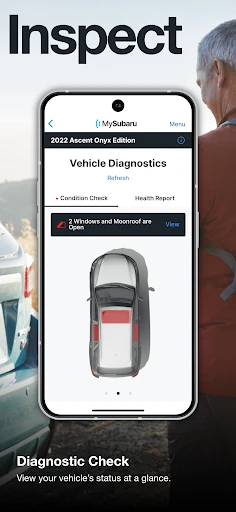
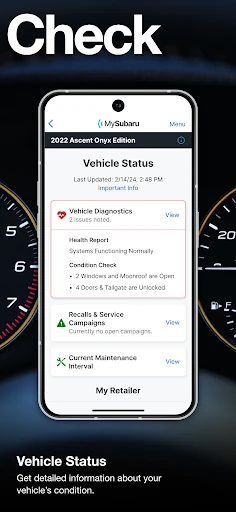
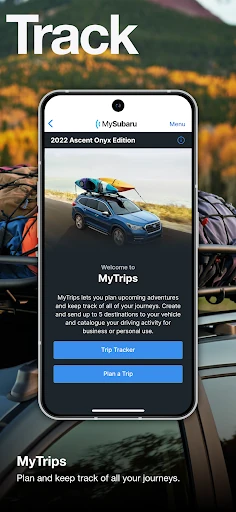
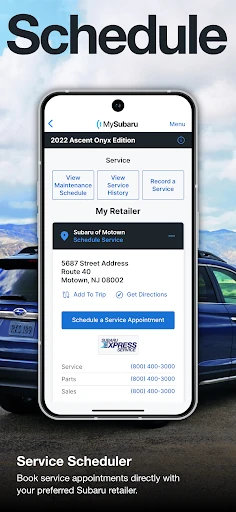
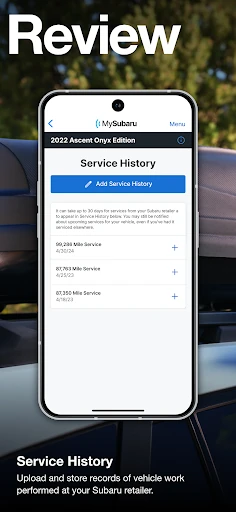
Analysis by Reviewed APKs
MySubaru is a companion app for Subaru owners who want to handle a few vehicle tasks from their phone, from remote controls to service scheduling and digital service history. I see its strongest appeal in the everyday convenience of checking in on a car without being beside it. It is focused rather than a general driving app, and some remote features depend on your vehicle and an active subscription.
A smoother start to the day
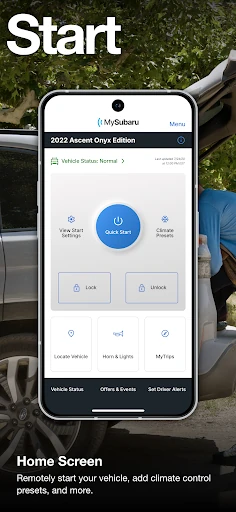
Picture a cold morning when you are getting ready for work and would rather have the car comfortable before you head outside. MySubaru offers remote engine start and, on compatible vehicles, climate control, so you can use the app for that small bit of preparation. The appeal is practical: instead of treating the car as something you can only manage from the driver’s seat, you have a few useful controls available through your phone.
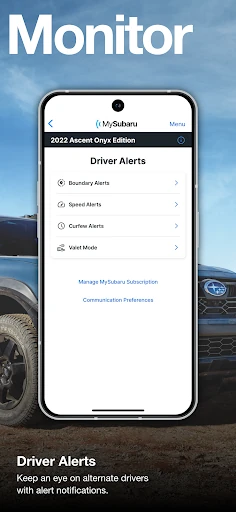
The same kind of convenience applies when you need to lock or unlock the vehicle remotely, or want to keep track of authorized drivers. Later, the service side can help you arrange an appointment and review digital service history. I like that the app brings these car-related jobs together; it gives an owner somewhere to start rather than making each task feel like a separate errand.
A companion, not a driving app
MySubaru is best understood as an ownership companion, not a navigation or trip-planning tool. Its focus is on remote vehicle features, service, and safety-related assistance. If I were choosing an app to plan a route or compare fuel stops, this would not be the one I would reach for. But for someone who wants to manage a few Subaru-specific tasks, that narrower focus makes sense.
There are important boundaries. Remote services require an active MySubaru Connected Services subscription, and remote start has vehicle requirements: it is for keyless-access models with push-button start, while climate control also requires automatic climate control. Remote start is not available on manual-transmission vehicles. Service scheduling is not offered by every Subaru retailer, so the app cannot promise that every owner will have the same options.
Small habits that help
I would make MySubaru part of an occasional ownership routine rather than something to open every hour. When it is time to think about maintenance, checking the digital service history and looking into an appointment can keep the relevant information in one place. If a retailer supports the scheduler, arranging service through the app may save the separate step of calling to ask about booking.
It also helps to know which features actually apply to your car before relying on them. I would check whether the vehicle supports the remote controls I care about and whether my Connected Services subscription is active. That way, a quick attempt to start the car remotely is not a surprise test on a rushed morning. Roadside assistance has its own coverage terms, so it is worth understanding those too.
More From Our News Desk

Zoom Meetings, Google Meet, or Teams: Which Is Easiest to Join?

How I Build a Free Streaming Lineup With Tubi

Why Crunchyroll Is the Default Anime App for So Many Fans

YouTube TV: A Practical Guide to Cutting Cable

Rummikub and the Small Comfort of Phone Games

TeamViewer Remote Control or AnyDesk for Helping Family?
Who will get the most from it
I would recommend MySubaru to Subaru owners who like having vehicle controls and service details close at hand. It is especially appealing if your car supports remote features and you expect to use them, or if you want a digital place to check service history and explore appointment scheduling. Owners who occasionally need roadside help may also appreciate having that service included among the app’s offerings.
It may be less useful if you do not own a Subaru, if your vehicle does not support the remote controls you want, or if you prefer to handle every service task directly with a retailer. The app’s remote services require an active subscription, and not every retailer supports scheduling through it. I would treat it as a convenient extra for ownership, not as a replacement for every car-related service.
MySubaru is published by Mobile - Subaru Of America and is in the Auto & Vehicles category on Google Play. It has over one million installs and a 4.7-star rating from around 88,000 ratings. The app is free to download, and the supplied store details show no in-app purchases or ads. Google Play gives it an Everyone content rating.
The current version in the supplied details is 3.2.4. MySubaru was released on June 23, 2015, and its latest update is dated January 20, 2026. It requires Android 10 or later. Those details are useful to check against your device before installing, especially if you are using an older phone.
A closer look at Subaru ownership
Getting started
My first impression of MySubaru is that it has a clear job: connect a Subaru owner with vehicle-related services and controls. That is a more useful starting point than trying to be a catch-all motoring app. I would begin by installing it on a compatible Android device and checking which of its services are available for my vehicle and account.
The key expectation to set early is that downloading the app does not by itself unlock every remote feature. Subaru says remote services require an active MySubaru Connected Services subscription. Vehicle equipment matters as well. Knowing those conditions upfront makes the app easier to evaluate: you can focus on the service history, scheduling, assistance, or controls that fit your situation.
Everyday ownership tasks
In day-to-day use, MySubaru is built around a handful of moments that tend to come up during ownership. You might want to start or lock the car remotely, arrange a service appointment, or look over digital service history. Those jobs are quite different, but keeping them within one Subaru-focused app can make the practical side of owning the car feel more organized.
I would not expect every visit to the app to be exciting. The value is more likely to show up when a specific need comes along: a remote control before heading out, or a service task that would otherwise sit on the to-do list. That makes it a useful occasional tool rather than an app that needs to become part of every drive.
Features with real purpose
Remote features are the most immediately appealing part. The app offers remote start and lock or unlock controls, with climate control available on vehicles that meet the stated equipment requirements. For a compatible car, being able to prepare it before getting in is a straightforward convenience. It is also easy to see why the feature is not universal: the vehicle setup determines what is available.
The service features address a different kind of ownership chore. MySubaru includes service scheduling and digital history, while its safety and security offerings include 24-hour roadside assistance and the ability to monitor authorized drivers. Together, these features make the app more than a remote-start button. The exact usefulness will depend on what applies to your car and the services available to you.
A practical ownership routine
A simple routine would be to check the app when a service need comes up, rather than trying to remember the details later. I would look at the digital history, then see whether my retailer offers scheduling through MySubaru. If the scheduler is available, it gives me a direct way to approach the appointment. If it is not, the history can still be a helpful reference for the conversation.
For remote controls, I would use them when they solve a real inconvenience, such as wanting to start a compatible vehicle before leaving. I would also keep the subscription and vehicle requirements in mind instead of assuming every Subaru has the same functions. For roadside assistance, I would pay attention to the coverage period: it is included with the standard three-year warranty and after three years with a gold package.
Limits to keep in mind
The biggest limitation is that remote features depend on both an active Connected Services subscription and the right vehicle equipment. Remote engine start applies to keyless-access vehicles with push-button start; climate control adds the requirement for automatic climate control. Manual-transmission vehicles are excluded from remote engine start. Those conditions make it important to check your specific setup before counting on a feature.
Service scheduling is also not available through every Subaru retailer. Roadside assistance has coverage conditions, too, so it is worth knowing how the warranty or gold package applies to you. These are not reasons to dismiss the app, but they do mean its usefulness is personal. One owner may rely on remote controls, while another may mainly value service information.
MySubaru makes the most sense as a practical companion for people who already own a Subaru and want a few ownership tasks within reach. Remote controls can be handy on compatible vehicles, and service history, scheduling, and roadside assistance give the app broader value than a single-purpose remote starter.
I would recommend giving it a look if you want Subaru-specific tools on your phone and are comfortable checking which features apply to your vehicle. If you mainly want navigation or an all-purpose driving planner, its focused set of ownership services may not match what you need.
MySubaru Frequently Asked Questions
What is the MySubaru app used for?
MySubaru connects owners with Subaru vehicle services. Depending on the vehicle and service availability, it offers remote start and lock or unlock controls, service scheduling, digital service history, roadside assistance, and authorized-driver monitoring. Remote services require an active MySubaru Connected Services subscription. It is focused on vehicle ownership rather than being a general navigation app.
Which phones and devices can run MySubaru?
The supplied store information is for the Android version of MySubaru, which requires Android 10 or later. Check Google Play for current device compatibility before installing. The app’s remote functions also depend on your Subaru’s equipment, so a compatible phone alone does not guarantee that every vehicle feature will be available.
What Android version does MySubaru require?
MySubaru requires Android 10 or later according to the supplied app details. If you are unsure which Android version your phone uses, check your device settings before installing. Requirements and compatibility details can change, so Google Play is the best place to confirm the current information for your device.
Does MySubaru cost money or include purchases?
The app is free to download, and the supplied details show no in-app purchases or ads. However, access to remote services requires an active MySubaru Connected Services subscription. The app’s service terms may depend on your vehicle or coverage, so check Google Play and Subaru’s information for details that apply to you.
Is MySubaru useful for every Subaru owner?
It can be useful for owners who want remote controls, service information, scheduling, or roadside assistance in one app, but features vary with the vehicle and retailer. Remote start has specific equipment requirements and is not available on manual-transmission vehicles. Service scheduling is not offered by every retailer, so check the app and store details for your situation.
Pros
- Combines remote vehicle controls with service history and appointment scheduling.
- Includes roadside assistance among its vehicle ownership services.
- Free to download, with no ads or in-app purchases shown in the supplied details.
- Can help owners prepare a compatible car before heading out.
Cons
- Remote services require an active Connected Services subscription.
- Remote start depends on vehicle equipment and is unavailable with manual transmissions.
- Service scheduling is not supported by every Subaru retailer.
- Category
- Auto & Vehicles
- Version
- 3.2.4