USAA DriveSafe
- 54.49K
- 4
- Installs
- 1.00M
- Price
- Free

Screenshots

Analysis by Reviewed APKs
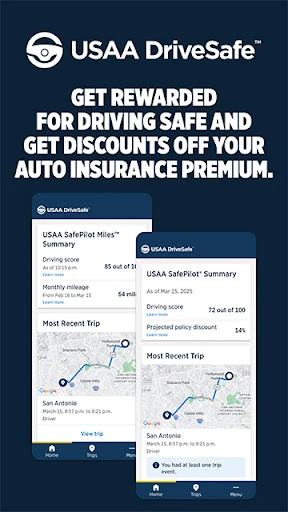
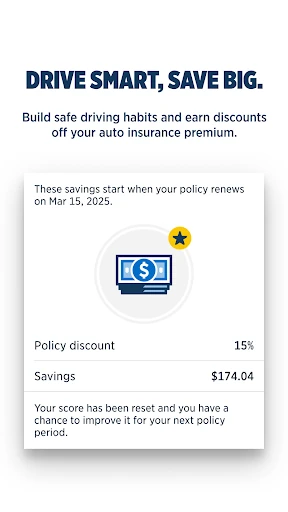
USAA DriveSafe is a driving-tracking app for eligible USAA auto insurance members enrolled in SafePilot or SafePilot Miles in select states. It records trip information and offers a look at habits such as phone use and harsh braking, with crash assistance as another practical feature. I see it as a useful companion to a participating insurance program, rather than a general-purpose driving or navigation app.
A week of everyday trips
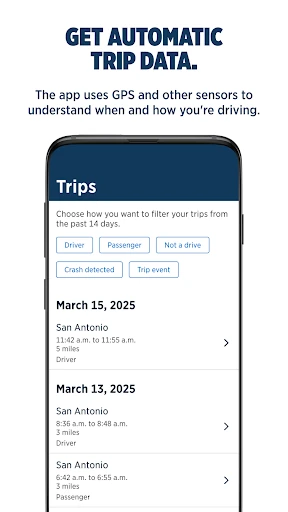
When I think about where DriveSafe fits, it is in the small trips that make up a normal week: a commute, a grocery run, or the drive across town to pick someone up. The app uses GPS and other phone sensors to map trips and understand how you drive. Later, you can review information such as how much you drove, phone use while driving, and harsh braking.
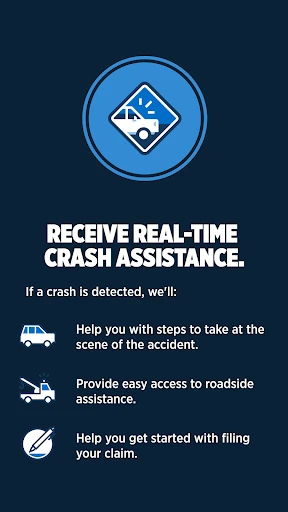
That kind of record can make an ordinary drive feel more visible. Instead of relying on a vague sense that I usually drive carefully, I can look at the habits the app tracks and notice where a routine might be rougher than expected. If a crash is detected, DriveSafe says it will check whether you are OK and help with next steps. That is a reassuring addition, though it does not replace being prepared to handle an accident.
An insurance companion, not navigation
DriveSafe makes the most sense alongside USAA auto insurance and an enrolled SafePilot or SafePilot Miles program. Its purpose is to collect driving information, surface insights, and support the participating insurance experience. It is not presented as a route planner, a map app, or a tool for finding traffic and choosing a faster way across town.
That distinction matters before installing it. Drivers looking for turn-by-turn directions or a broad collection of car utilities will need other apps for those jobs. DriveSafe is also limited to USAA members with an active auto policy in select states who have enrolled in one of the named programs. For an eligible driver, the narrow focus may be useful; for everyone else, it is likely not relevant.
Make tracking less fussy
I would treat DriveSafe as a background companion to the driving routine, rather than something to operate while the car is moving. Give the app the permissions it needs to record trip data, then check its insights when parked or at home. The setup information points users toward enabling permissions, which is a good reminder that phone settings are part of making this kind of tracking work.
A simple habit is to review the driving information after a few days of normal use, rather than judging yourself from one unusual trip. The app tracks patterns such as phone use and harsh braking, so a familiar weekly routine gives that information some context. If a trip appears unexpected or the tracking does not behave as you expect, it is sensible to review the app permissions and its setup guidance.
More From Our News Desk

Zoom Meetings, Google Meet, or Teams: Which Is Easiest to Join?

How I Build a Free Streaming Lineup With Tubi

Why Crunchyroll Is the Default Anime App for So Many Fans

YouTube TV: A Practical Guide to Cutting Cable

Rummikub and the Small Comfort of Phone Games

TeamViewer Remote Control or AnyDesk for Helping Family?
Who will find it useful
I would recommend DriveSafe to USAA members who have an active auto policy, live in a participating state, and are enrolled in SafePilot or SafePilot Miles. For that group, the app brings trip data and driving insights into one place and includes crash assistance. It may be particularly appealing to people who want a clearer picture of everyday driving habits as part of their insurance program.
It may not suit someone who is not eligible for those USAA programs, or who simply wants navigation, vehicle maintenance tools, or a broad driving log. It also asks users to allow trip-related data collection through phone sensors and GPS, so anyone uncomfortable with that arrangement should consider the fit carefully. The app is most useful when its tracking and insurance-program role match what a driver actually wants.
USAA DriveSafe is developed by USAA and is listed in the Auto & Vehicles category on Google Play. It is free to download, with no in-app purchases and no ads. Google Play shows a 4.0-star rating from about 54,000 ratings and over one million installs. The content rating is Everyone.
The current version is 3.16.0.134836, and the app was last updated on February 6, 2026. Its release date was January 23, 2019. Android requirements can vary by device and app version, so check the Google Play listing for the current compatibility details before installing.
A closer look at everyday driving
Getting started
My first impression is that DriveSafe has a clear job: record trips and give eligible drivers a way to review selected habits. It is not an app I would open to browse around for unrelated tools. The important first step is being enrolled in SafePilot or SafePilot Miles with an active USAA auto policy in a participating state.
The setup depends on permissions because the app uses GPS and other phone sensors to map trips and interpret driving. I would take a moment to follow the setup guidance and check those permissions before relying on the tracking. That small bit of preparation is more important here than personalizing a long list of preferences.
The daily experience
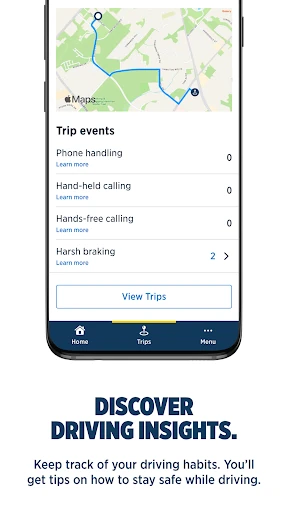
Once the app is set up, its core role is to gather information from trips and make driving habits easier to review. The examples given include distance driven, phone use while driving, and harsh braking. Those are concrete details that can help bring attention to patterns in a regular routine, whether that is a daily commute or a few errands spread through the week.
I would not expect every drive to tell a complete story on its own. A sudden stop or a phone-related measure needs to be understood in the context of the trip, not treated as a full judgment of a driver. The most useful approach is to check in periodically and use the information as a prompt to reflect on habits, rather than as a reason to fiddle with the phone on the road.
Insights and crash help
The standout feature is the combination of automatic trip data and driving insights. Rather than requiring a driver to enter each journey manually, DriveSafe uses phone sensors and GPS to map trips. The app then makes information about driving habits available, including phone use while driving and harsh braking. That automatic approach suits a tool meant to observe normal routines over time.
Crash assistance adds a different kind of value. If the app detects a crash, it says it will check whether the user is OK and help with next steps. The driving information may also help move a claim along if the user chooses to file one after an accident. I appreciate that the description frames this as possible assistance, not a promise about how any particular claim will proceed.
A practical weekly check-in
A workable routine would be to set up the app once, drive as usual, and then review the available driving information at a convenient time. For example, after a week of commuting and errands, I could look at the amount driven and the tracked habits to see whether anything stands out. That is a more grounded use than checking the app after every short trip.
If the information points to phone use or harsh braking, I would take it as a cue to think about the circumstances and my habits, not as a score that explains everything. The app is designed around driving insights and an enrolled insurance program, so a brief, regular review keeps it connected to its purpose. It also avoids turning a useful record into a distraction during a drive.
Limits to keep in mind
Eligibility is the biggest limitation: DriveSafe is for USAA members with an active auto insurance policy in select states who have enrolled in SafePilot or SafePilot Miles. That is a narrower audience than a general driving app, and downloading it alone does not make it a fit for every motorist. I would check program eligibility before spending time on setup.
The app also relies on GPS and other phone sensors, so its usefulness depends on having the permissions needed for trip tracking. And while driving information may support a claim process, it is not the same thing as a claim decision or a substitute for other help after an accident. Drivers who want navigation or a full suite of vehicle tools will need to look elsewhere.
USAA DriveSafe has a focused purpose and a sensible set of features for drivers already enrolled in the relevant USAA programs. Automatic trip data, practical habit insights, and crash assistance give it more substance than a simple trip counter. Its value depends on eligibility and comfort with phone-based tracking, so it is best viewed as part of the insurance program rather than a standalone driving essential.
If you are an eligible USAA member and want to review everyday driving habits, DriveSafe is worth considering. If you need directions, broader car utilities, or are outside the program's reach, it is not the right tool for those needs. I would start by checking eligibility and permissions, then let the app do its limited job in the background.
USAA DriveSafe Frequently Asked Questions
What is USAA DriveSafe used for?
USAA DriveSafe maps trips using GPS and other phone sensors, then provides information about habits such as how much you drive, phone use while driving, and harsh braking. It also offers crash assistance if a crash is detected. The app is intended for USAA members with active auto insurance who have enrolled in SafePilot or SafePilot Miles in select states.
Which devices can run USAA DriveSafe?
USAA DriveSafe is available on Android through Google Play. The Android version required can vary, so check the current Google Play listing for compatibility with your device. The app uses GPS and other phone sensors for trip data, which means its tracking role depends on having the relevant permissions enabled.
What Android version does USAA DriveSafe require?
The Android requirement can vary by device and app version. Before installing, check the compatibility details shown for USAA DriveSafe on Google Play. The app's trip tracking uses GPS and other phone sensors, so make sure your device and settings support the permissions it requests.
Does USAA DriveSafe cost money?
USAA DriveSafe is free to download on Google Play. It has no in-app purchases and contains no ads. Eligibility is separate from the download: the app is for USAA members with an active auto insurance policy in select states who are enrolled in SafePilot or SafePilot Miles.
Is USAA DriveSafe a good fit for every driver?
It is best suited to eligible USAA auto insurance members enrolled in SafePilot or SafePilot Miles who want to review driving habits and trip information. It may not suit people outside those programs, or drivers seeking navigation and broader vehicle tools. Since it uses GPS and phone sensors, consider whether that kind of trip tracking fits your preferences.
Pros
- Automatically maps trips using GPS and other phone sensors.
- Surfaces practical details such as phone use and harsh braking.
- Includes crash assistance and driving information that may help with a claim.
- Free to download, with no ads or in-app purchases.
Cons
- Available only to eligible USAA members enrolled in named programs in select states.
- Relies on GPS and phone-sensor permissions for trip tracking.
- Not designed for navigation or a broad set of vehicle tools.
- Category
- Auto & Vehicles
- Version
- 3.16.0.134836