Dollar Tree
- 2.56K
- 3.7
- Installs
- 1.00M
- Price
- Free

Screenshots
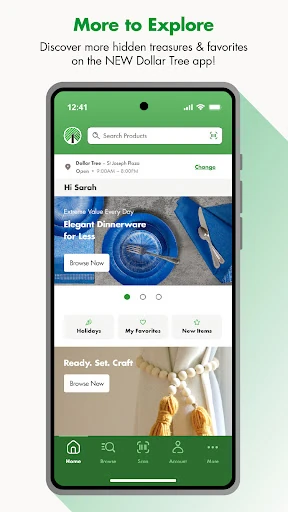
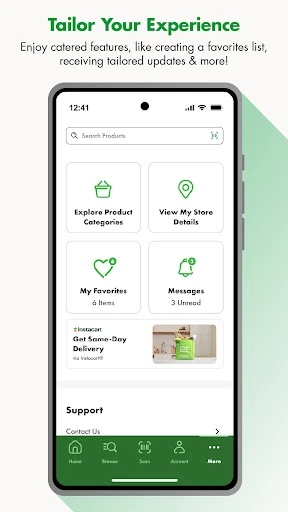
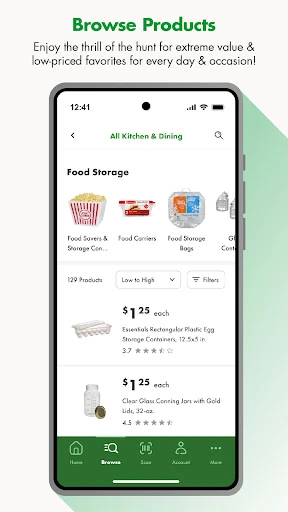
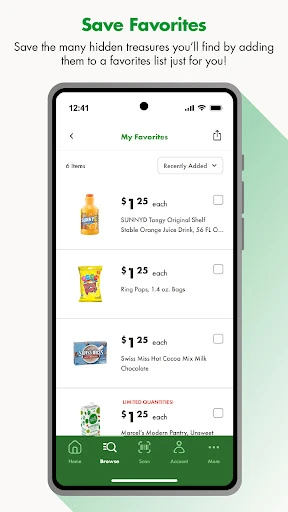
Analysis by Reviewed APKs
Dollar Tree is a shopping companion for browsing products, checking weekly ads, keeping a list of favorites, and looking up items while you’re in a store. I see its appeal for bargain hunters who like to plan a quick visit or browse seasonal finds before heading out. Its most useful touch is the in-store barcode scanner, though it’s best viewed as a store-planning aid rather than a complete online shopping service.
Before a Dollar Tree Run
When I’m planning a Dollar Tree visit, I can use the app to browse products and seasonal items before I leave home. I might spot something worth checking out, then save it to my favorites list instead of relying on memory in the aisle. The weekly ads offer another way to see what’s being featured. It’s a simple routine: browse, collect a few ideas, and take that short list along.
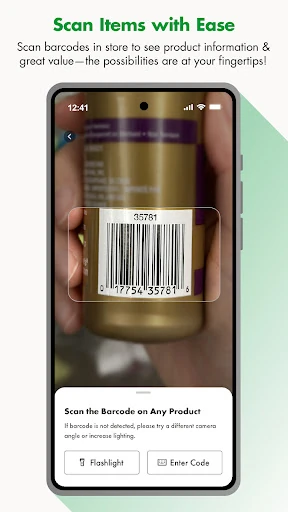
Once I’m in the store, the barcode scanner gives the app a more immediate job. I can scan an item to see product information and price details, which is handy when I’m curious about something I’ve picked up. Selecting a store also tailors the experience around that location, including its amenities. The app doesn’t need to become the center of a shopping trip; it’s most useful as a quiet reference when a question comes up.
A Store Companion, Not a Cart
Compared with a general shopping app, Dollar Tree is focused on one retailer and the experience of browsing its products, weekly ads, and seasonal items. That narrow focus can be a plus if I already know I’m visiting Dollar Tree: I’m not sorting through unrelated stores or trying to turn a broad shopping list into a project. Store selection and the scanner make it especially relevant to planning and browsing in person.
I wouldn’t treat it as a full online ordering or delivery service based on the features described. Its role is discovery and store support: find things to look for, save favorites, and check product details or price information in a store. If I need a broad comparison across retailers or a digital checkout flow, this isn’t the app I’d reach for. That distinction helps set expectations before I start browsing.
Make Browsing More Useful
A little organization makes the favorites list more useful than a pile of impulse finds. I’d add items I genuinely want to look for, then review that list before heading out. The app describes the list as one I can curate myself, so it can serve as a lightweight reminder rather than a rigid plan. Seasonal browsing can be kept separate mentally from everyday needs: one is an idea for later, the other is something I came to find.
I’d also select the store I’m most likely to visit before relying on store-specific details. That gives the app a clearer context for amenities and the shopping experience. In the aisle, the scanner is best used when I want to check an item’s information or price details, not as a reason to scan everything. A few deliberate checks are less distracting and leave more room to enjoy the familiar treasure-hunt aspect of browsing.
More From Our News Desk

Zoom Meetings, Google Meet, or Teams: Which Is Easiest to Join?

How I Build a Free Streaming Lineup With Tubi

Why Crunchyroll Is the Default Anime App for So Many Fans

YouTube TV: A Practical Guide to Cutting Cable

Rummikub and the Small Comfort of Phone Games

TeamViewer Remote Control or AnyDesk for Helping Family?
Who Will Enjoy It
I’d recommend Dollar Tree to regular shoppers who like checking new finds, seasonal merchandise, or weekly ads before a visit. It should also suit anyone who tends to forget the items they meant to look for; a personal favorites list is a practical little nudge. People who are already in a store may appreciate being able to scan a barcode for product information and price details without treating the app as a complicated shopping system.
It may be less appealing if you want a multi-store price comparison tool or expect to complete an online order through the app. The described features center on browsing and in-store support, so shoppers looking for a broader retail toolkit may find the scope limited. I’d also skip it if I rarely shop at Dollar Tree; its focused catalog and store features are most valuable when a visit is already part of my routine.
Dollar Tree is a free Android shopping app from Dollar Tree Stores. On Google Play, it has over one million installs and a 3.7-star rating from about 2,600 ratings. The listed content rating is Everyone. The app is version 1.5.6, with a release date of February 23, 2024, and a last-updated date of October 6, 2026.
There are no in-app purchases or ads listed, and the app is free to download. The minimum Android version isn’t included in the available app details, so I’d check Google Play for device compatibility before installing. The practical features include product browsing, weekly ads, seasonal items, a favorites list, barcode scanning for product information and price details, and store selection with amenities.
A Closer Look at the Store Companion
A Familiar Starting Point
When I first opened Dollar Tree, the appeal was easy to understand: it brings product browsing, weekly ads, and seasonal finds together in one retailer-focused app. That’s a useful starting point for someone who wants ideas before a visit, rather than an elaborate digital storefront. The overall job is straightforward, and the app’s features point toward browsing and in-store use.
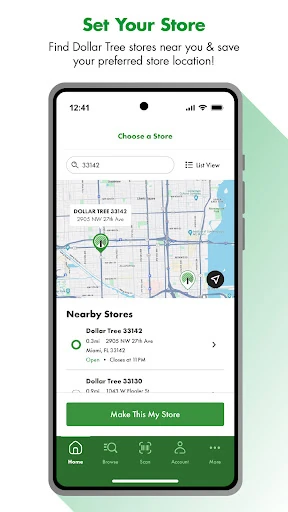
I’d begin by selecting the store I expect to visit. The app says that choice helps tailor the experience and makes store amenities available. That makes setup feel practical rather than like an account-management chore. I can then browse with a particular trip in mind, or simply see what catches my eye. Either way, the first step is choosing context for the shopping rather than opening a general-purpose catalog.
Browsing Between Visits
Day to day, browsing is the feature I’d use most when I’m not standing in an aisle. I can look through products and seasonal items at a convenient moment, then save a few favorites for later. The weekly ads add a time-sensitive reason to check back, while trendy new items offer a discovery angle. Together, these features make the app useful for both planning and casual browsing.
I like that favorites can turn an interesting browse into a small plan. It’s easy to forget a product you saw earlier, especially when you’re only making a quick stop. A personal list gives me somewhere to collect those finds. I wouldn’t expect it to replace every shopping note or household list, but it can keep Dollar Tree ideas in one place and make the next visit feel a little more intentional.
Useful In-Store Details
The barcode scanner is the feature that most clearly separates this app from a simple digital flyer. In store, I can scan a product to see information and price details. That’s a modest but practical tool when I’m holding an item and want to check what it is or confirm its listed price. It makes the app relevant at the shelf, not just on the couch before a trip.
Store selection adds another useful layer. The app can show amenities for the selected location, which is the kind of detail that matters when I’m deciding where to go. I appreciate that the experience can be tied to a particular store instead of remaining entirely generic. These features don’t transform a shopping visit, but they can answer small questions that otherwise interrupt the simple rhythm of browsing.
A Simple Trip Routine
My practical routine would start at home with a glance at the weekly ads and seasonal items. If something stands out, I’d browse for related products and save only the items I actually want to remember. Keeping the favorites list short makes it easier to use when I arrive. It’s a small planning step, not a promise that every idea will turn into a purchase.
At the store, I’d check the selected location and use the barcode scanner when I have a specific question about a product. I might also refer to the favorites list as I browse, while staying open to whatever catches my eye. This combination suits a relaxed visit: a little preparation beforehand, a little help in the aisle, and no need to spend the whole trip managing an app.
Keep Expectations Grounded
The focused scope is also the main limitation. Dollar Tree is built around one retailer, so it won’t be my choice for comparing products across different stores. The described features are about browsing, favorites, ads, store amenities, and in-store product details. If I’m hoping for a broad shopping hub, this is simply a more specialized tool.
I’d also keep the scanner’s purpose in perspective: it provides product information and price details. It isn’t a reason to assume that every shopping task happens inside the app. The best experience is likely to come from using it for the small questions it addresses, then carrying on with the visit. That keeps the app helpful without expecting it to do more than its store-focused job.
Dollar Tree is at its best when I use it as a companion to an actual store visit. Browsing, weekly ads, seasonal finds, favorites, store amenities, and barcode scanning give it several practical jobs without making the experience feel overly complicated. I especially like the idea of collecting a few finds before a trip and checking details in the aisle when needed.
I’d recommend it to frequent Dollar Tree shoppers who enjoy browsing and want a simple way to keep track of items or check product information in store. If you’re looking for broad retailer comparisons or an online ordering destination, the app’s described focus may feel narrow. For its intended, store-centered role, it offers a useful set of everyday features.
Dollar Tree Frequently Asked Questions
What is the Dollar Tree app used for?
Dollar Tree is a shopping app for browsing products, weekly ads, seasonal items, and new finds. You can save favorites to a personal list, select a store, view its amenities, and scan barcodes in store to see product information and price details. It’s mainly a companion for browsing and store visits.
Which devices can run the Dollar Tree app?
Dollar Tree is an Android app available through Google Play. The minimum Android version can vary by app release or device compatibility, so check the current Google Play details for your phone before installing. The information here describes the Android version and doesn’t establish availability on other platforms.
Does the Dollar Tree app cost anything?
The app is free to download, and no in-app purchases or ads are listed in its app details. Store policies and app details can change, so it’s worth checking the current Google Play page before installing if you want the latest information about cost or purchases.
Does Dollar Tree offer in-store barcode scanning?
Yes. The app describes a barcode scanner that shows product information and price details in store. You can also choose a store to tailor the experience and see its amenities. These tools are intended to support browsing and a store visit, rather than serve as a general shopping comparison service.
Who is the Dollar Tree app best for?
It’s a good fit for people who regularly shop at Dollar Tree and want to browse items, check weekly ads, save favorites, or look up product details during a visit. It may be less suitable if you want to compare multiple retailers or need a broader online shopping service.
Pros
- Combines product browsing, weekly ads, and seasonal finds in one retailer-focused app.
- Favorites provide a simple way to remember items for a future store visit.
- Barcode scanning can show product information and price details in store.
- Store selection includes access to location amenities.
Cons
- Its retailer-specific focus won’t help with comparisons across different stores.
- The described features center on browsing and store visits, not broad online shopping.
- The minimum Android requirement should be checked on Google Play.
- Category
- Shopping
- Version
- 1.5.6











