Command
- 32.05K
- 4.6
- Installs
- 500.00K
- Price
- Free

Screenshots
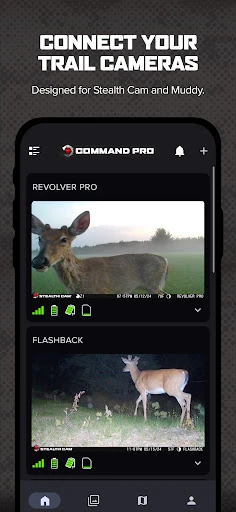
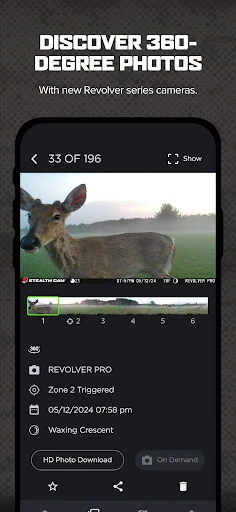
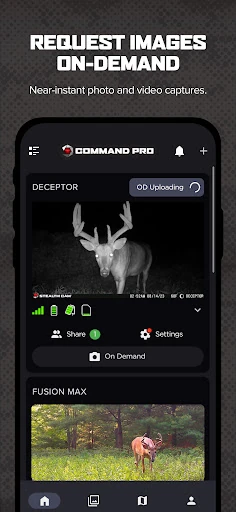
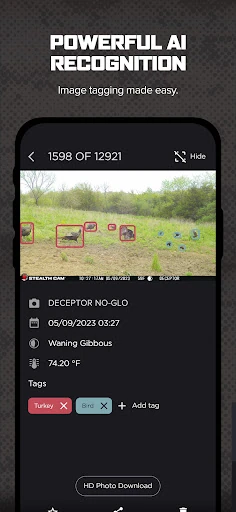
Analysis by Reviewed APKs
Command is a companion app for managing Stealth Cam and Muddy cellular trail cameras, from setting them up to reviewing and organizing the images they send. It suits hunters and wildlife watchers who use those camera brands and want scouting information in one place. I like its mix of camera controls, mapping and image tools, though it is useful only if you have compatible gear.
A Check From Home
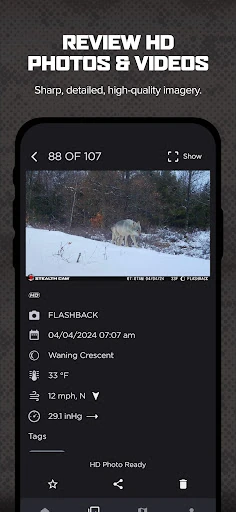
Picture checking a trail camera before heading out to scout. In Command, I can review newly received photos, use filters such as time of day or weather, and look for activity without first traveling to the camera. Push notifications can flag new photos, which makes a quick check between errands more practical than waiting until I am back at the camera itself.
If a moment deserves a closer look, the app can request an On-Demand HD photo or video. On compatible cameras, Live View offers real-time HD video and audio. I would treat those as useful ways to check a location remotely, not as a substitute for being there: the experience depends on having a supported camera and its cellular connection.
A Camera Companion, Not a Camera
Command is best understood as the management and viewing side of a Stealth Cam or Muddy cellular trail-camera setup. It can handle camera activation, settings, received images, data plans and billing, so the routine does not stop at capturing a picture. Its mapping and image-review tools also give it a broader scouting role than a basic place to browse camera photos.
That focus is also its main boundary. Command is not a general hunting guide or a standalone camera; its core job depends on compatible Stealth Cam or Muddy cellular cameras. If you do not use those brands, the controls and camera-specific features will not be much help. I would choose it for managing that equipment, rather than expecting it to replace every other outdoor app.
Small Habits, Better Scouting
A little organization makes repeated checks easier. I would group cameras by area, then use the image filters to narrow a busy feed by AI tags, weather, solunar data or time of day. Tags can be applied by the app’s AI or manually, giving me a way to keep useful images findable instead of scrolling through every arrival again.
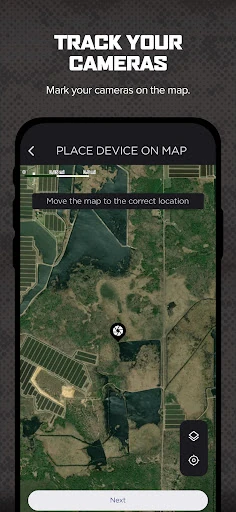
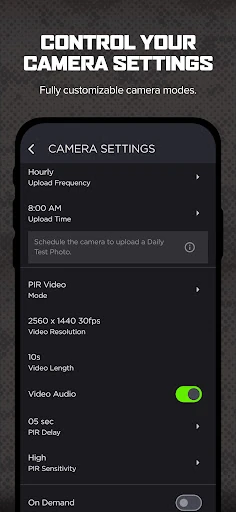
It also helps to decide how often each camera should transmit. Command supports instant, instant group, hourly, twice-daily and once-daily transmission schedules. I would match the schedule to how closely I need to follow a location, then use the map to review camera placement and settings together. Sharing view-only access can help another Command user follow along without handing over camera control.
More From Our News Desk

Zoom Meetings, Google Meet, or Teams: Which Is Easiest to Join?

How I Build a Free Streaming Lineup With Tubi

Why Crunchyroll Is the Default Anime App for So Many Fans

YouTube TV: A Practical Guide to Cutting Cable

Rummikub and the Small Comfort of Phone Games

TeamViewer Remote Control or AnyDesk for Helping Family?
Who Gets the Most From It
I would recommend Command to people already using Stealth Cam or Muddy cellular trail cameras who want to handle setup, image review and camera organization from a phone. It is particularly appealing if you expect to check photos remotely, sort a growing collection, or use maps as part of scouting. Support for panoramic images on Revolver-series cameras adds a more specialized reason to use it.
It may not suit someone looking for a general-purpose wildlife camera app or an all-in-one hunting resource independent of camera hardware. The more advanced viewing options are tied to compatible cameras, and the app’s usefulness naturally follows the features of the equipment you own. For a single camera and occasional checks, some of its organization and filtering tools may matter less.
Command is developed by GSM Outdoors and is a free Android app on Google Play. It has over 500,000 installs and a 4.6-star rating from about 32,000 ratings. The app is rated Everyone. Google Play reports version 6.6.6, released May 20, 2020, with its latest update dated October 15, 2026.
There is no purchase price, in-app purchases or advertising. The app supports managing cellular data plans and billing for cameras, but that is distinct from a charge to download Command. The minimum Android version is not stated in the supplied app details, so check Google Play for device compatibility before installing.
Remote Camera Checks, With Useful Detail
Getting a Camera Connected
The setup process follows a direct path: create or sign in to an account, add a camera with the plus button, scan the QR code inside the camera and follow the instructions. I like that this links the phone app to a physical device rather than asking me to hunt through a generic setup flow. Once connected, the camera can be managed in Command.
That first step is also a reminder that this is equipment-specific software. The app is designed around Stealth Cam and Muddy cellular cameras, and its available controls depend on the camera model. I would have the camera nearby when setting up, then check that the connection succeeds before planning around remote image checks.
The Everyday Image Feed
The day-to-day appeal is having photos and videos, camera controls and scouting context gathered in one app. I can download, review, save and share high-definition images, then use AI-driven or manual tags to keep notable sightings easier to find. Filters for weather, solunar data, tags and time of day offer more focused ways to revisit a camera’s activity.
Transmission timing gives the workflow another useful lever. Instant and instant-group options are available alongside hourly, twice-daily and once-daily schedules. I would set the cadence according to how often I need updates, rather than treating every camera as equally urgent. Notifications for new photos make it easier to notice activity without repeatedly opening the app just to check.
Tools Beyond Photo Review
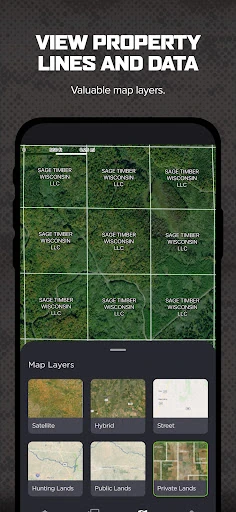
Mapping is one of Command’s more distinctive additions to the camera-management routine. The app supports advanced map layers, including property lines and hunting land maps, and lets users manage cameras and settings from the mapping screen. That can make it easier to think about placement alongside the surrounding area, instead of treating each camera as an isolated photo source.
There are also features aimed at particular camera models and viewing needs. Revolver and Revolver Pro cameras can show panoramic 360- and 180-degree images in the app. Compatible cameras can use On-Demand requests for HD photos and videos or Live View for real-time HD video and audio. Night-time colorization is available for infrared-flash photos.
A Simple Weekly Routine
For a regular scouting check, I would start with new-photo notifications, then scan the feed and flag images worth keeping. A quick filter by time of day or weather could help me compare activity without re-opening every image. After saving or sharing useful photos, I could check the map and confirm that the cameras remain organized by location.
Before the next stretch away from the cameras, I would review transmission schedules and decide whether any need more frequent updates. If another person needs to follow the same cameras, view-only sharing offers a way to include them. This routine keeps the app focused on practical decisions—what arrived, where it came from and how often I want the next update.
Keep the Hardware in Mind
Command’s strongest tools are not universal across every trail-camera setup. It is built to manage Stealth Cam and Muddy cellular cameras, while Live View and panoramic image review are tied to compatible models. That means the feature list is best read as a set of options for the right camera, not a promise that every connected device will offer every viewing mode.
Remote requests and live viewing are useful conveniences, but they depend on the camera and its connection. The app also covers cellular data plans and billing, so managing a camera system involves more than installing the app. I would check that my camera supports the specific feature I care about and review the plan details before relying on frequent remote checks.
Command brings camera setup, remote image review, tagging, maps and transmission controls into one place for Stealth Cam and Muddy cellular camera owners. I especially like the way filters and camera groups can make a growing feed easier to handle. Its value is closely tied to the hardware, but within that scope it offers a practical scouting companion.
I would recommend it to people who already use supported cameras and want a more organized way to check them from a phone. If you are shopping for a camera-independent wildlife app, this is not the right fit. For the intended audience, Command’s combination of remote checks and camera management makes it worth trying.
COMMAND PRO Frequently Asked Questions
What is Command used for?
Command is used to set up and manage Stealth Cam and Muddy cellular trail cameras. It lets users review, download, save and share photos and videos, adjust transmission schedules, organize cameras, and use image filters and mapping tools. Compatible cameras also support features such as On-Demand requests and Live View.
Which devices can I use Command on?
Command is an Android app available through Google Play. Its functions are intended for compatible Stealth Cam and Muddy cellular trail cameras, with some features limited to specific camera models. Check the Google Play details and your camera’s documentation for current device compatibility and supported features.
What Android version does Command require?
The minimum Android version may vary as the app is updated and by device. Check Command’s Google Play page for the current compatibility requirements before installing. The app’s camera features also depend on having a supported Stealth Cam or Muddy cellular trail camera.
Does Command cost money to use?
Command is free to download, and it has no in-app purchases or advertising. The app includes tools for managing cellular data plans and billing for cameras, so camera service costs are separate from the app’s download price. Check the store and plan details for current terms.
Is Command right for my camera setup?
It is intended for people managing Stealth Cam or Muddy cellular trail cameras, especially those who want remote photo review, camera organization and scouting tools. Some options require compatible camera models. If you use another brand or need a general-purpose wildlife app, Command may not fit your setup.
Pros
- Combines camera management, photo review, transmission schedules and cellular-plan tools.
- Filters and camera groups help organize a growing collection of images.
- Mapping layers add context to camera placement and scouting.
- Supports On-Demand viewing and Live View on compatible cameras.
Cons
- Its usefulness depends on owning Stealth Cam or Muddy cellular cameras.
- Live View and panoramic image features require compatible camera models.
- Remote requests and viewing depend on the camera connection and service.
- Category
- Sports
- Version
- 6.6.6