Chronogolf by Lightspeed
- 4.93K
- 4.1
- Installs
- 100.00K
- Price
- Free
Screenshots
Analysis by Reviewed APKs
Chronogolf by Lightspeed is a golf booking app for finding courses, comparing available tee times and reserving a round from a phone. It also gives participating club members a few useful booking details, and supports prepaid rounds and guest invitations. I see it as a practical companion for arranging the round, rather than an all-purpose golf tracker; its value depends on the courses you actually want to play being available.
Planning a Round on the Go
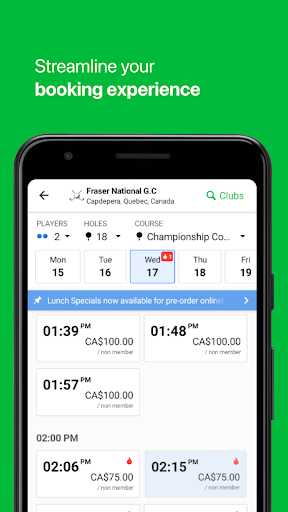
When I’m trying to fit a round into a busy week, the hardest part can be coordinating a course and a time before everyone’s calendar fills up. Chronogolf is built for that specific job: I can look for tee times at courses in my community or farther afield, then book through my mobile device. It turns a loose plan—“maybe Saturday morning”—into a reservation without making me start by calling around.
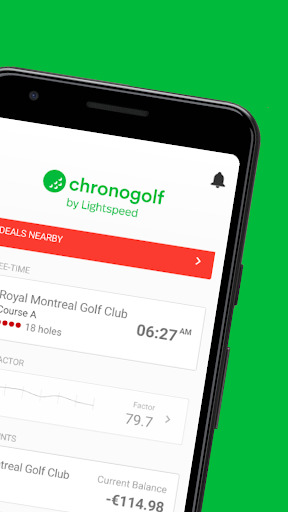
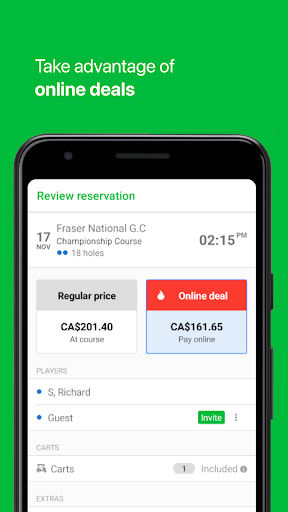
The useful detail is that this isn’t only a directory of courses. Participating courses can offer discounted tee times, and members at participating clubs may see how many places remain in a slot, along with the names and handicaps of registered players. If I’m arranging a group round, those details can help me decide whether a time works before I commit. Availability and member information depend on the course’s participation.
A Booking Tool, Not a Scorecard
Compared with phoning a pro shop or checking a course’s own booking process one course at a time, Chronogolf brings tee-time booking for local and international clubs into one mobile experience. It is most compelling when the courses I’m considering are part of the service, and when I want to spot an available time or special offer quickly. The app’s focus is the reservation and the details attached to it.
I wouldn’t choose Chronogolf expecting a round-by-round score tracker or a golf instruction library. The supplied features center on booking, participating-course offers, member tee-sheet information, prepaid packages and inviting playing partners. That narrower scope is a sensible fit for a booking app, but it means golfers looking for broader game-management tools will need something else alongside it. Desktop tee-time booking is available through Chronogolf’s website.
Make Booking Details Work
A small habit that makes the app more useful is checking for a time before the group chat has settled on a specific hour. That leaves room to compare openings and, where participating courses offer them, discounted tee times. Once a slot looks promising, I can invite guests or fellow members through the booking flow, so the reservation is connected to the people joining me rather than living only in my calendar.
If I have a prepaid package at a participating course, it’s worth applying it during booking and keeping an eye on the remaining rounds or carts. Club members can also use the tee-sheet information to see who is already registered and how many places are open. These are modest conveniences, not complicated planning tools, but they can save a few back-and-forth messages when I’m organizing a regular game.
More From Our News Desk

Zoom Meetings, Google Meet, or Teams: Which Is Easiest to Join?

How I Build a Free Streaming Lineup With Tubi

Why Crunchyroll Is the Default Anime App for So Many Fans

YouTube TV: A Practical Guide to Cutting Cable

Rummikub and the Small Comfort of Phone Games

TeamViewer Remote Control or AnyDesk for Helping Family?
Who Will Get the Most From It
I’d recommend Chronogolf to golfers who regularly book rounds and want a convenient way to check tee times across courses that use the service. It has particular appeal if your club participates, you have prepaid rounds to apply, or you like seeing available places and registered players before choosing a slot. For a casual player, the basic promise is straightforward: search for a course and handle the reservation from a phone.
It may be less useful if your preferred courses aren’t represented, or if you mainly want help tracking scores, improving your swing or managing other parts of a golf routine. The app is centered on bookings, not a complete golfing toolkit. I’d also consider whether you are comfortable with an app that contains ads. If you mostly book on a desktop, the Chronogolf website is another route for tee-time reservations.
Chronogolf by Lightspeed is made by Lightspeed Commerce Inc. On Google Play, it has over 100,000 installs and a 4.1-star rating from 4,927 ratings. The app is free to download, contains ads and does not offer in-app purchases. Its content rating is Everyone, making it broadly suitable for general audiences.
The supplied Google Play details give version 13.0.0, a release date of January 18, 2018, and a last update date of November 2, 2026. No minimum Android version is provided in the supplied app details, so check the Google Play page on your device for compatibility information.
The Details That Shape a Booking
A Straightforward First Visit
When I first opened Chronogolf, the purpose was easy to understand: this is a place to arrange a round, not an app asking me to build a complicated profile of my game. I’d start by looking for courses and tee times that suit the plan. That clear focus is welcome when I’m checking availability between errands and don’t want to work through unrelated tools before getting to the booking.
The app’s reach depends on participating clubs, so my first useful test would be searching for the courses I actually play. A broad search is less important than finding the local options I can realistically get to. Once I know those are represented, the app’s other booking details—offers, prepaid packages and invitations—have a chance to matter in my regular routine.
The Everyday Booking Flow
Day to day, the core experience is about finding a suitable tee time and reserving it on a mobile device. That makes sense for the moments when plans change: a free morning appears, the weather looks promising, or a friend suggests playing later in the week. Rather than treating the app as something I need to check constantly, I can use it when I’m ready to turn an idea into a booked round.
The booking process can also account for prepaid rounds and carts, where those packages apply. Being able to use them as part of the reservation and keep track of remaining inventory is more convenient than having to remember a separate balance without context. I’d still pay attention to the course and time I’m choosing, but the app brings those package details into the same basic task.
Useful Course-Specific Extras
Discounted tee times are a practical extra when participating courses make special offers available. I like that this is tied directly to choosing a round: a deal is most useful when I can compare it with an actual time and course I might play. It gives me another reason to check the app when my schedule is flexible, without turning the whole experience into a hunt for promotions.
The member tee-sheet view is more specific. Members of participating courses can see the number of open places for each tee time and the names and handicaps of registered players. That can help when I’m deciding whether to join a slot or add someone to a group. It isn’t described as a general feature for every course, so its usefulness will naturally vary with club participation and membership.
A Simple Group Routine
For a typical group round, I’d first check what times are available at a course everyone can reach. If a participating course has an offer, I can weigh that alongside the available slots. For a member tee sheet, seeing open places and registered players can make the choice more informed. The point is to settle on a time that works before the group chat wanders into a dozen competing suggestions.
After booking, inviting guests or fellow members keeps the other players connected to the tee time. The description also says they can be aware of events related to the reservation. If I’m using a prepaid package, I can apply the rounds or carts during booking and check what remains. It’s a compact workflow: find a slot, account for the package, reserve, and bring the group in.
Limits to Keep in Mind
The biggest practical limitation is coverage. Chronogolf can only help me book through the courses available in its service, and some extras are explicitly tied to participating courses or club membership. If my usual course isn’t there, the app won’t replace that course’s own booking method. I’d check my local options before assuming it will become the one place I arrange every round.
Its narrow purpose is another consideration. Chronogolf handles tee-time reservations and related booking details, but the provided feature information doesn’t make it a scorekeeping or coaching app. It also contains ads, which may be a drawback for people who prefer an ad-free experience. Those limits don’t undermine the booking function; they simply make it important to judge the app as a focused reservation tool.
Chronogolf by Lightspeed is a useful, clearly focused option for finding and booking golf tee times from a phone. Discounts, prepaid packages, guest invitations and member tee-sheet details add value when the relevant course supports them. The central question is whether the courses you want to play are available through it.
I’d give it a try if booking rounds is a recurring task and your local clubs participate. If you want a score tracker or a broader golf companion, this won’t cover that whole need. For straightforward reservations and the occasional group-planning detail, its focused approach makes sense.
Chronogolf by Lightspeed Frequently Asked Questions
What is Chronogolf by Lightspeed used for?
Chronogolf by Lightspeed is used to find and book golf tee times on a mobile device. It can also show discounted times from participating courses, let eligible club members view tee-sheet details, apply prepaid rounds and carts during booking, and invite guests or fellow members to a reservation.
Which devices can run Chronogolf by Lightspeed?
Chronogolf by Lightspeed is available as an Android app on Google Play. The supplied details do not give a minimum Android version, so check the Google Play page for the current compatibility requirements for your device. Tee times can also be booked on desktop through the Chronogolf website.
What Android version does Chronogolf by Lightspeed require?
The minimum Android version is not included in the supplied app details. Requirements can vary as the app is updated and by device, so I’d check the Chronogolf by Lightspeed page on Google Play before installing. The listed app version is 13.0.0.
Is Chronogolf by Lightspeed free?
Chronogolf by Lightspeed is free to download on Google Play. The app contains ads and does not offer in-app purchases according to the supplied details. Course prices and any charges associated with a particular round are separate booking details, so check the course and reservation information before confirming.
Who should use Chronogolf by Lightspeed?
It is a good fit for golfers who want to book tee times by phone, especially when their usual courses participate or they use a club’s prepaid packages. It may not suit someone looking for scorekeeping, coaching or a comprehensive golf toolkit. Its usefulness also depends on whether the courses they want are available through the service.
Pros
- Books tee times at local and international courses from a mobile device.
- Participating courses can offer discounted tee times and useful member availability details.
- Supports prepaid rounds, carts and invitations for guests or fellow members.
- Desktop tee-time booking is also available through the Chronogolf website.
Cons
- The booking selection depends on whether preferred courses participate in the service.
- Some tee-sheet details and prepaid package features apply only at participating clubs.
- The app contains ads and focuses on bookings rather than broader golf tools.
- Category
- Sports
- Version
- 13.0.0