Sudoku.com - Sudoku Puzzle
- 2.53M
- 4.7
- Installs
- 100.00M
- Price
- Free

Screenshots


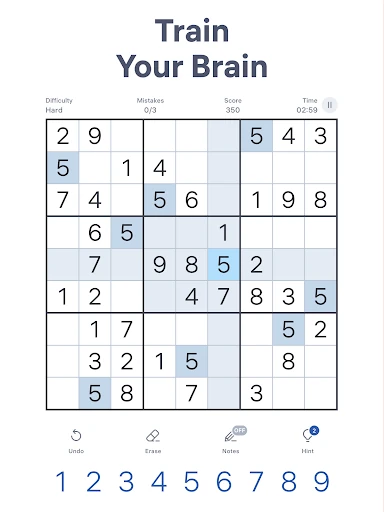


Analysis by Reviewed APKs
Sudoku.com - Sudoku Puzzle is a classic 9x9 number puzzle game, built around solving grids at your own pace. I found it easy to pick up for a short break and flexible enough to suit both new solvers and people who want tougher challenges. Its familiar rules and practical solving aids make it approachable, though ads and optional purchases are part of the free-to-play package.
A puzzle at your pace
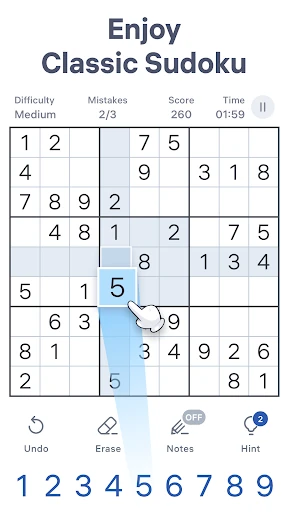
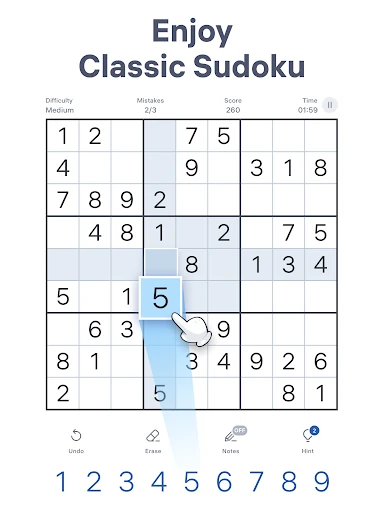
A typical session starts with choosing one of six difficulty levels, then working through an empty-looking 9x9 grid by placing numbers from one to nine. Each number must fit its row, column, and box, so progress comes from checking what is already present and narrowing down the possibilities. I like that this basic loop needs no long setup: I can open a puzzle, make a few careful moves, and stop when the moment is over.
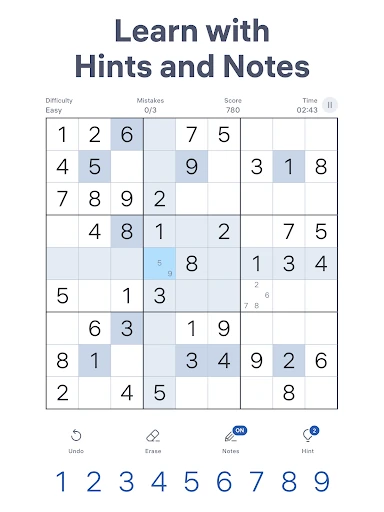
The tools help keep the focus on reasoning rather than bookkeeping. Notes let me record possible numbers in a cell, and those notes update as I fill in other cells. The game can highlight duplicates, check my entries as I go, and offer hints when I am stuck. Auto-save is useful for interrupted sessions, while undo and the eraser make it less painful to correct a clumsy tap.
Classic Sudoku, not a variety pack
This is a good fit if I want the standard Sudoku experience in a convenient mobile format. The puzzles use the familiar 9x9 grid, and the range from fast and easy through hard, expert, and giant gives me room to choose how much concentration I want to spend. It feels suitable for a quick pause in the day as well as a more deliberate session with a challenging board.
It is not a collection of different number games or a broad puzzle variety app. The material here centers on classic Sudoku, with daily challenges and seasonal events adding structure around that core rather than changing the rules. Players who want a story, action, or a rotating set of unrelated puzzle mechanics should look elsewhere. For me, the appeal is the reliable routine of solving one more grid.
Start with a comfortable level
For the first few hours, I would begin at easy or medium rather than treating the hardest setting as a test of skill. A less demanding grid gives you time to learn the touch controls and get comfortable scanning rows, columns, and boxes. If a board feels too simple, moving up a level is straightforward; if it starts to feel like guesswork, stepping back can make the game more enjoyable.
Try Notes when you have several candidates in a cell, and use duplicate highlighting to catch repeated numbers before they turn into a larger tangle. Auto-check is useful while learning, but switching it off can make mistakes part of the solving process if you prefer to find them yourself. I also recommend leaving a puzzle unfinished when needed: auto-save means you can return instead of rushing to complete it.
More From Our News Desk

Zoom Meetings, Google Meet, or Teams: Which Is Easiest to Join?

How I Build a Free Streaming Lineup With Tubi

Why Crunchyroll Is the Default Anime App for So Many Fans

YouTube TV: A Practical Guide to Cutting Cable

Rummikub and the Small Comfort of Phone Games

TeamViewer Remote Control or AnyDesk for Helping Family?
Who will enjoy the grids
I would recommend Sudoku.com to players who enjoy logic puzzles and want a familiar game that fits around everyday routines. The difficulty range makes it approachable for someone learning the rules, while expert and giant options give experienced solvers something more demanding to work through. Daily challenges, seasonal events, statistics, and trophies can also provide reasons to return without changing the central puzzle format.
Players who dislike methodical, numbers-first gameplay may bounce off quickly; the basic activity remains filling a Sudoku grid, however helpful the tools are. It may also disappoint anyone looking for a campaign, character progression, or lots of different puzzle types. I see it as a handy digital Sudoku notebook, not a game that constantly introduces new mechanics or dramatic surprises.
Sudoku.com - Sudoku Puzzle is made by Easybrain. On Google Play, it has over 100 million installs and a 4.7-star rating from around 2.5 million ratings. The game is free to download, with in-app purchases priced from $2.49 to $14.99 per item, and it contains ads. Its content rating is Everyone.
The game was released on November 26, 2017. The current version is 7.10.0, and the store information gives an October 22, 2026 update date. It supports phones and tablets, with portrait and landscape play on tablets. The Android minimum version is not included in the available store facts, so check Google Play for device compatibility.
The Small Details That Shape Each Solve
An easy first step
The opening experience is built around a clear choice: select a difficulty and start solving a classic grid. That simplicity suits Sudoku, since the rules are already familiar to many players and the app does not need to dress them up with a long introduction. I can get straight to placing numbers, while the selectable levels help make the first puzzle feel manageable rather than intimidating.
The available aids make the game welcoming without taking over the puzzle. Notes support the pencil-and-paper habit of tracking candidates, and duplicate highlighting can draw attention to a repeated number in a row, column, or box. Auto-check can flag mistakes as they happen, while hints offer help when I cannot see a next move. These are useful options for learning, though players can choose how much assistance to use.
Difficulty and daily rhythm
Six difficulty levels give the game a sensible range, from fast and easy puzzles to hard, expert, and giant challenges. That makes it easier to match a board to the time and attention I have available. An easy grid can work as a short pause, while a tougher one asks for more patient scanning and candidate tracking. Difficulty choice is one of the strongest ways this game adapts to different moods.
Daily Sudoku challenges and seasonal events add a reason to come back beyond simply opening another standard puzzle. Statistics track progress by difficulty, including best times and other achievements, so returning players can see how their solving changes. These features give the routine a little shape, but the pacing remains self-directed: the central activity is still solving a grid, not following a story or racing through stages.
A familiar toolkit
The most useful standouts are practical rather than flashy. Unlimited undos let me back out of a mistaken entry, and the eraser clears unwanted numbers. Auto-save is especially welcome when a real-life interruption arrives halfway through a puzzle. Selected cells also have related rows, columns, and boxes highlighted, which helps me keep track of the area I am checking without losing my place.
The game includes more than 10,000 classic Sudoku puzzles, all based on the standard 9x9 format, and each puzzle has one solution. Notes update as numbers are filled in, reducing the effort of maintaining possible candidates by hand. Together, these touches make a phone feel closer to a working Sudoku pad. They support the logic without changing what makes the puzzle satisfying.
Free play and paid extras
The game is free to download, but Google Play identifies both ads and in-app purchases. Individual in-app items are priced from $2.49 to $14.99. That is worth knowing if you prefer a completely uninterrupted puzzle session or want to avoid optional spending. I would treat the free version as the starting point and check the store details before making a purchase.
The core activity is familiar Sudoku, and the listed aids include notes, hints, auto-check, duplicate highlighting, undo, and auto-save. Those options help make puzzles approachable, but the presence of ads may affect how seamless a session feels. I would not assume that a purchase is necessary to enjoy solving; the available facts establish that purchases exist, not that they are required for the basic puzzle experience.
A few practical limits
Sudoku.com is available offline, which makes it convenient for a commute or a place with unreliable reception. The description also presents it as a game to pick up wherever you go, and auto-save helps when a session gets interrupted. Daily challenges and seasonal events are included, but the available details do not explain how every event behaves without a connection, so it is sensible to check the game or store information for specifics.
The game is focused on a single kind of puzzle, so variety depends on changing the grid difficulty and taking part in its challenges and events. It is also a numbers-and-logic activity that rewards concentration; it will not suit someone looking for fast action or a constantly changing set of mechanics. The facts do not specify a minimum Android version, so device compatibility is worth checking on Google Play before installing.
Sudoku.com - Sudoku Puzzle is a solid choice when I want classic Sudoku with helpful tools and enough difficulty options to fit different days. Notes, auto-save, undo, and offline availability make it practical, while daily challenges and seasonal events add a little structure. Its focused design is a strength for Sudoku fans, but it will not provide much variety beyond the grid.
I recommend it to beginners who want guidance and experienced players who want a range of puzzles on a phone or tablet. Go in expecting ads and optional in-app purchases, and check Google Play for device requirements. If a calm, methodical logic game sounds appealing, this is an easy one to try.
Sudoku.com Frequently Asked Questions
Is Sudoku.com - Sudoku Puzzle free to play?
Yes. Sudoku.com - Sudoku Puzzle is free to download on Google Play. The game contains ads and offers in-app purchases, so free access does not mean the experience is ad-free. Check the store page for the current details before installing, since store information and purchase options can vary.
What in-app purchases does Sudoku.com - Sudoku Puzzle have?
Google Play lists in-app purchases for Sudoku.com - Sudoku Puzzle, with items priced from $2.49 to $14.99. The available information does not specify every item or what each one includes, so check the current store details in the game or on Google Play before buying.
Can I play Sudoku.com - Sudoku Puzzle offline?
Yes. The game description says Sudoku.com - Sudoku Puzzle is available offline, making its classic puzzles suitable for times without a connection. Daily challenges and seasonal events are also mentioned, but their connection requirements may vary. Check the game or store information for details about particular features.
Which devices can run Sudoku.com - Sudoku Puzzle?
Sudoku.com - Sudoku Puzzle supports Android phones and tablets, and tablet play supports portrait and landscape orientations. The minimum Android version is not included in the available details, so check Google Play for the requirement that applies to your device.
Is Sudoku.com - Sudoku Puzzle suitable for children?
Google Play gives Sudoku.com - Sudoku Puzzle an Everyone content rating. It is a classic number puzzle built around filling a 9x9 grid, with options such as hints and auto-check. Parents who want the latest age guidance should review the current store page, as ratings and store details can vary.
Pros
- Six difficulty levels make it easy to find a puzzle that suits the time available.
- Notes, hints, duplicate highlighting, and auto-check support both new and experienced solvers.
- Offline play and auto-save make it practical for interrupted or on-the-go sessions.
- Daily challenges, seasonal events, and statistics give regular play some structure.
Cons
- The experience stays focused on classic Sudoku rather than offering different puzzle types.
- Ads and optional in-app purchases may interrupt players looking for an entirely seamless session.
- Harder grids can demand sustained attention and patience.
- Category
- Puzzle
- Version
- 7.10.0