Arrows – Puzzle Escape
- 2.26M
- 4.7
- Installs
- 100.00M
- Price
- Free

Screenshots
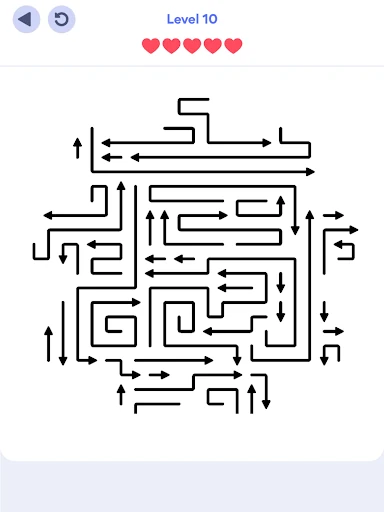
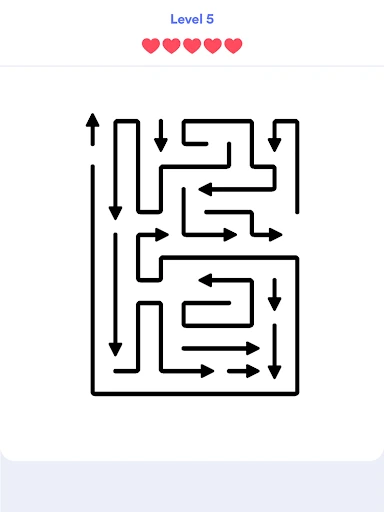
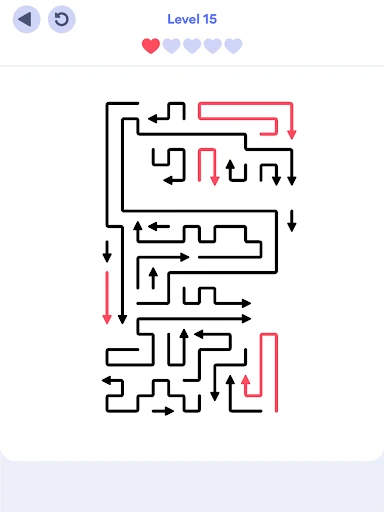
Analysis by Reviewed APKs
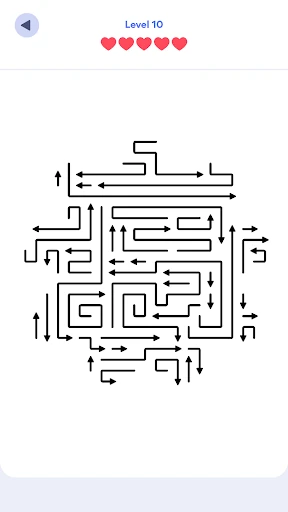
Arrows – Puzzle Escape is a minimalist logic game about clearing a grid by removing arrows without causing collisions. I like how quickly it gets me thinking: a board looks simple at first, then the order of moves starts to matter. It suits players who enjoy short, focused puzzles more than action or story-driven games. My overall take is that it makes a calm, satisfying pocket challenge, though tougher levels can demand patience.
Reading the Arrow Grid
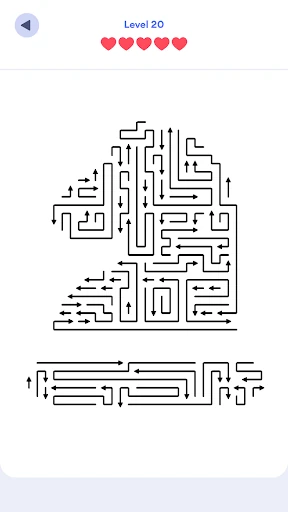
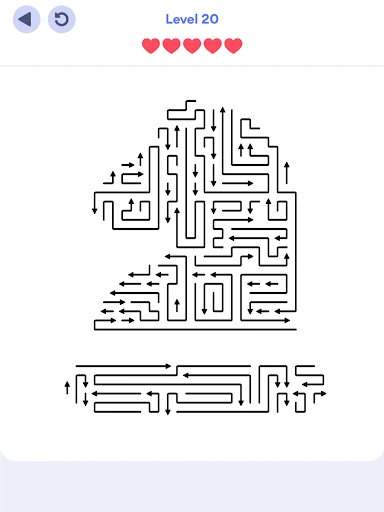
A typical session starts with a quick scan of the board. Each arrow needs to be extracted without colliding with another, so I look for pieces that can move freely and consider what might be blocking the rest. The basic idea is easy to understand, but the puzzle is in spotting a safe sequence. One careless move can cost a heart, which makes me pause before tapping rather than clearing the grid on instinct.
The loop is simple: inspect the layout, decide which arrow to move, and work through the puzzle until the board is clear. I can fit a level into a spare moment, but I also find myself spending longer when a crowded arrangement takes several attempts to untangle. There are no timers, so the pressure comes from planning and avoiding mistakes, not from racing a clock. Hints are available when I need a nudge.
A Calm Logic Challenge
Compared with puzzle games built around fast reactions or matching colorful pieces, Arrows puts more weight on spatial reasoning and move order. Its stripped-back presentation keeps my attention on the grid, and the no-timer approach gives me room to think. That makes it an easy game to pick up in a quiet moment, whether I have a few minutes or feel like sitting with a harder board for a while.
It is not a sprawling adventure, a story-led campaign, or a competitive test of speed. The appeal is the repeated process of reading a compact puzzle and finding a clean route through it. Players looking for character progression, narrative scenes, or action may find the experience too narrow. I enjoy that focus, but it is worth knowing that the main attraction is solving one arrow arrangement after another.
Start With a Slow Scan
In the first hours, I recommend taking a moment to trace where each arrow can go before making a move. Look for pieces with a clear path, then consider whether moving them will open space for others. The game is about avoiding collisions, so a move that seems obvious may not be the safest one. A little planning up front is more useful than tapping quickly and hoping the board sorts itself out.
If I get stuck, I treat the hint system as a way to regain direction rather than something to use automatically. Trying a few possibilities first helps me understand the board’s logic, while a hint can help when I have stopped seeing useful options. Since there are no timers, there is no need to rush through early levels. Getting comfortable with the basic cause-and-effect makes later, more complex layouts easier to approach.
More From Our News Desk

Zoom Meetings, Google Meet, or Teams: Which Is Easiest to Join?

How I Build a Free Streaming Lineup With Tubi

Why Crunchyroll Is the Default Anime App for So Many Fans

YouTube TV: A Practical Guide to Cutting Cable

Rummikub and the Small Comfort of Phone Games

TeamViewer Remote Control or AnyDesk for Helping Family?
Who Will Enjoy It Most
I would recommend Arrows to people who like compact logic puzzles and enjoy planning several steps ahead. It works well for a short break because the objective is immediately clear, but the increasing complexity can also keep a puzzle fan occupied for longer. The minimalist design and lack of timers are a good fit if you want a thoughtful game that lets you set your own pace instead of demanding constant attention.
Players who prefer action, a strong story, or lots of different activities may bounce off its deliberately focused format. The core task stays centered on clearing arrow grids, so variety comes from how each puzzle is arranged rather than from switching to a different kind of game. I also would not recommend rushing through it: the satisfaction comes from working out a safe sequence, and that can mean stopping to reconsider a board.
Arrows – Puzzle Escape is a free puzzle game from Lessmore GmbH on Google Play. It has more than 100 million installs and a 4.7-star rating from about 2.3 million ratings. The game contains ads and offers in-app purchases. Google Play gives it an Everyone content rating, making it suitable for a broad audience.
The current version listed is 0.24.0, and the release date is July 9, 2025. In-app product prices range from $1.49 to $40.00 per item. The Android version requirement can vary by device, so check Google Play for compatibility with your phone or tablet.
A Closer Look at the Puzzle Flow
A Quick Start
When I first opened Arrows, the central idea was clear without much fuss: remove the arrows while avoiding collisions. That straightforward goal makes it easy to begin playing rather than spending time learning a long list of rules. The clean, minimalist look supports that first impression. I can focus on the layout itself, which matters in a game where understanding the positions and possible paths is the whole point.
The early experience is about getting used to the relationship between a move and the space it leaves behind. I find it helpful to treat each board as a small planning exercise, not just a collection of arrows to tap. There is no timer pressing me forward, so I can inspect the grid at my own pace. That makes the opening feel approachable, even when I need a couple of tries to spot the right order.
Complexity Builds
The game describes its levels as increasing in complexity, and that progression gives the basic mechanic room to develop. As arrangements become less straightforward, I have to think beyond the next arrow and consider how one removal affects the rest of the grid. A puzzle that looks crowded can feel satisfying once I identify a sequence that clears it without a collision. The challenge is more about careful observation than fast input.
Because there are no timers, the pacing feels self-directed. I can make a quick attempt, take a break, and return to the same kind of focused problem without feeling that I have missed a window. The trade-off is that a difficult board can stall my momentum if I cannot see a safe next move. Hints provide help when I need it, but the main reward still comes from understanding the layout for myself.
Focused Puzzle Content
The standout feature is the simple arrow-clearing premise, supported by thousands of handcrafted levels. That gives the game a clear identity: rather than layering on unrelated activities, it keeps asking me to solve variations on the same spatial challenge. The changing layouts are what make the familiar rules interesting. I can go from a quick board to a more involved one without needing to learn a new mode or a different set of controls.
Hints are a useful addition for the moments when I have examined a board several times and still cannot see a route through it. They offer a way to get unstuck without changing the game into a timed test. The overall presentation stays minimalist, which helps me concentrate on the puzzle. If you want a broad collection of game modes, this may feel limited; if you like a consistent logic challenge, that focus is a strength.
Ads and Purchases
Arrows is free to download, but it contains ads and offers in-app purchases. The listed in-app products range from $1.49 to $40.00 per item, so the available purchases cover a broad price range. I would go in expecting a free-to-start puzzle game with optional spending, rather than assuming every part of the experience is paid for in advance.
The no-timer design makes the puzzle-solving itself feel relaxed, but that does not mean there are no commercial elements around the game. Ads are present, and purchases are available. I would consider whether those interruptions or optional items suit my preferences before settling in for a long session. The core described activity remains solving arrow puzzles, with hints there for players who get stuck.
Keep Expectations Simple
The game’s focused design is also its main limitation. The central task remains clearing arrows from a grid, so players who need a steady stream of different modes or a story may find the routine repetitive. I enjoy the repeated logic challenge, but it depends on liking that kind of puzzle in the first place. The changing complexity helps, though it does not turn the game into a different genre.
There are no timers, which removes one common source of pressure, but mistakes can still matter: the description frames clearing the grid without losing a heart as part of the challenge. Some levels may therefore take more thought or more than one attempt. The game’s store information gives an Everyone rating, and device compatibility is worth checking on Google Play before installing if you have an older Android device.
Arrows – Puzzle Escape works best when I want a small, quiet logic problem rather than a busy game competing for my attention. Its clean presentation, no-timer pace, hints, and growing level complexity make the basic idea easy to revisit. The ads and in-app purchases are worth keeping in mind, but the core appeal is straightforward: study the grid and plan a safe sequence.
I recommend it to players who enjoy spatial puzzles and do not mind repeating a focused mechanic across many levels. If you want a story, action, or a wide selection of modes, this probably will not hold your interest for long. For a calm puzzle break with room to think, though, Arrows is an easy one to try.
Arrows Frequently Asked Questions
Is Arrows – Puzzle Escape free to play?
Yes. Arrows – Puzzle Escape is free to download on Google Play. The game contains ads and offers in-app purchases, so free access does not mean the experience is entirely free of commercial elements. Check the store page for current details before installing.
Does Arrows – Puzzle Escape have in-app purchases?
Yes. Arrows – Puzzle Escape offers in-app purchases, with listed product prices ranging from $1.49 to $40.00 per item. It also contains ads. The available items and prices can change, so Google Play is the place to check for current purchase details.
Can I play Arrows – Puzzle Escape offline?
The game information describes its arrow puzzles, hints, and no-timer gameplay, but does not specify whether an internet connection is required. Offline availability can vary, so check the Google Play page or the game’s current requirements before relying on it without a connection.
What devices support Arrows – Puzzle Escape?
Arrows – Puzzle Escape is an Android game on Google Play. The Android version requirement can vary by device, and compatibility depends on your phone or tablet. Check the store page from the device you plan to use to see whether the current version is available for it.
Is Arrows – Puzzle Escape suitable for children?
Google Play gives Arrows – Puzzle Escape an Everyone content rating. Its described gameplay is based on logic puzzles and clearing arrows without collisions. Parents can review the current Google Play page for the latest age guidance and details about ads and in-app purchases.
Pros
- Clear objective makes it easy to start solving puzzles.
- No timers let me think through each grid at my own pace.
- Thousands of handcrafted levels offer a growing logic challenge.
- Hints can help when I cannot find a safe move.
Cons
- The repeated arrow-clearing mechanic may feel narrow over time.
- Ads and in-app purchases are part of the free-to-play setup.
- Some layouts can slow progress when the right sequence is hard to spot.
- Category
- Puzzle
- Version
- 0.24.0