Golf Clash - Golfing Simulator
- 2.14M
- 4.3
- Installs
- 10.00M
- Price
- Free

Screenshots


Analysis by Reviewed APKs
Golf Clash - Golfing Simulator is a competitive mobile golf game built around quick shots, online head-to-head matches, solo tournaments, and a steady climb through tours and gear. I like how it makes aiming feel thoughtful without asking me to manage a full golf simulation. It suits players who enjoy short skill-based contests and gradual progression, though its online focus and optional purchases are worth considering before settling in.
Aiming, Adjusting, And Taking The Shot
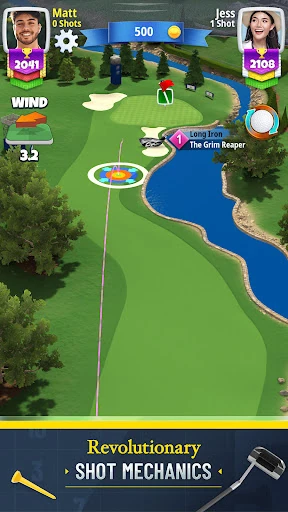
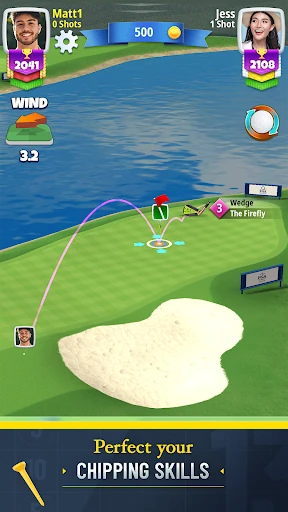
A typical match starts with a simple choice: pick a club and ball, then line up a shot. The challenge comes from accounting for wind, slope, and spin before sending the ball toward the hole. I appreciate that the basic idea is easy to grasp, but each adjustment gives me something to think about. A decent shot can feel satisfying, while a small miscalculation gives me a clear reason to try a different approach next time.
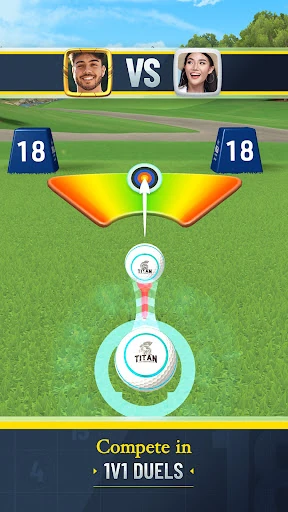
The rhythm shifts depending on the format. In a 1v1 match, I’m sharing the contest with a rival, while Quick 9 solo tournaments remove the wait for an opponent’s move. There are also 9-hole and full 18-hole matches, so I can choose a shorter run or a longer session. After a round, progression gives me another reason to return: I can develop my gear, collect balls, and work through the game’s tours.
A Different Kind Of Golf Game
Golf Clash is a better fit for players who want golf distilled into compact decisions and direct competition than for anyone looking for a slow, detailed recreation of an entire day on a course. Its shot mechanic puts aiming and adjustments front and center, and its online matches give each round a clear opponent or leaderboard context. The arcade-style challenges also add variety when I want to focus on individual shots rather than a full match.
I wouldn’t approach it as a quiet, fully offline golf pastime. The game requires an internet connection, and much of its appeal comes from rivals, tournaments, leagues, and shared community features. That emphasis can be a plus if I enjoy competing and improving against other players. If I mainly want an unhurried game with no connection requirement or ongoing progression to track, the online structure may feel like a mismatch.
Good Habits For Early Rounds
In the first hours, I’d focus on learning how wind, slope, and spin change a shot rather than trying to force a spectacular result every time. Picking a club and ball is part of the decision, so it helps to treat each shot as a small experiment: make an adjustment, see where the ball goes, and use that outcome to guide the next one. The game’s easy-to-learn mechanic leaves room to build precision gradually.
I’d also try more than one format early on. Quick 9 is designed for faster solo tournament play, while Checkpoint Challenge brings randomized clubs and Golden Shot limits the number of attempts. Those modes give me different ways to practice and compete. As gear and ball collections grow, I’d pay attention to their stated characteristics instead of assuming that the newest unlock automatically suits every shot or playing style.
More From Our News Desk

Zoom Meetings, Google Meet, or Teams: Which Is Easiest to Join?

How I Build a Free Streaming Lineup With Tubi

Why Crunchyroll Is the Default Anime App for So Many Fans

YouTube TV: A Practical Guide to Cutting Cable

Rummikub and the Small Comfort of Phone Games

TeamViewer Remote Control or AnyDesk for Helping Family?
Who Will Enjoy The Course
I’d recommend Golf Clash to players who like short, readable skill contests with a competitive edge. The appeal is in making a shot, seeing how it works out, and learning to account for the conditions next time. A mix of head-to-head matches, solo Quick 9 tournaments, and arcade-style challenges gives regular players several ways to spend a session. The tours, leagues, seasonal leaderboards, and gear progression also give completion-minded players goals beyond one round.
Players who dislike online requirements, competition, or progression tied to unlockable gear may bounce off. The game includes in-app purchases and ads, so anyone who prefers a completely purchase-free, ad-free experience should take that into account. I also wouldn’t recommend it to someone seeking a leisurely golf game that can be played without an internet connection. Its strongest identity is as accessible, online golf competition, not a solitary course simulator.
On Google Play, Golf Clash - Golfing Simulator is published by ELECTRONIC ARTS and is free to download. It has over 10 million installs and a 4.3-star rating from around 2.1 million ratings. The game contains ads and offers in-app purchases; listed item prices range from $0.49 to $129.99. Purchases include virtual currency and can be used to acquire virtual items, including randomly selected items.
Google Play gives the game an Everyone content rating. The current version shown in the provided store details is 3.4.9, and its release date is January 18, 2017. The provided facts do not include an Android minimum-version requirement, so players should check the Google Play store page for device compatibility. The game requires an internet connection, and network fees may apply.
How Golf Clash Builds A Round
Learning The Shot
Golf Clash makes its central action understandable from the outset: choose a club, select a ball, aim, and take a shot. The learning curve comes from using wind, slope, and spin to fine-tune that aim. I like this balance because I don’t need to understand a complicated rulebook to get started, but a basic shot still leaves plenty to improve. The appeal is less about memorizing a long sequence and more about reading each situation.
That simplicity can make early play approachable, but it doesn’t mean every result is predictable. Small adjustments matter, and the game presents precision as something to master over time. When I’m learning, I’d treat a missed target as useful feedback rather than a reason to change everything at once. Keeping the focus on one factor at a time makes the mechanic easier to understand and helps each later shot feel more deliberate.
Progress Without A Sprint
Progression stretches beyond individual matches. The game has 13 tours, weekly leagues, and monthly seasonal leaderboards, alongside gear that can be leveled up and legendary clubs to unlock. It also offers more than 600 golf balls with different characteristics. That gives regular play a collection-and-improvement thread, though it means the game is asking me to think about long-term development as well as the shot in front of me.
The pacing has options for different amounts of free time. Quick 9 solo tournaments are presented as a faster format without waiting for another player, while 9-hole and 18-hole matches offer more substantial rounds. In a busy moment, that distinction matters: I can choose a short competition instead of starting a longer one. The range is useful, although players who dislike recurring events or a steady ladder of goals may find the structure demanding.
Tours, Challenges, And Courses
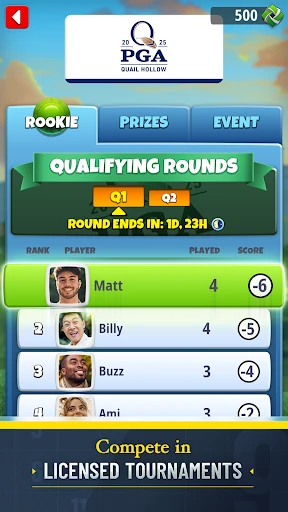
There’s more here than standard head-to-head matches. Checkpoint Challenge uses randomized clubs, while Golden Shot asks players to make the most of a limited number of shots. Quick 9 adds solo tournament play, and the game also includes officially licensed tournaments on real golf courses. These formats change what I’m trying to do from one session to another, whether that means progressing through a round or making each attempt count.
The course setting is another draw. The game features real-world venues such as Pebble Beach, East Lake Golf Club, and St Andrews Links. Players can choose their path through courses, and the shot mechanic keeps attention on the next landing spot rather than only on the final score. I find that combination gives the rounds some visual variety while retaining a clear, focused task: judge the situation, make the shot, and see what follows.
There’s also a social layer for players who want it. Clans, in-game chat, sharing replays, and playing with friends add ways to interact beyond a single match. Vanity rewards such as tees, hole explosions, and emotes can be unlocked through the free season track. These details won’t matter equally to everyone, but they give community-minded players and collectors extra reasons to spend time around the core golf matches.
Purchases And Fair Expectations
The game is free to download, but it contains ads and optional in-app purchases. Google Play shows item prices from $0.49 to $129.99, and the game’s virtual currency can be used to obtain virtual items, including random selections. I’d go in knowing that purchases are part of the overall setup. Players who prefer not to spend can still consider the free-to-download game, but should review the store details and make their own choices about purchases.
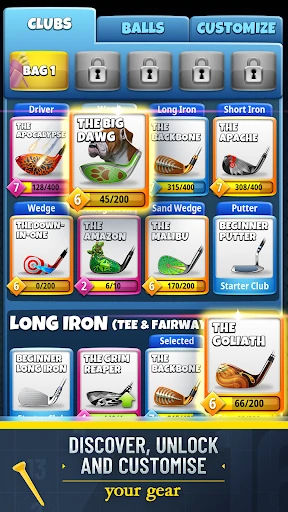
The existence of purchasable items is worth weighing alongside the gear progression. Clubs can be leveled up, legendary clubs can be unlocked, and balls have different characteristics, so collecting and equipment are part of the game’s design. I wouldn’t assume that a purchase is necessary to enjoy a round, but nor would I treat the spending layer as invisible. If ads or purchase prompts interrupt your preferred style of play, that may shape your experience.
Online Play And Other Limits
The clearest practical limitation is connectivity: Golf Clash requires an internet connection. That rules it out for a commute or trip where I’m expecting to play without service. Network fees may apply, too. Online competition is central to the experience, with global rivals, tournaments, leaderboards, and community tools, so this requirement fits the design, but it still matters when deciding whether the game suits a particular routine.
The game also includes features that let players communicate, and its description says there are direct links to the internet and social networking sites intended for an audience over 13. Families should consider those details in addition to the Everyone content rating. Device requirements are another practical check: the supplied Google Play facts don’t give a minimum Android version, so I’d verify compatibility on the store page before installing rather than guessing.
Golf Clash - Golfing Simulator makes a strong case for quick golf contests with a skillful shot mechanic and plenty of ways to compete. I especially like the choice between opponent-based matches and faster solo play, plus the variety of challenges and courses. The main trade-offs are its required internet connection, ads, and purchase options.
I’d recommend it to players who want accessible online golf with room to improve and collect gear. If you’re after offline play or a low-pressure, purchase-free experience, it may not be your game. For everyone else, it’s worth trying as a free download, with store details checked for device compatibility and spending preferences.
Golf Clash Frequently Asked Questions
Is Golf Clash - Golfing Simulator free to play?
Golf Clash - Golfing Simulator is free to download on Google Play. It contains ads and also offers optional in-app purchases, so free access does not mean the game has no spending options. I’d check the store page for current details and review the purchase settings that make sense for your device and household.
What can I buy in Golf Clash - Golfing Simulator?
The game offers in-app purchases, with Google Play showing prices from $0.49 to $129.99 per item. Purchases include virtual currency that can be used for virtual in-game items, including random selections. Prices and available items can vary, so the current Google Play store page is the best place to check before making a purchase.
Can I play Golf Clash - Golfing Simulator offline?
No. Golf Clash requires an internet connection, and network fees may apply. Its online matches, tournaments, and community features fit that requirement, but it isn’t a good choice when you need a golf game for a place without a connection. Check the store page for current details about the game’s online features.
What devices support Golf Clash - Golfing Simulator?
Golf Clash is available on Android through Google Play. The supplied store details give its current version as 3.4.9 but do not specify a minimum Android version. Compatibility can vary by device and may change, so check the Google Play store page on your phone or tablet before downloading.
Is Golf Clash - Golfing Simulator suitable for children?
Google Play gives Golf Clash an Everyone content rating. The game also allows players to communicate and includes direct links to the internet and social networking sites intended for an audience over 13. Families may want to consider those features alongside the rating. Check the current store page for its latest age and content details.
Pros
- Easy-to-grasp shot mechanic leaves room to improve aim, spin, and course decisions.
- Head-to-head matches, solo tournaments, and arcade challenges offer different session lengths.
- Real-world courses and a broad collection of golf balls add variety.
- Tours, leagues, and seasonal leaderboards give regular players ongoing goals.
Cons
- An internet connection is required, so offline play is not an option.
- Ads and in-app purchases may not suit players who prefer a quieter free game.
- Chat and other online features may need consideration for younger players.
- Category
- Sports
- Version
- 3.4.9