Word Chums
- 150.66K
- 4.6
- Installs
- 1.00M
- Price
- Free
Screenshots

Analysis by Reviewed APKs
Word Chums is a turn-based word-building game for people who like anagrams, crossword-style boards, and a little friendly competition. I like that it pairs familiar letter placement with clear scoring feedback and cheerful character customization, without making every session feel like a speed test. It suits players who enjoy taking turns with friends or practicing against the computer, though its central board game will feel familiar rather than radically new.
A Turn Built Around Letters
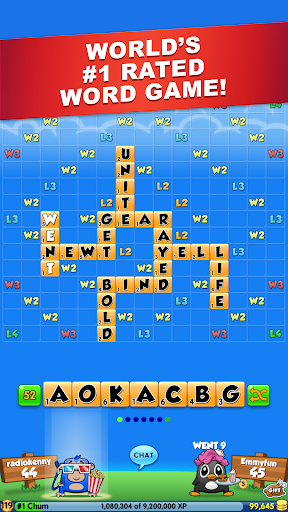
A typical turn starts with the letters you have and the board position you want to use. I look for a word that fits, then weigh a safe placement against a more ambitious one. Word Chums validates words as I place letters and displays an indication of the word’s strength, so I can rethink a move before committing. That quick feedback keeps the central puzzle readable, even when I am not sure which combination is best.
The appeal is in the little decisions rather than a complicated setup. A modest word can keep a useful spot open; a clever one might earn more points or improve my position. Between turns, the game can be played with friends, random opponents, or computer Chumbots. I appreciate that this structure accommodates both a quick solo practice session and a match that unfolds at a more relaxed, turn-by-turn pace.
Classic Board, Social Flavor
Compared with a basic anagram puzzle, Word Chums asks me to think about both the word and where it lands on the board. Compared with a crossword app, it adds competition and a shared score-driven match. That makes it a good fit for players who enjoy familiar word-building rules but want an opponent, a team option, or a reason to revisit the board over multiple turns.
It is not a collection of unrelated riddles or a fast action game, and I would not choose it for a tightly scripted solo campaign. The main attraction is still making words on a crossword-style board. Its Chum characters, levels, and leaderboards add personality and long-term goals, but they do not replace that core activity. If you want the board game itself to change dramatically from one session to the next, this may feel restrained.
Start With Strong Habits
In the first hours, I would take time to test letter combinations before settling on a move. The built-in dictionary lets me check valid words, and tapping a word can show its definition. That makes an uncertain play a chance to learn rather than a reason to guess blindly. I also pay attention to the automatic strength indicator; it helps me compare a straightforward option with a more promising arrangement.
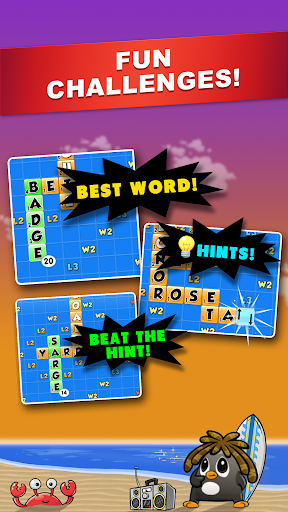
Hints can point toward a better word when I am stuck, so I treat them as a nudge rather than my default move. The game also describes a Bomb option that lets me take a turn with a new set of letters. I would save tools like these for a genuine dead end, while using early matches to learn how board placement and scoring interact. Experience from played words contributes to leveling and gear unlocks.
More From Our News Desk

Zoom Meetings, Google Meet, or Teams: Which Is Easiest to Join?

How I Build a Free Streaming Lineup With Tubi

Why Crunchyroll Is the Default Anime App for So Many Fans

YouTube TV: A Practical Guide to Cutting Cable

Rummikub and the Small Comfort of Phone Games

TeamViewer Remote Control or AnyDesk for Helping Family?
Who Will Enjoy the Wordplay
I would recommend Word Chums to anyone who likes word-board games and wants a friendly way to play with other people. The choice of friends, random opponents, and computer Chumbots gives it flexibility, while two-to-four-player games and a team option broaden the social side. The built-in dictionary and instant word validation are especially welcoming for players who are still building confidence with less familiar words.
It may be less appealing to someone who wants a fast, one-sitting puzzle with a definite ending. Matches built around taking turns naturally emphasize patience, and the familiar word-building format stays at the center throughout. Players who dislike score competition or are not interested in character gear, experience, and leaderboards may have little reason to stick around after learning the basics. For everyone else, the steady mix of vocabulary and tactics is easy to return to.
Word Chums is developed by PeopleFun and is free to download on Google Play, with a 4.6-star rating from about 151,000 ratings and over one million installs. The game contains ads and offers in-app purchases. Google Play lists individual in-app items priced from $0.99 to $49.99, so optional spending can span a wide range.
The game has an Everyone content rating. Its listed version is 2.20.0, and its release date is July 30, 2013. The supplied store details do not give a minimum Android version, so check Google Play for current device compatibility before installing.
Small Decisions Make the Board
An Easy First Match
Word Chums has a low-friction premise: make a word from your letters and place it on a crossword-style board. The game’s instant validation means I can see whether a play is acceptable while arranging it, rather than waiting until after a turn. The strength badge adds another layer of guidance. Those small bits of feedback make the opening experience approachable even if I am rusty with word games.
The dictionary is useful beyond checking a play. I can tap a word to see its definition, which gives unfamiliar vocabulary a little context instead of leaving it as a score-producing mystery. I like that this supports beginners without removing the challenge of deciding what to play. There is still room to improve at spotting combinations and judging which board placement offers the better opportunity.
Progress Without a Rush
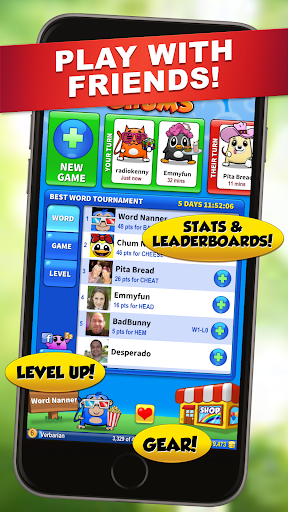
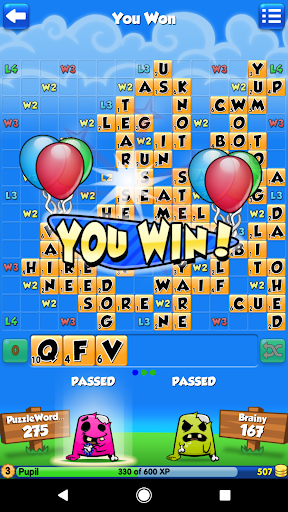
Progression comes through experience earned by playing words. As experience adds up, players level up and unlock gear for their Chum; the game also has achievements, player stats, best-word challenges, and weekly leaderboard competitions. These goals give regular matches a longer tail. I find them most appealing as side rewards, rather than as a reason to force a session when I would rather stop.
The difficulty comes from finding stronger words and making useful placements, not from a rapid timer described in the available game details. That suits a thoughtful pace and leaves room to learn across turns. The trade-off is that momentum depends on the match and its opponents. If you want a puzzle that delivers a fresh, self-contained challenge every few minutes, a turn-based board game may feel slower than you prefer.
More Than One Opponent
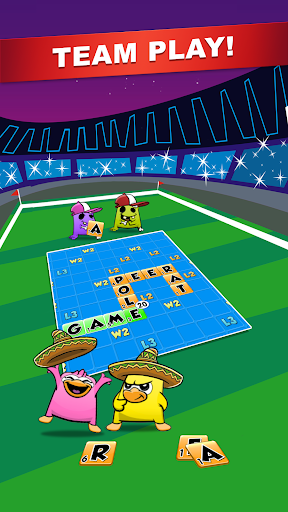
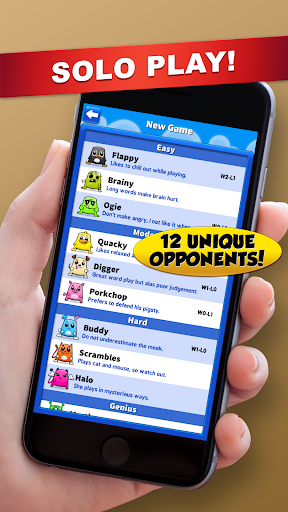
The supported play options include solo games against computer Chumbots and matches against friends or random opponents. Games can include two to four players, and a team mode offers a collaborative alternative to simply competing one-on-one. That range gives the same word-building format a slightly different social feel, especially when a player would rather cooperate than focus only on beating an opponent’s score.
The Chums themselves are another distinctive touch. Players earn gear to outfit their characters, adding a light customization goal alongside word scores and leveling. There are also weekly crossword-style leaderboards and hint challenges, plus the Bomb option for taking a turn with a new set of letters. These features complement the board rather than turning the game into a broad collection of separate puzzle genres.
Spending and Fairness
Word Chums is free to download, but Google Play reports both ads and in-app purchases. Individual purchase prices range from $0.99 to $49.99. That is a broad spread, so I would treat purchases as optional and check the store’s current details before spending. The game’s basic appeal—finding and placing words—does not depend on a purchase according to the information available here.
I do not want to overstate how often ads appear or what each purchase contains; those details can change and are not specified in the supplied facts. From a practical standpoint, the free entry point makes it easy to try the core game first. Players who are sensitive to advertising or prefer a one-time-price app should keep the ad-supported model and optional spending in mind.
Keep the Context in Mind
The game is explicitly presented as social and online, with play against friends and random opponents. It also supports solo games against computer Chumbots. The available information does not establish whether all features work offline, so I would not plan on uninterrupted access without a connection. If offline play matters to your routine, check Google Play’s current details before relying on it.
Turn-based matches are naturally better suited to a few considered moves than to a burst of constant action. That can make the game easy to fit around a break, but a match may take time to develop. No minimum Android requirement is provided in the supplied facts, and device compatibility can vary, so it is worth checking the store on the phone you plan to use.
Word Chums works best when I treat it as a relaxed word-board game with social options, not as a rapid-fire puzzle collection. Its word validation, dictionary, and scoring feedback make the basics approachable, while levels, gear, and leaderboards give regular players extra goals. The familiar format is its strength and its limitation.
I recommend it to players who enjoy building words and do not mind a match unfolding at a measured pace. Try it if you want to play friends, random opponents, or computer Chumbots; look elsewhere if you need fast rounds or a more varied solo campaign.
Word Chums Frequently Asked Questions
Is Word Chums free to download?
Yes. Word Chums is listed as free to download on Google Play. The game contains ads and also offers optional in-app purchases, so free installation does not mean the app is ad-free. Store details can change, so check Google Play for the current information before installing.
What in-app purchases does Word Chums have?
Google Play reports in-app purchases, with individual items priced from $0.99 to $49.99. The supplied details do not describe every item or how often purchase prompts appear. Check the current store page and in-game purchase details if you want to know exactly what is available.
Can I play Word Chums offline?
Word Chums offers solo play against computer Chumbots, as well as games with friends and random opponents. The available details do not say whether the game works offline, so I would not assume every mode is available without a connection. Check Google Play for current connectivity details.
What devices can run Word Chums?
Word Chums is an Android game on Google Play. The supplied details do not give a minimum Android version, and compatibility can depend on the device and current app version. Check the Google Play page from the Android device you plan to use for its current requirements.
Is Word Chums suitable for children?
Word Chums has an Everyone content rating and is described as a word game for a broad audience. It contains ads and offers in-app purchases, which are worth considering when deciding whether it suits a child. Store ratings and details can vary, so check Google Play for current information.
Pros
- Instant word validation and scoring feedback make it easier to learn through play.
- Play against friends, random opponents, or computer Chumbots.
- A built-in dictionary, definitions, and hints support vocabulary exploration.
- Chum gear, leveling, and leaderboards add goals beyond individual matches.
Cons
- The familiar board-game format may feel limited to players seeking varied puzzle types.
- Turn-based matches may feel slow when you want a quick, complete challenge.
- The free game contains ads and offers a wide range of purchase prices.
- Category
- Word
- Version
- 2.20.0